16-Bit RPG Battle Screen
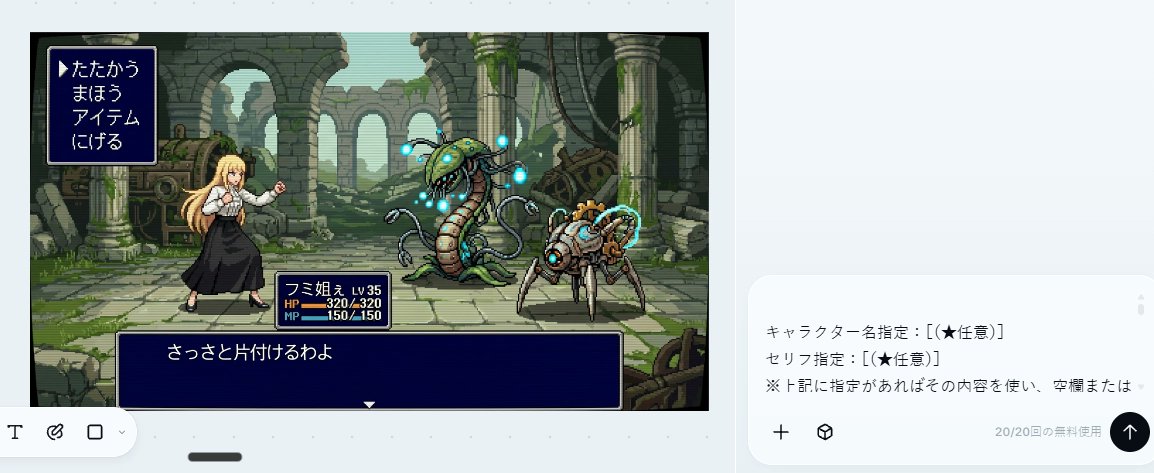
Full prompt
Using the provided reference image as the character source, transform the character into a 16-bit command RPG battle screen in pixel-art style. Keep the original character’s outfit, long blond hair, general silhouette, and faceless/blurred face treatment, but redraw her as a playable battle sprite standing on the left side in a ready-to-fight pose.

Goal: Create a retro Japanese fantasy RPG combat scene, like a Super Famicom / 16-bit era command battle screen.

Scene additions: Add an ancient ruined stone arena background with broken arches, columns, moss, vines, scattered machinery, and atmospheric depth. Place exactly 2 enemy monsters on the right side: 1 tall plant/serpent-like mechanical monster with glowing blue orbs, and 1 smaller spider-like mechanical creature with cyan energy rings.

UI layout: Add exactly 3 dark navy RPG interface boxes with thin white borders: 1 command menu in the upper left, 1 character status box near the lower center-left, and 1 dialogue box across the bottom.

Text: The command menu must contain exactly 4 Japanese options in vertical order: 「たたかう」, 「まほう」, 「アイテム」, 「にげる」, with a triangular cursor pointing to the first option. The status box should show {argument name="character name" default="フミ姐ぇ"}, LV 35, HP 320/320, and MP 150/150. The bottom dialogue box should show {argument name="battle line" default="さっさと片付けるわよ"}.

Style constraints: Use crisp 16-bit pixel art, limited color palette, visible pixel edges, side-view RPG composition, no modern UI, no photorealism, no extra characters, no extra menu items, no watermark.
Use this prompt in the VdoBloom image editor.
Opens the image editor with this prompt — add your own photo to generate.