3D Footstool Mesh Comparison
Full prompt
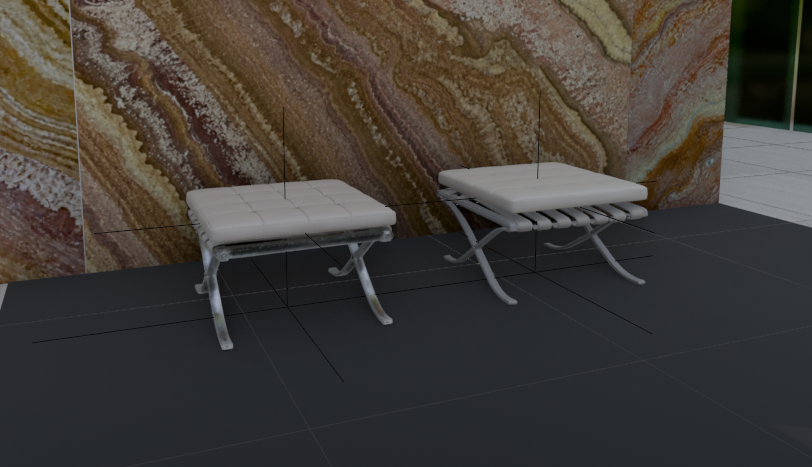
Create a realistic architectural visualization comparing two 3D-generated ottoman stools in an interior showroom scene. Canvas: wide landscape 16:9 render, camera at low eye level looking slightly downward. Scene: two small Barcelona-style footstools placed side by side on a dark charcoal tiled floor, in front of a tall glossy stone wall with dramatic brown, cream, rust, and gold onyx/marble veining; a narrow strip of green-tinted glass or window appears at the far right edge, with pale exterior floor tiles visible beyond. Subjects: exactly 2 footstools: left stool is the HD version, slightly smaller and lower, with a white tufted square cushion divided into a 4-by-4 grid, rounded soft edges, light gray leather straps underneath, and reflective polished metal X-shaped legs; right stool is the Smart Mesh version, slightly larger and cleaner, with a thicker smooth white cushion, parallel white underside straps, and gray polished X-shaped metal legs. Add thin black 3D viewport guide lines or wireframe axis lines crossing through and around both stools, including vertical and horizontal alignment lines, as if shown in a 3D modeling comparison viewport. Materials: white leather cushions with subtle seams and soft highlights, chrome legs with reflections, dark matte floor tiles with faint grout lines, glossy veined stone wall. Lighting: soft indoor studio lighting, moderate shadows, realistic but slightly CGI-rendered look. Composition: left stool around one-third of the frame, right stool around two-thirds, both facing forward at a slight angle, enough floor visible in front, marble wall filling the background. No people, no labels, no UI panels, no watermark.
Use this prompt in the VdoBloom image editor.
Opens the image editor with this prompt — add your own photo to generate.