AI Image Realism Comparison
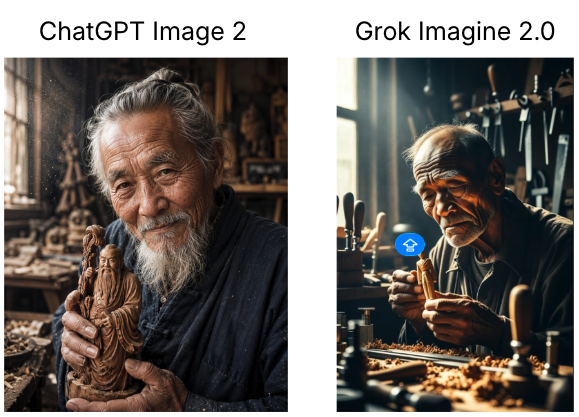
Full prompt
Create a side-by-side comparison graphic on a white background showing two AI image results from the same prompt. Canvas: landscape aspect ratio, approximately 580×420 px, clean white margins. Layout: two equal vertical image panels aligned horizontally with a narrow white gutter between them; each panel has a black sans-serif heading centered above it. Use exactly 2 headings: left heading “ChatGPT Image 2”, right heading “Grok Imagine 2.0”. Left panel: a highly realistic warm-toned portrait photo of an elderly East Asian woodcarver in a cluttered traditional workshop, gray hair tied back, long white beard and mustache, weathered face with fine wrinkles, wearing dark work clothes, holding a detailed carved wooden statue close to his chest with both hands, soft window light from the left, shelves and tools blurred in the background, dusty particles in the air, documentary realism. Right panel: a more cinematic but less natural portrait of an elderly East Asian craftsman seated at a workbench in a woodworking studio, balding gray hair, deeply wrinkled face, dark shirt, carving a small wooden figure with hand tools, strong dramatic sunlight from a window, many chisels and woodworking tools standing upright behind him, wood shavings scattered across the table, high contrast shadows, slightly artificial glossy look. Include exactly 1 small blue circular overlay icon near the center-left of the right panel, with a simple white symbol inside, resembling an interface marker. Overall style: realistic photographic comparison, left image more natural and detailed, right image more stylized and dramatic. No extra captions, no watermarks beyond the single blue overlay icon, no borders except the white page background.
Use this prompt in the VdoBloom image editor.
Opens the image editor with this prompt — add your own photo to generate.