Four-Panel AI Visual Showcase
Full prompt
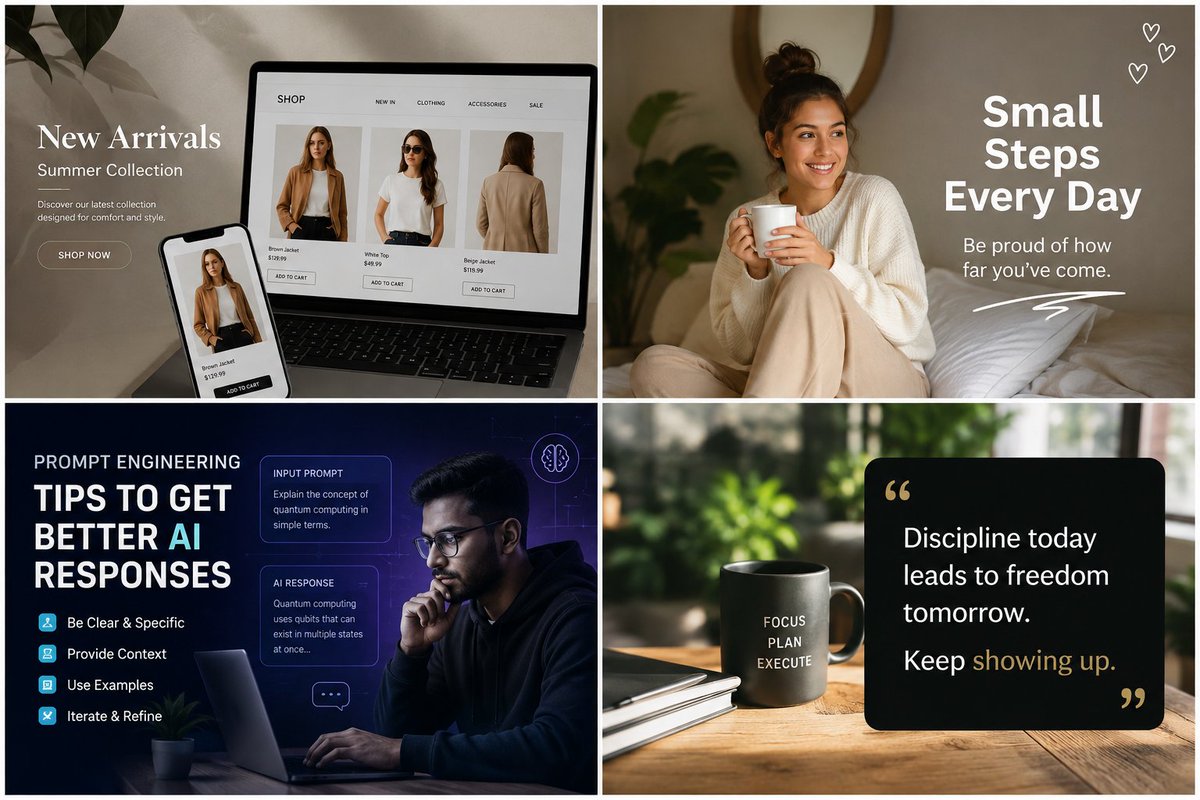
Goal: Create a polished 2x2 collage advertising the range of AI-generated visual content, with four distinct square/landscape social-media-style examples separated by thick white gutters.

Canvas: Wide 3:2 aspect ratio, clean 2-by-2 grid, each quadrant the same size, thin white outer border and thick white dividers between panels. Overall aesthetic is premium, modern, photorealistic mixed with graphic design overlays.

Layout and panels: Use exactly 4 panels.
1. Top-left panel: E-commerce fashion landing page mockup on a laptop and smartphone in a soft beige home-studio setting with plant shadows. On the left, overlay elegant white serif text: “New Arrivals”, smaller “Summer Collection”, a short description “Discover our latest collection designed for comfort and style.” and a rounded “SHOP NOW” button. On the laptop screen show a minimalist shop page with a top navigation containing exactly 5 labels: “SHOP”, “NEW IN”, “CLOTHING”, “ACCESSORIES”, “SALE”. Show exactly 3 product cards on the laptop: a brown jacket front view, a white t-shirt outfit, and a beige jacket back view, each with small price text and an “ADD TO CART” button. The phone repeats one product card for the brown jacket.
2. Top-right panel: Cozy lifestyle motivational post. A smiling young woman with medium skin tone and dark hair in a messy bun sits on a bed holding a white mug, wearing a cream sweater and beige pants, warm natural bedroom light, pillows and soft greenery in the background. Add bold white stacked headline text on the right: “Small Steps Every Day”. Under it place smaller text: “Be proud of how far you’ve come.” Add exactly 3 small hand-drawn white heart icons in the upper-right corner and one white scribble underline near the bottom-right.
3. Bottom-left panel: Dark blue futuristic prompt engineering educational graphic. A thoughtful man with glasses works on a laptop at night, blue/purple tech glow, faint grid and UI elements. Large text on the left reads: “PROMPT ENGINEERING” and “TIPS TO GET BETTER AI RESPONSES”, with “AI” highlighted in cyan. Include exactly 4 tip rows with small cyan square icons: “Be Clear & Specific”, “Provide Context”, “Use Examples”, “Iterate & Refine”. Add exactly 2 translucent UI cards on the right: one titled “INPUT PROMPT” with text about explaining quantum computing in simple terms, and one titled “AI RESPONSE” with a short explanation about qubits. Add exactly 2 small decorative icons: a brain outline circle near the top-right and a chat bubble near the lower-right.
4. Bottom-right panel: Minimal productivity quote scene on a wooden desk with blurred green plants in the background. Place a matte dark mug on the left-center printed with stacked white words: “FOCUS”, “PLAN”, “EXECUTE”. Add a notebook and pen nearby. On the right place a black rounded-rectangle quote card with gold quotation marks. Text on the card reads: “Discipline today leads to freedom tomorrow. Keep showing up.” with “showing up” highlighted in muted gold.

Visual style: High-end commercial social media graphics, realistic photography, warm neutral color palette in the top panels, deep navy/cyan tech palette in the bottom-left, natural green and black/gold productivity palette in the bottom-right. Sharp readable typography, soft shadows, professional ad mockup quality.

Customization: Use {argument name="fashion headline" default="New Arrivals"}, {argument name="motivational headline" default="Small Steps Every Day"}, {argument name="educational headline" default="TIPS TO GET BETTER AI RESPONSES"}, {argument name="quote text" default="Discipline today leads to freedom tomorrow. Keep showing up."}, and {argument name="mug words" default="FOCUS PLAN EXECUTE"}.

Constraints: Preserve the exact 4-panel grid, keep all listed text legible, do not add extra panels, avoid logos and watermarks, maintain clean white dividers and a premium AI-generated marketing showcase feel.
Use this prompt in the VdoBloom image editor.
Opens the image editor with this prompt — add your own photo to generate.