Universal AI Character Sheet Generator
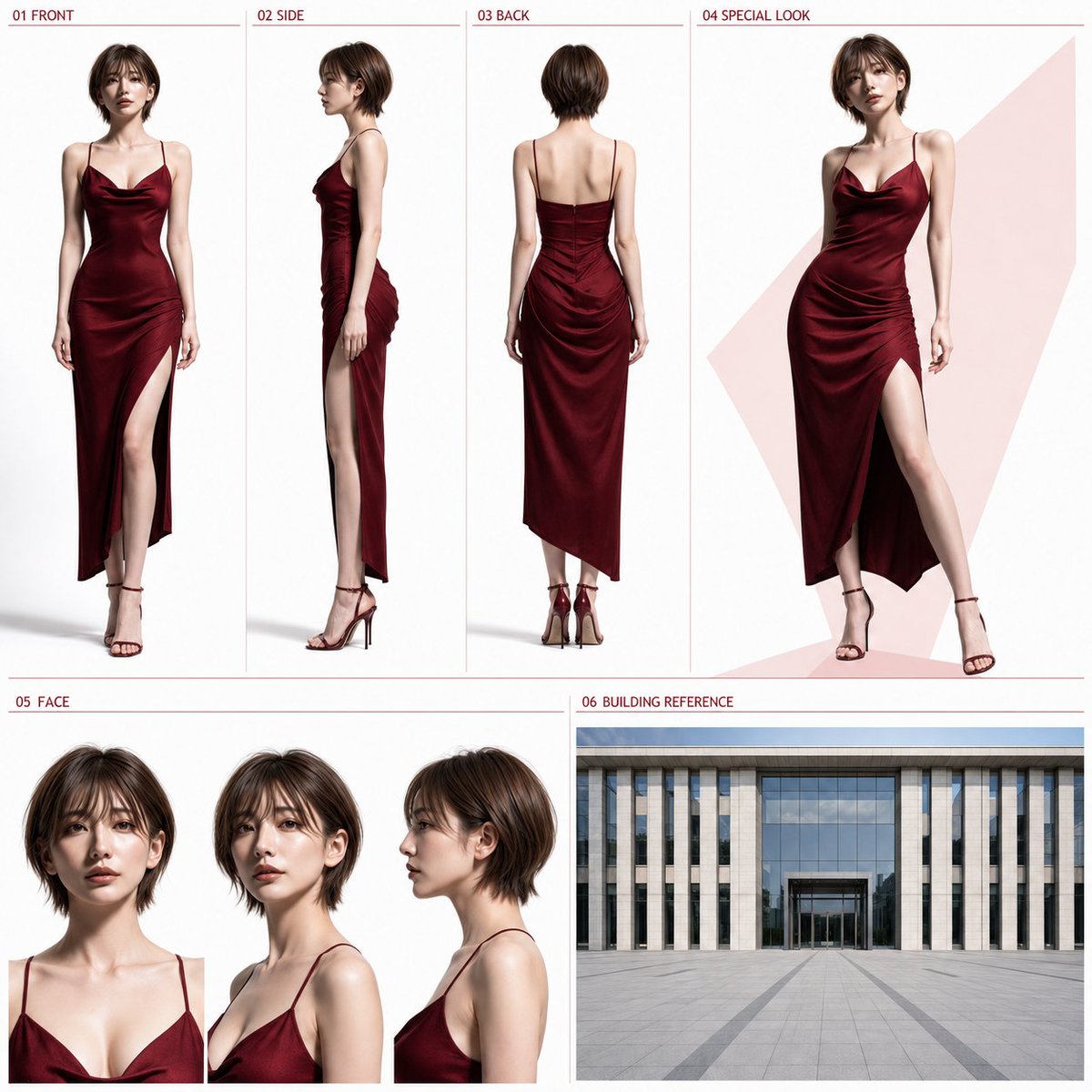
Full prompt
【Input Items】
Clothing Type: [{argument name="clothing type" default="Business / Elegant Date Style"}]
Color Direction: [{argument name="color scheme" default="Navy / Red"}]
Default to "Business" and "Navy" if left blank.

【Reference Usage】
One full-body reference image attached with this instruction.

【Body Text】
Using the attached full-body reference image as the sole subject reference, create one high-quality 1:1 square photorealistic character sheet. If the reference image is a real photo, maintain it as the same person. If it's an illustration, convert it to a natural photorealistic person while preserving character features. Maintain the facial features, hairstyle, hair color, perceived age, skin tone, gender impression, height, proportions, body type, and overall ratios of the reference person. Do not perform beautification, rejuvenation, aging, body type changes, or character swaps. Only the outfit and shoes should be changed in principle.

【Clothing】
Adapt the specified clothing type naturally to the gender, age, and body type of the reference person.
- Business
Modern, clean business style. Includes a jacket, forming a tidy and practical outdoor outfit.
- Elegant Date Style
Sophisticated and glamorous outdoor attire suitable for restaurants or city dates. Use outfits that allow for clear body shape visualization; avoid uniforms, excessive formal wear, overly long hems, large decorations, complex layering, or brand logos.

【Coloring】
Use the specified color as the primary or central color of the outfit. White, ivory, grey, or black can be added sparingly as secondary colors, but do not make it multi-colored.
- Navy: Focus on deep navy.
- Red: Focus on deep red, bordeaux, or wine red.

【Overall Layout】
Divide the entire composition into a two-tier structure: upper tier approx. 58%, lower tier approx. 42%. Do not change the basic placement, order, or ratios.

【Upper Tier: Approx. 58%】
01 FRONT: 22%
02 SIDE: 22%
03 BACK: 22%
04 SPECIAL LOOK: 34%
01-03 must be full-body views at the same scale, showing the person from the top of the head to the tips of the toes. Unify the height, proportions, body type, outfit, shoes, and camera distance. Use a natural upright posture where arms or hands do not hide the body shape or outfit.
- 01 FRONT: Front full body
- 02 SIDE: Profile full body from the side
- 03 BACK: Back full body

【04 SPECIAL LOOK】
A larger 3/4 full-body view of the same person in the same outfit. Use a natural expression and a still pose with slight movement to best convey the character's appeal. Only behind 04, a simple flat color or subtle geometric color plane using a light version of the specified color may be placed.

【Lower Tier: Approx. 42%】
Left 62% for 05 FACE, right 38% for 06 BUILDING REFERENCE.

【05 FACE】
Place three views (front, 3/4 angle, profile) in a single horizontal row with the same size, camera distance, and head position. Use natural expressions for all three to make facial features, eyes, contours, bangs, hairstyle, and perceived age easy to verify.

【06 BUILDING REFERENCE】
Use the entire 06 area as a single wide-angle exterior image showing the structure of the building front, entrance, and outdoor plaza. Clothing type and color direction are not reflected here. It should be a neutral building reference unaffected by the person's outfit colors or theme colors. Depict a clean, modern building facade and an automatic glass entrance under uniform natural daylight in a wide outdoor plaza. Avoid night scenes, sunset, warm lighting, or specific atmospheric directions like hotels or restaurants. Do not split the 06 area; construct it as a single view. No collages, split views, or multiple angles. Consist of one continuous wall, one ground floor, one continuous ground, one building front, and one clear entrance. Clearly depict either a sliding or revolving automatic glass door, without mixing structures.
Approx. 30-40% of the lower 06 area is the outdoor plaza, and 60-70% is the building front. Place the entrance only in the center bottom, with the width being approx. 20-30% of the 06 area. Use a wide-angle composition showing a clear linear path to the entrance. Avoid close-ups of just the door, overly distant views, multiple entrances, overlapping facades, or adding people, cars, and signs.

【Labels】
Use only the following short English notations:
01 FRONT
02 SIDE
03 BACK
04 SPECIAL LOOK
05 FACE
06 BUILDING REFERENCE
Place each label in the upper left of its respective area in a small, unified font without overlapping important parts. Specified colors may be used sparingly for labels and thin dividers.

【Common Design】
The sheet background (excluding 06) should be white to very light grey. Ensure enough margin so views do not overlap, creating a clean, professional design suitable for single-image sharing. Include only the specified 4 full-body and 3 face views, all maintaining the same person and outfit. No thick borders, excessive decoration, long descriptions, dialogue, subtitles, logos, or watermarks.
Original prompt
【入力項目】
服装タイプ:[{argument name="服装タイプ" default="ビジネス / デート向ききれいめ"}]
配色方向:[{argument name="配色方向" default="ネイビー / 赤"}]
未入力の場合は「ビジネス」「ネイビー」とする。

【使用参照】
本指示書と同時に添付された全身参照画像1枚。

【本文】
添付された全身参照画像1枚を唯一の人物参照として使用し、1:1スクエアの高品質な実写キャラクターシートを1枚作成する。参照画像が実写の場合は同一人物として維持する。人物イラストの場合は、人物特徴を維持した自然な実写人物へ変換する。参照人物の顔立ち、髪型、髪色、年齢感、肌色、性別印象、身長感、頭身、体型、全身比率を維持する。美化、若返り、老化、体型変更、別人化を行わない。変更するのは原則として衣装と靴のみとする。

【服装】
指定された服装タイプを、参照人物の性別、年齢感、体型に自然に合わせる。
・ビジネス
現代的で清潔感のあるビジネススタイル。ジャケットを含む、整った実用的な外出着とする。
・デート向ききれいめ
レストランや街中でのデートに適した、上品で華やかさのある外出着とする。全身の形が見やすい衣装とし、制服、過度な礼装、長すぎる裾、大きな装飾、複雑な重ね着、ブランドロゴを避ける。

【配色】
指定色を衣装の主色または中心色として使用する。白、アイボリー、グレー、黒などを補助色として少数加えてよいが、多色化しない。
・ネイビー:深いネイビーを中心とする
・赤:深い赤、ボルドー、ワインレッドを中心とする

【全体レイアウト】
全体を上段約58%、下段約42%の2段構成とする。  基本の配置、順番、比率を変更しない。

【上段:約58%】
01 FRONT:22%
02 SIDE:22%
03 BACK:22%
04 SPECIAL LOOK:34%
01〜03は、頭頂部から足先まで完全に入った同倍率の全身表示とする。身長感、頭身、体型、衣装、靴、カメラ距離を統一し、自然な直立姿勢で、腕や手により体型や衣装を隠さない。
・01 FRONT:正面全身
・02 SIDE:真横からの側面全身
・03 BACK:背面全身

【04 SPECIAL LOOK】
01〜03と同一人物、同一衣装による、大きめの全身3/4ビュー。人物の魅力が最も伝わる、軽く動きのある静止ポーズと自然な表情を使用する。04の背後にのみ、指定色を薄く使用した単純な平面色または控えめな幾何学的色面を置いてよい。

【下段:約42%】
左62%を05 FACE、右38%を06 BUILDING REFERENCEとする。

【05 FACE】
正面、斜め3/4、側面の顔3点を、同じ大きさ、同じカメラ距離、同じ頭の位置で横一列に配置する。3点とも自然な通常表情とし、顔立ち、目元、輪郭、前髪、髪型、年齢感を確認しやすくする。

【06 BUILDING REFERENCE】
06領域全体を、建物正面、入口、屋外広場の構造を一つの構図で確認できる、広角の外観画像1点として使用する。服装タイプと配色方向は06へ反映しない。人物の衣装色、04のテーマカラー、シート全体の差し色からも影響を受けない、中立的な建物参照とする。明るい昼の均一な自然光のもと、広い屋外広場から見た、清潔で現代的な建物正面と自動ガラス入口を描く。夜景、夕景、暖色照明、ライトアップ、強い色調演出、ホテル、レストラン、オフィスなど特定用途を強く連想させる演出は加えない。06内部も分割せず、単一画面・単一視点の1枚として構成する。コラージュ、複数ビュー、上下分割、別角度の併記を行わない。一つの連続した外壁、一つの地上階、一つの連続した地面、一つの建物正面、一か所の明確な入口で構成する。自動ガラス入口は、左右スライド式または回転式のどちらか一方を明確に描き、異なる入口構造を混在させない。
06領域の下部約30〜40%を連続した屋外広場、上部約60〜70%を建物正面とする。入口は中央下部の1か所だけに配置し、入口幅は06領域全体の約20〜30%を目安とする。入口へ向かう直線的な動線が分かり、建物、地面、入口の比率が自然に見える広角構図とする。入口だけの近接表示、入口が判別できない遠すぎる全景、複数の入口、上下に重複した建物正面、二重の地面、複雑な階段やテラス、人物、車、看板を入れない。

【見出し】
以下の短い英語表記のみを使用する。
01 FRONT
02 SIDE
03 BACK
04 SPECIAL LOOK
05 FACE
06 BUILDING REFERENCE
各見出しは対応領域の左上に、小さく統一した書体で配置し、人物や建物の重要部分へ重ねない。見出しと細い区切り線には、指定色を控えめに使用してよい。

【共通デザイン】
06 BUILDING REFERENCEを除くシート背景は、白からごく薄いグレーとする。人物と各領域が重ならない十分な余白を確保し、画像単体で共有できる、整理された洗練されたデザインにする。人物表示は、指定した全身4点と顔3点だけとし、すべてを参照画像と同一人物、同一衣装として維持する。太い枠、過度な装飾、長い説明文、台詞、字幕、ロゴ、ブランド名、透かしを入れない。
Use this prompt in the VdoBloom image editor.
Opens the image editor with this prompt — add your own photo to generate.