Anime Graffiti Butterfly Mural
Full prompt
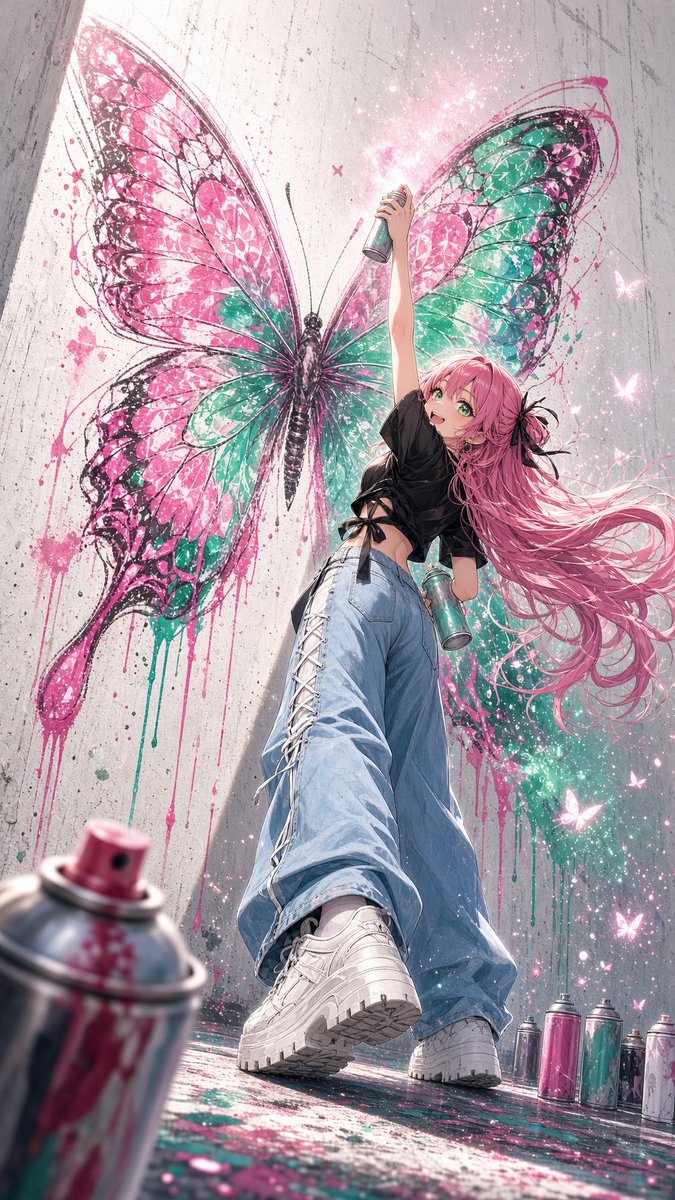
Create a dynamic vertical anime street-art illustration of {argument name="character name" default="a cheerful young woman graffiti artist"} posing in front of a huge freshly painted butterfly mural on a tall rough concrete wall. Use an extreme low-angle perspective from near the ground, making her white platform sneakers and wide loose light-blue jeans dominate the foreground while her body rises upward toward the butterfly wings. She has very long flowing {argument name="hair color" default="pink"} hair streaming to the right, bright green eyes, an excited open smile, and a black ribbon hair accessory. Her outfit is a cropped oversized black T-shirt tied at the side with ribbon details, baggy lace-up jeans with white crisscross lacing along one leg, and chunky white sneakers. She holds exactly two spray paint cans: one raised high in her right hand spraying a glowing mist above the mural, and one teal can in her left hand near her hip. Behind her, paint an enormous butterfly mural with exactly four large wings, black sketchy ink outlines and vein lines, vivid hot pink and turquoise fills, splattered paint, dripping paint trails, and a dark butterfly body centered behind her. Add magical glittering particles around the spray mist and exactly five small glowing butterfly silhouettes scattered mostly on the right side. Include exactly seven visible spray cans in the scene: one large blurred pink spray can cropped in the extreme lower-left foreground, two cans in her hands, and four upright cans lined along the lower-right floor. The ground should be wet and paint-splattered, reflecting pink, teal, and white highlights. The background is a gritty gray concrete alley wall with vertical seams, stains, scratches, and overspray. Style: highly detailed modern anime, vibrant cyber-pop graffiti colors, painterly ink splatter, cinematic lighting, shallow depth of field, energetic composition, crisp character rendering, soft bloom and sparkle effects. Use a 9:16 vertical canvas, no text, no watermark, no logo.
Use this prompt in the VdoBloom image editor.
Opens the image editor with this prompt — add your own photo to generate.