Anime Neighbor Intercom Screen
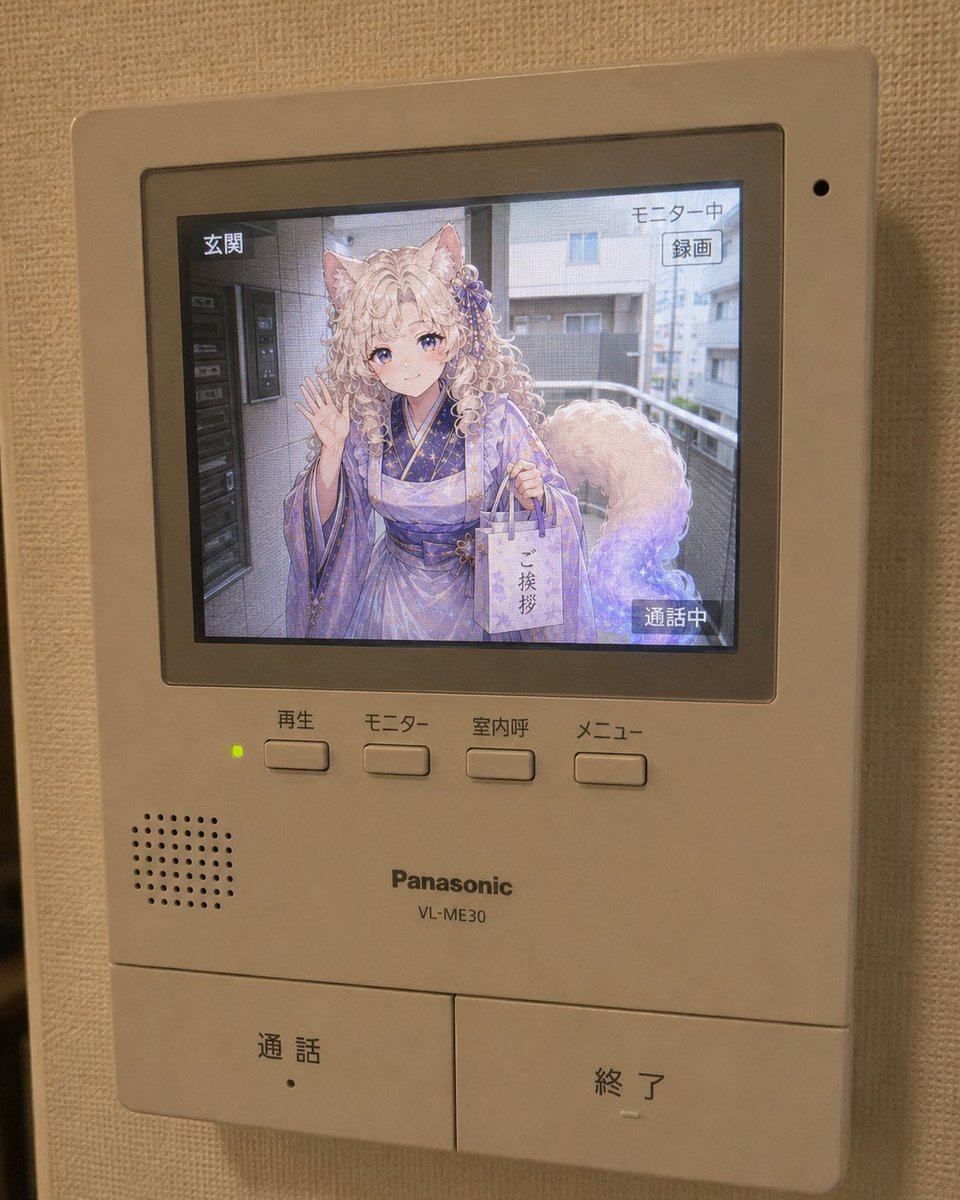
Full prompt
Using the reference image as the character design base, under the concept of 'what if the neighbor was your character,' depict the moment a {argument name="character" default="anime character"} appears as a visitor on a real apartment/mansion intercom screen. Accurately maintain the vibe of the character as an anime illustration. Do not break the character's identity. Do not turn them into a live-action human, a 3D figure, or a cosplayer. The character remains an anime illustration. However, the location where the character is displayed is inside a real intercom LCD screen. The overall image should look like a smartphone photo of a home intercom installed in a real room. The unit is a typical Japanese indoor intercom with an LCD monitor, in white or beige plastic housing. Buttons (talk, end, monitor, menu), speaker holes, and small LEDs are naturally placed with slight signs of use. Inside the LCD screen, the anime character stands at the entrance or in a hallway. The background is a real photo—realistic Japanese residential streets, apartment corridors, stairs, or near delivery boxes. The background must be photorealistic, not an anime background. Only the character is an anime illustration; everything else like the entrance, road, sky, and fences is drawn like a real photo. The character looks like they came to say hello after moving in next door. Apply effects to make it look like they are truly on the screen. The character is looking at the camera, leaning in slightly, waving, or holding a small gift bag with a nervous but friendly smile. Important: The character should not look like a pasted illustration but like they are being filmed by the entrance camera. The LCD should feature natural intercom-style UI like 'In Call' or 'Monitoring' in Japanese. Add textures like slight LCD bleeding, highlights, low resolution, scanlines, and glass reflections. Lighting should match: outdoor light for the character on screen and indoor room light for the physical intercom unit. The composition should be like a casual smartphone snapshot taken from a slight angle, with slight blur or wall edges visible. Avoid cinematic or glossy AI renderings.
Original prompt
参照画像をキャラクターデザインのベースとして使用し、「もしもお隣さんがあなたのキャラクターだったら」というコンセプトで、現実のマンション・アパートのインターフォン画面に、{argument name="キャラクター" default="アニメキャラクター"}が来訪者として映っている瞬間を描く。

キャラクターのアニメイラストとしての空気感を正確に維持する。
キャラクターのアイデンティティを絶対に崩さない。
実写人間化しない。
3Dフィギュア化しない。
コスプレ人間にしない。
キャラクター本人はアニメイラスト表現のまま維持する。

ただし、キャラクターが表示されている場所は、現実のインターフォン液晶画面の中である。

画像全体は、現実の室内に設置された家庭用インターフォンをスマートフォンで撮影した写真風にする。

架空の日本の家庭用インターフォンにありそうな、液晶モニター付き室内親機。
白やベージュのプラスチック筐体。
押しボタン、通話ボタン、終了ボタン、モニターボタン、メニューボタン、スピーカー穴、小さなLEDランプなどが自然に配置されている。

インターフォン本体には軽い使用感がある。とはいえ汚すぎない。

液晶画面の中には、玄関前またはマンションの廊下に立っているアニメキャラクターが映っている。
背景は実写。

背景は現実的な日本の住宅街、マンションの共用廊下、アパートの外階段、玄関前、宅配ボックス付近、道路沿いの門扉前など。
背景は必ず実写風にする。
背景までアニメ背景にしない。

キャラクターだけがアニメイラスト表現で、周囲の玄関前背景や道路、建物、空、植木、フェンス、電柱、駐輪場などは現実写真のように描く。

キャラクターは、隣に引っ越してきて挨拶に来たような雰囲気にする。ちゃんと液晶に写っているような効果をかける。

キャラクターは、

・インターフォンカメラを見ている
・少し身を乗り出している
・片手を軽く振っている
・小さな紙袋や引っ越し挨拶の品を持っている
・少し緊張しつつも笑顔
・「今日から隣に住むことになりました」くらいの自然な距離感

など、来訪者として自然なポーズにする。

重要:
キャラクターは、インターフォン画面にただ貼り付けられたイラストではなく、玄関前のインターフォンカメラで撮影されているように見せる。

液晶画面には、インターフォン特有の表示を入れる。

例:
「通話中」
「玄関」
「モニター中」
「メニュー」
「録画」
「応答」
「終了」

日本語UIは自然なインターフォン風にする。
過剰な装飾UIやスマホアプリ風UIにはしない。

液晶画面には、画面越しの質感を入れる。

軽い液晶のにじみ、モニター越しの白飛び、低解像度感、わずかな走査線、微細なノイズ、モアレにならない程度のドット感、反射、ガラス面の映り込み、黒浮き、液晶特有の色の浅さを自然に加える。

ただし、キャラクターの顔が崩れるほどノイズを強くしない。
キャラクターの表情、目、髪型、衣装の印象は綺麗に見えるようにする。

インターフォン画面の中のキャラクターには、屋外の自然光を当てる。
室内のインターフォン本体には、部屋の暖色照明や壁からの反射光を当てる。
液晶画面の光と室内の光が自然に混ざっているようにする。

構図は、スマートフォンで何気なく撮った写真のようにする。

少し斜めから撮影。
完璧な正面構図にしない。
壁に設置されたインターフォンを近距離で撮っている。
画面の端に壁紙、影、手ブレ、わずかな傾きが入っている。

映画ポスター風にしない。
広告ビジュアル風にしない。
過剰なシネマティック演出は禁止。
綺麗すぎる構図は禁止。
AI特有の glossy rendering を避ける。

全体の雰囲気は、「家のインターフォンを見たら、なぜか隣に引っ越してきたアニメキャラが普通に映っていた」という、少し不思議で生活感のある写真にする。
Use this prompt in the VdoBloom image editor.
Opens the image editor with this prompt — add your own photo to generate.