Bedtime Companion App Mockup
Full prompt
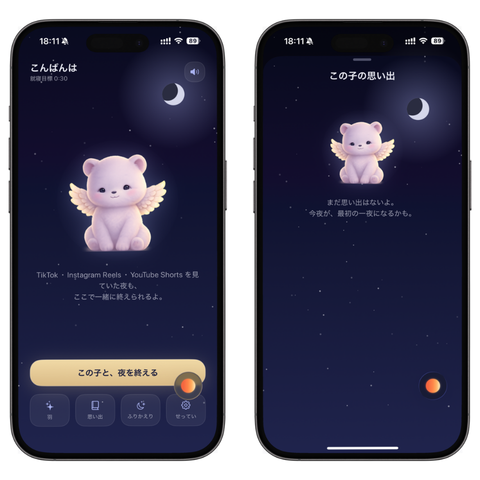
Goal: Create a polished mobile app prototype mockup showing two iPhone screens side by side for a gentle bedtime companion app centered on {argument name="character name" default="this child"}, with a dreamy night-sky theme and a cute plush guardian character.

Canvas: Square 1:1 image on a plain white background. Place exactly 2 black iPhone mockups next to each other, left and right, both with rounded corners, Dynamic Island, status bar, and bottom home indicator. Use realistic device frames with subtle shadows.

Visual style: Dark navy-to-indigo gradient backgrounds, tiny scattered stars, soft glowing moonlight, premium Japanese wellness-app design, calm and minimal. Use rounded UI elements, subtle glassmorphism, muted lavender panels, and warm orange accent buttons. The overall mood should feel sleepy, tender, safe, and magical.

Shared character details: In both screens, show exactly 1 central mascot: a pastel lavender teddy-bear-like baby creature with small rounded ears, simple black eyes, tiny smile, soft plush texture, sitting pose, and small cream angel wings. Add a soft glow around the mascot. Include exactly 1 crescent moon icon per screen near the upper right area.

Left screen layout: Status bar at top shows 18:11 with small signal, Wi-Fi, and battery icons. Near the top left, display the greeting {argument name="greeting text" default="こんばんは"} in white, with a smaller line beneath reading {argument name="sleep countdown text" default="睡眠時間 0:30"}. Near the upper right, include exactly 1 small circular speaker/audio button. Center the winged plush mascot in the upper-middle. Below it, add small Japanese explanatory text: “TikTok・Instagram Reels・YouTube Shorts を見ていた君が、ここで一緒に眠れるれるよ。” Near the bottom, place exactly 1 large rounded cream-colored primary button labeled {argument name="primary button text" default="この子と、夜を終える"}. Under it, place exactly 4 small rounded navigation buttons in a row, each with a simple line icon and Japanese labels: 1) sparkle icon, “森”; 2) phone/rectangle icon, “日々みる”; 3) crescent/sleep icon, “おやすみ”; 4) gear icon, “せってい”. Add exactly 1 floating orange circular action button overlapping the lower-right edge of the large cream button.

Right screen layout: Status bar at top again shows 18:11 and phone icons. At the very top center, include a short thin lavender handle line. Centered below, show the title {argument name="memory title" default="この子の思い出"} in white. Place the winged plush mascot below the title, slightly smaller than on the left screen. Put the crescent moon to the upper right of the mascot. Under the mascot, add centered small Japanese text: “まだ思い出はないよ。今夜が、最初の一夜になるかも。” Leave the lower half mostly empty with sparse stars. Add exactly 1 small orange floating circular button near the lower-right side of the screen. Include the white home indicator at the bottom.

Constraints: Use exactly 2 phone screens, exactly 2 mascots total, exactly 2 crescent moons total, exactly 4 bottom navigation buttons on the left screen, and exactly 2 orange floating action buttons total. Keep all typography crisp and legible, with Japanese text rendered cleanly. Do not add extra panels, logos, watermarks, or additional characters.
Use this prompt in the VdoBloom image editor.
Opens the image editor with this prompt — add your own photo to generate.