Black Dragon Moonwalk Stage
Full prompt
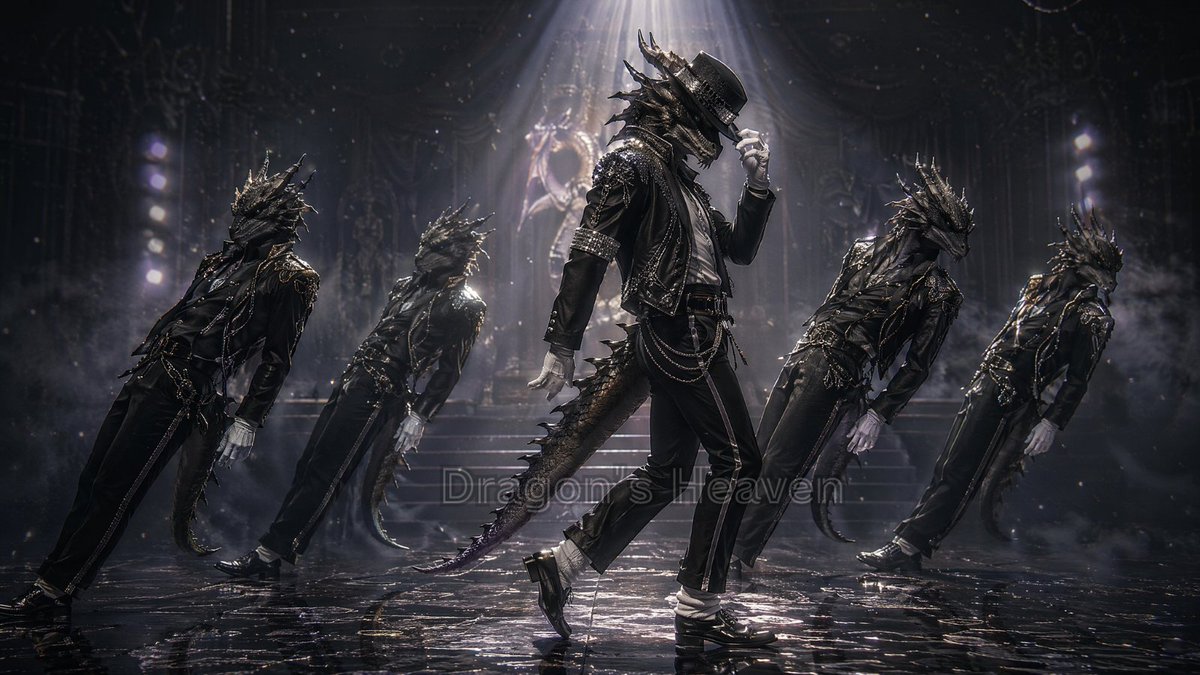
Create a dark cinematic fantasy dance-stage scene in a 16:9 widescreen frame. Show exactly 5 anthropomorphic black dragon men performing a moonwalk-inspired dance pose on a glossy wet black floor: 1 central lead dancer in front, upright and most detailed, tipping a black fedora with one white-gloved hand, one foot sliding back; and 4 backup dragon dancers, 2 on the left and 2 on the right, all leaning backward in synchronized motion with their arms low and tails trailing. The performers have reptilian dragon heads with long horns, jagged spines, scaled snouts, glowing dark eyes, clawed hands in white gloves, long tails, and black leather stage outfits with metallic studs, chains, belts, cropped jackets, slim trousers, shiny black shoes, and white socks. The central character should feel like a stylish gothic pop star without using any real celebrity name. Use {argument name="dragon color" default="glossy black"} scales, {argument name="outfit style" default="black studded leather pop-dance costume with chains"}, and {argument name="dance move" default="moonwalk pose with fedora tip"}. Set the background as a grand shadowy theater or cathedral-like concert stage with stairs, ornate statues, rigging, faint vertical light towers, drifting smoke, falling dust or snow-like particles, and a strong white spotlight beam from above centered on the lead dancer. Use dramatic low-key lighting, silver highlights, volumetric fog, high contrast, wet reflections, motion blur on the backup dancers, hyper-detailed fantasy realism, cinematic depth of field, and a moody monochrome black-and-silver palette. Add a faint semi-transparent center watermark text reading {argument name="watermark text" default="Dragon's Heaven"} if desired, blending into the floor reflection and not dominating the image. Avoid bright colors, cute cartoon styling, extra dancers, human faces, or visible microphones.
Use this prompt in the VdoBloom image editor.
Opens the image editor with this prompt — add your own photo to generate.