Cat Recognition Result Screen
Full prompt
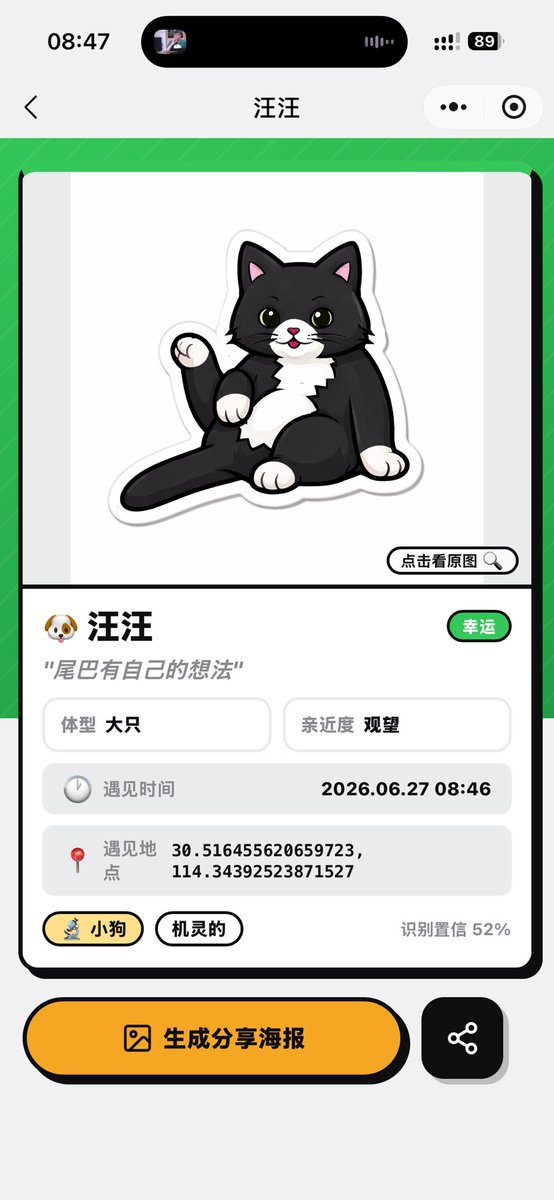
Using the provided reference image as the source cat and app context, transform the camera recognition screen into a completed pet-profile result screen for a mini app. Replace the live camera view with a clean card-style analysis page: show a cute sticker-like cartoon illustration of the same black-and-white cat sitting with its tail raised on a white preview area, with a small button labeled “点击看原图” and a magnifying-glass icon. Keep the mobile screenshot aspect ratio and iOS-style top chrome, but change the page title to {argument name="pet name" default="汪汪"}.

Layout: Create one large rounded rectangular result card on a bright green patterned background. Under the illustration, add a profile section with exactly these visible data elements: 1) name row with a dog emoji and {argument name="pet name" default="汪汪"}, plus a green badge labeled “幸运”; 2) quote text {argument name="quote" default="尾巴有自己的想法"}; 3) two small info boxes labeled “体型 大只” and “亲近度 观望”; 4) a gray row labeled “遇见时间” with {argument name="encounter time" default="2026.06.27 08:46"}; 5) a gray row labeled “遇见地点” with {argument name="coordinates" default="30.516455620659723, 114.34392523871527"}; 6) two pill tags labeled “小狗” and “机灵的”; 7) confidence text “识别置信 52%”.

Bottom actions: Add two bottom buttons below the card: a large yellow rounded button with an image icon and text “生成分享海报”, and a smaller black rounded square share button with a share-network icon.

Style: playful polished Chinese mini-program UI, thick black outlines, rounded cards, soft shadows, yellow accent color, clean vector-like illustration. Do not keep the original camera scanning brackets, zoom controls, shutter button, or live street background.
Use this prompt in the VdoBloom image editor.
Opens the image editor with this prompt — add your own photo to generate.