Three-View Character Reference Sheet Layout
Full prompt
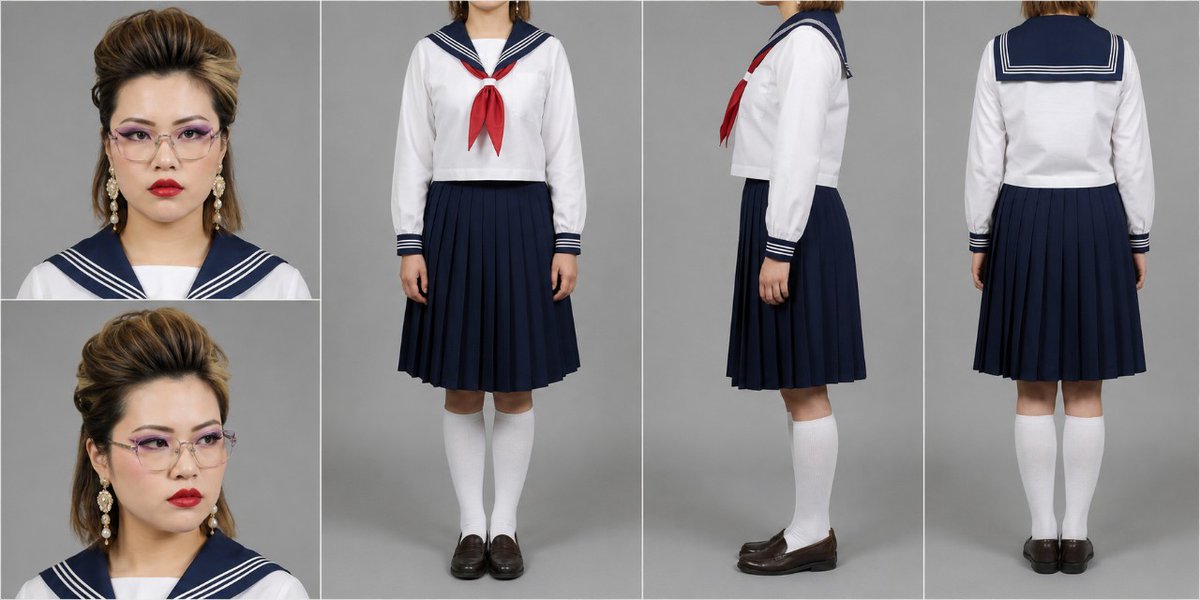
A {argument name="aspect ratio" default="2:1 horizontal"} image. Divide the whole into left and right, with the left being 25% of the total width and the right being 75%. The right side is a 3:2 area using the full height, containing a three-view diagram on a {argument name="background color" default="gray background"} arranged side-by-side in the order of front, side, and back. The three-view diagrams should all be {argument name="standing poses" default="standing poses"} where the full body is visible. However, in all three cuts, the top should be cut slightly below the jaw, showing only from the jaw down. Everything above the neck is completely out of frame, and the face, head, and hair are not shown at all. The left side is divided into two parts, top and bottom, with two squares of the same size. Both are close-ups of faces on a gray background. The top shows a serious expression facing the camera, and the bottom shows a face looking away. The three-view diagram on the right is configured for full-body costume verification.
Original prompt
{argument name="画像比率" default="横長2:1"}の画像。全体を左右に分割し、左側を全体幅の25%、右側を全体幅の75%にする。右側は高さいっぱいを使った3:2エリアとし、その中に{argument name="背景色" default="灰色背景"}の3面図を正面・側面・背面の順に横並びで配置する。3面図は3カットすべて全身が見える{argument name="立ち姿" default="立ち姿"}にする。ただし3カットすべて、上端は顎の少し下で切り、顎から下のみを写す。首より上は完全にフレーム外とし、顔・頭部・髪の毛は一切写さない。 左側は上下に2分割し、同じ大きさの正方形2枚を配置する。どちらも灰色背景の顔アップ。上は真面目な表情でカメラ目線の正面顔。下は目線を外した顔。右側の3面図は全身衣装の確認用として構成する。
Use this prompt in the VdoBloom image editor.
Opens the image editor with this prompt — add your own photo to generate.