Dark UI Character Sheet Evaluation
Full prompt
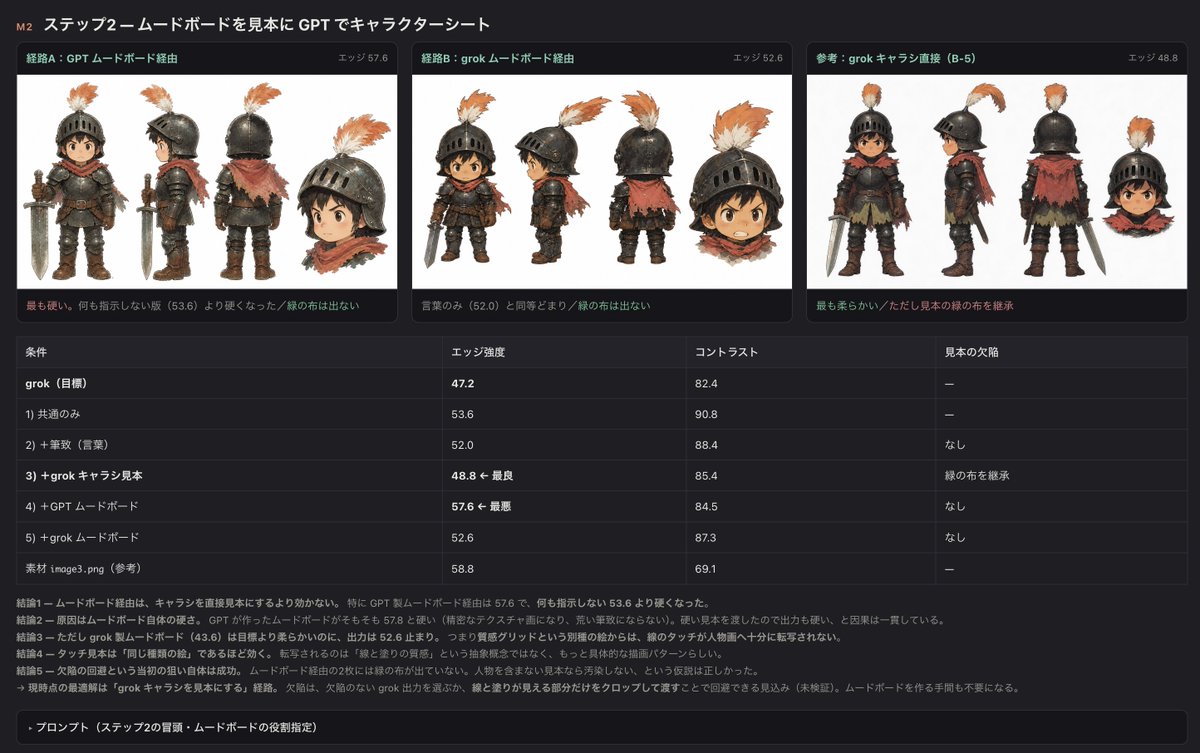
Using REFERENCE_0 as the source material, create a dark-mode Japanese evaluation report slide that compares attempts to generate a character sheet while preserving the same rough watercolor/ink illustration style.

Goal: Turn the reference into a structured experiment-summary dashboard titled 「M2 ステップ2—ムードボードを見本に GPT でキャラクターシート」. Keep the subject as the small armored child character from the reference, but present the result as an analysis screen rather than a single illustration.

Canvas and style: Use a wide 16:9 dark UI layout with charcoal background, thin dividers, rounded cards, small Japanese UI text, orange/green accent labels, and embedded white image panels. Make it look like a screenshot of an internal comparison report.

Top section: Create exactly 3 comparison cards across the top. Each card contains a white character-sheet panel showing the same character in multiple views and a small detached head/bust crop. Use these card titles and edge scores:
1. 「経路A:GPT ムードボード経由」 with 「エッジ 57.6」
2. 「経路B:grok ムードボード経由」 with 「エッジ 52.6」
3. 「参考:grok キャラ直接(B-5)」 with 「エッジ 48.8」
Under each card add one short Japanese note line; the third card should mention that it is the softest and inherits the sample’s green cloth.

Middle section: Add a comparison table with exactly 4 columns labeled 「条件」, 「エッジ強度」, 「コントラスト」, 「見本の欠陥」. Include exactly 7 data rows:
1. 「grok(目標)」 — 47.2 — 82.4 — 「—」
2. 「1) 共通のみ」 — 53.6 — 90.8 — 「—」
3. 「2) + 筆致(言葉)」 — 52.0 — 88.4 — 「なし」
4. 「3) + grok キャラ見本」 — 「48.8 ← 最良」 — 85.4 — 「緑の布を継承」
5. 「4) + GPT ムードボード」 — 「57.6 ← 最悪」 — 84.5 — 「なし」
6. 「5) + grok ムードボード」 — 52.6 — 87.3 — 「なし」
7. 「素材 image3.png(参考)」 — 58.8 — 69.1 — 「—」

Bottom section: Add several short Japanese conclusion lines beginning with 「結論1」 through 「結論5」, explaining that moodboard routes are not very effective, direct character reference works better, and the practical workaround is to avoid moodboards and use the Grok output with cropping. Finish with a collapsible dark bar labeled 「プロンプト(ステップ2の冒頭:ムードボードの役割指定)」.

Constraints: Preserve the character identity and rough painted look from REFERENCE_0 in the embedded panels, but do not recreate the full original reference screenshot. Do not add unrelated characters. Use crisp UI typography and readable Japanese labels. The main title topic may be customized as {argument name="report title" default="M2 ステップ2—ムードボードを見本に GPT でキャラクターシート"}; the three route labels may be customized as {argument name="route labels" default="経路A:GPT ムードボード経由 / 経路B:grok ムードボード経由 / 参考:grok キャラ直接(B-5)"}; the character-sheet subject may be customized as {argument name="character subject" default="the small armored child knight from the reference"}; the table metric emphasis may be customized as {argument name="best and worst edge notes" default="48.8 ← 最良, 57.6 ← 最悪"}.
Use this prompt in the VdoBloom image editor.
Opens the image editor with this prompt — add your own photo to generate.
