Realistic Chen Hao Character Reference Sheet
Full prompt
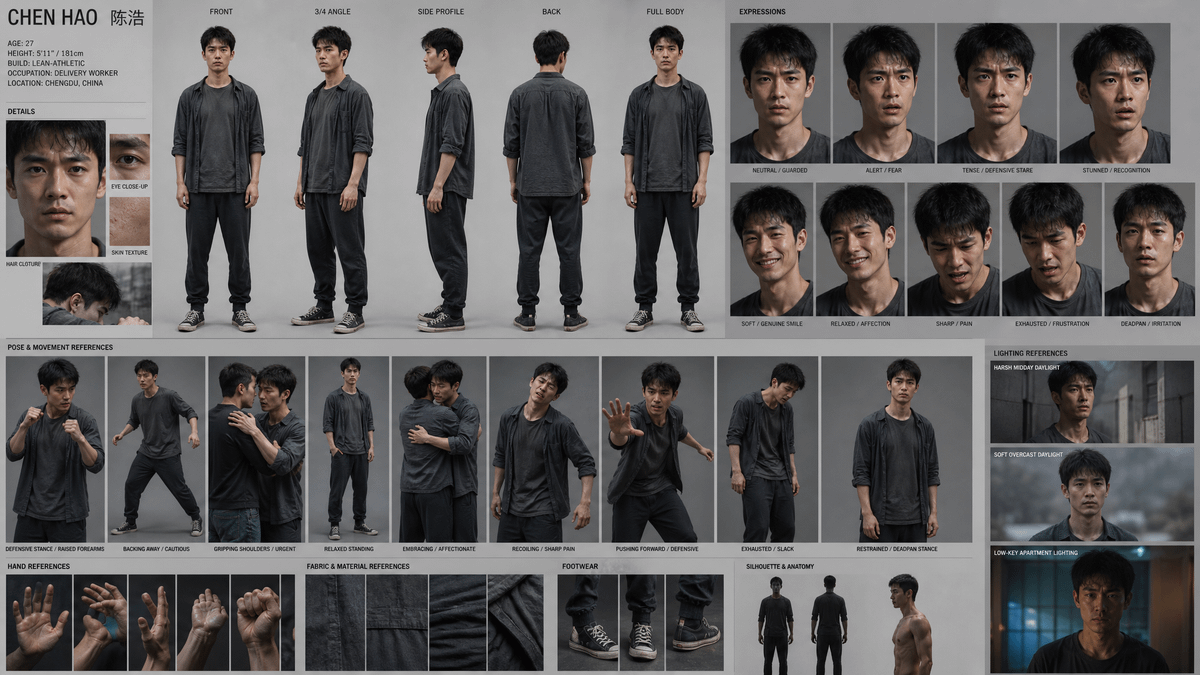
Goal: Create a highly detailed cinematic character reference sheet for {argument name="character name" default="CHEN HAO 陈浩"}, a realistic contemporary Asian male delivery worker, designed for film/game character development.

Canvas: Wide 16:9 character board on a matte light-gray studio background, approximately 1200 x 675 composition, clean grid layout with thin dividing lines, small black uppercase labels, documentary realism, muted desaturated color palette.

Character identity panel: Top-left title reads “CHEN HAO 陈浩”. Include compact profile text: Age 27; Height 5'11” / 181 cm; Build lean-athletic; Occupation delivery worker; Location Chengdu, China. Character has short messy black hair, tired guarded eyes, light stubble, medium-light East Asian skin, slim athletic frame, and a serious worn-down presence.

Main turnaround section: Across the upper center-left, show exactly 5 full-body studio views of the same character wearing a dark charcoal open overshirt, faded dark gray T-shirt, loose black jogger pants, and worn black canvas sneakers with white laces and soles. Label the 5 views: “FRONT”, “3/4 ANGLE”, “SIDE PROFILE”, “BACK”, and “FULL BODY”. Keep proportions consistent across all views.

Details section: On the left beneath the identity text, show exactly 4 close-up detail reference images: 1 intense face close-up labeled “HAIR CLOTHURE” or similar small label, 1 eye close-up labeled “EYE CLOSE-UP”, 1 skin texture close-up labeled “SKIN TEXTURE”, and 1 small candid side-head detail photo.

Expressions section: On the upper right, create exactly 9 head-and-shoulders expression portraits arranged in a clean grid. Labels must be: 1 “NEUTRAL / GUARDED”, 2 “ALERT / FEAR”, 3 “TENSE / DEFENSIVE STARE”, 4 “STUNNED / RECOGNITION”, 5 “SOFT / GENUINE SMILE”, 6 “RELAXED / AFFECTION”, 7 “SHARP / PAIN”, 8 “EXHAUSTED / FRUSTRATION”, 9 “DEADPAN / IRRITATION”. Keep lighting soft gray studio, face realistic and consistent.

Pose and movement references: Create exactly 10 mid-to-full-body action reference panels across the middle row, labeled: 1 “DEFENSIVE STANCE / RAISED FOREARMS”, 2 “BACKING AWAY / CAUTIOUS”, 3 “GRIPPING SHOULDERS / URGENT”, 4 “RELAXED STANDING”, 5 “EMBRACING / AFFECTIONATE”, 6 “RECOILING / SHARP PAIN”, 7 “PUSHING FORWARD / DEFENSIVE”, 8 “EXHAUSTED / SLACK”, 9 “RESTRAINED / DEADPAN STANCE”, and 10 a quiet standing reference. Include varied body language: anxious, defensive, injured, gentle, tired.

Bottom reference strip: Include exactly 4 sub-sections. “HAND REFERENCES” with 5 close-up hand images: open palm, two-handed gesture, side hand, dirty palm, clenched fist. “FABRIC & MATERIAL REFERENCES” with 5 close-up swatches of black-gray shirt fabric, seams, folds, and worn cotton texture. “FOOTWEAR” with 3 close-up sneaker images: front shoes, side/angle shoes, heel/side detail. “SILHOUETTE & ANATOMY” with 3 figures: front clothed silhouette, back clothed silhouette, and shirtless side torso anatomy.

Lighting references: On the far right lower column, show exactly 3 cinematic lighting reference panels labeled: “HARSH MIDDAY DAYLIGHT”, “SOFT OVERCAST DAYLIGHT”, and “LOW-KEY APARTMENT LIGHTING”. The third should have moody blue-orange interior night lighting.

Visual style: Photorealistic, sharp professional reference photography, realistic skin pores and fabric, subdued gray background, consistent character likeness, natural imperfections, cinematic Asian social-realist tone, organized like a production design character sheet.

Constraints: Use only one recurring character with consistent face, hair, build, outfit, and age. Keep all labels small and legible. No logos, no watermark, no decorative fantasy elements, no extra characters except where an embrace/gripping pose requires partial interaction, and do not add extra panels beyond the specified counts.
Use this prompt in the VdoBloom image editor.
Opens the image editor with this prompt — add your own photo to generate.