Chengdu Scrapbook Travel Guide Poster
Full prompt
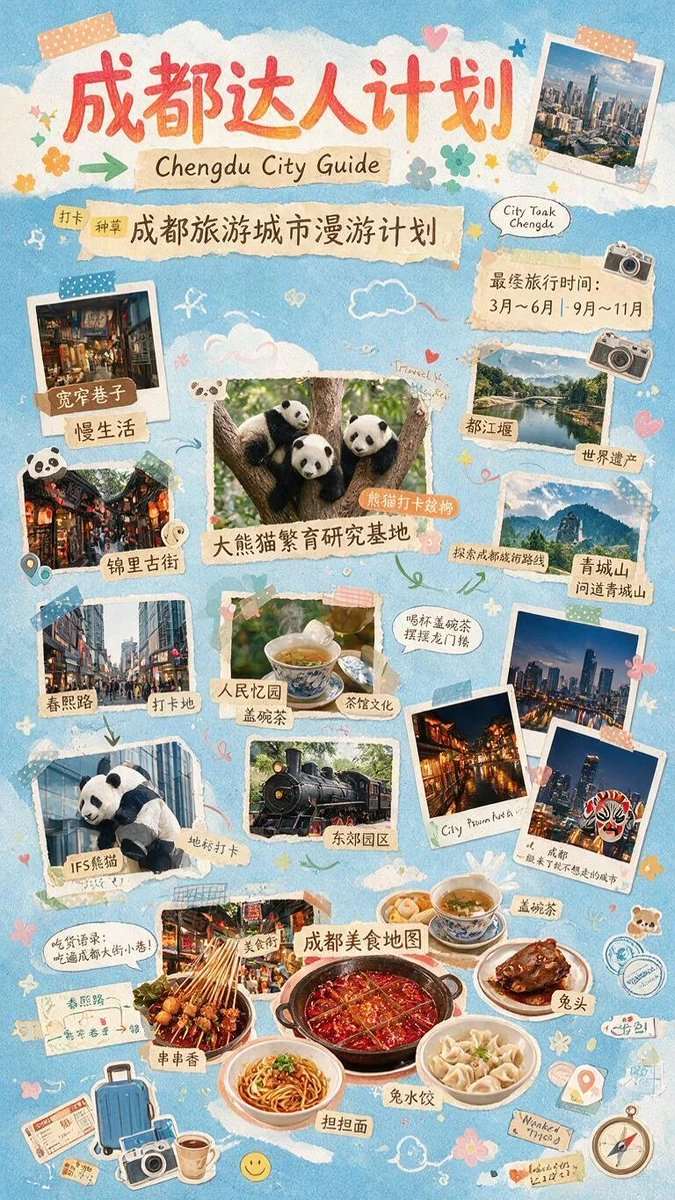
Goal: Create a vertical scrapbook-style travel guide poster for {argument name="destination city" default="Chengdu"}, combining cute hand-drawn decoration, taped paper scraps, Polaroid photos, Chinese calligraphy titles, and food/travel stickers.

Canvas: Tall portrait poster, 9:16 ratio, soft sky-blue paper-texture background with white torn-cloud shapes near the top and throughout. Use a warm, playful, handmade journal aesthetic with pastel colors, washi tape, torn kraft labels, doodled arrows, hearts, flowers, clouds, stars, butterflies, stamps, a compass, suitcase, camera, tickets, map pin, and small panda doodles.

Main text hierarchy: At the top, large red-orange brush lettering reading {argument name="main Chinese headline" default="成都达人计划"}. Directly underneath, a beige torn-paper strip with handwritten English text reading {argument name="English subtitle" default="Chengdu City Guide"}. Below that, a longer torn-paper strip with Chinese text reading {argument name="Chinese guide title" default="成都旅游城市漫游计划"}, with small tag-like labels at the left. On the upper right, add a small speech bubble reading “City Tank Chengdu.” Add a beige note on the right reading “Best travel time: March–June | September–November,” styled like handwritten travel advice.

Layout and counted photo elements: Use exactly 16 main photo or cutout image elements arranged in a lively collage, each with tape or torn-paper label styling. The 16 elements are: 1) top-right Polaroid of a modern Chengdu skyline; 2) upper-left Polaroid of a cozy interior alley/teahouse labeled as Kuanzhai Alley slow life; 3) left-middle photo of a red lantern ancient street labeled Jinli Ancient Street; 4) center hero photo of three pandas in a tree labeled Giant Panda Breeding Research Base; 5) upper-right landscape photo of Dujiangyan river and mountains labeled Dujiangyan, World Heritage; 6) right-middle mountain photo labeled Qingcheng Mountain; 7) left-lower city street photo labeled Chunxi Road shopping/check-in spot; 8) left-lower panda cutout leaning from a building labeled IFS Panda landmark; 9) center photo of a gaiwan tea cup labeled People’s Park gaiwan tea and tea culture; 10) center-lower photo of a black steam train labeled Eastern Suburb Memory / East Park; 11) right-lower Polaroid of a night city skyline; 12) right-lower Polaroid of a warmly lit traditional street at night; 13) right-lower Polaroid of skyscrapers at night with a Sichuan opera face mask sticker; 14) bottom-left food photo of skewers labeled skewer aroma; 15) bottom-center large hotpot photo labeled Chengdu Food Map; 16) bottom-right food arrangement with tea, rabbit head, dumplings, and noodles.

Food section details: The bottom third should feel like a Chengdu food map. Include exactly 6 labeled food items: spicy red hotpot in the center, skewers on the left, dandan noodles at the bottom, rabbit dumplings on the right, rabbit head at the far right, and gaiwan tea above/right. Labels should be small torn-paper Chinese-style tags, but the overall prompt remains in English.

Visual style: Cute travel diary collage, semi-realistic printed photos mixed with illustrated stickers, soft grain, pastel blue background, cream paper scraps, coral-red title, muted orange labels, white photo borders, slightly rotated elements, visible tape strips in peach, blue, and green. The image should look like a handmade planner page or Xiaohongshu travel guide poster, dense but readable.

Constraints: Keep the poster vertical and information-rich. Maintain the exact count of 16 main image elements and 6 labeled food items. Do not add logos, watermarks, QR codes, or extra large text. Preserve a cheerful Chengdu tourism mood with pandas, tea, hotpot, historic streets, city skyline, and mountain scenery.
Use this prompt in the VdoBloom image editor.
Opens the image editor with this prompt — add your own photo to generate.