Corporate Lobby Fight Storyboard
Full prompt
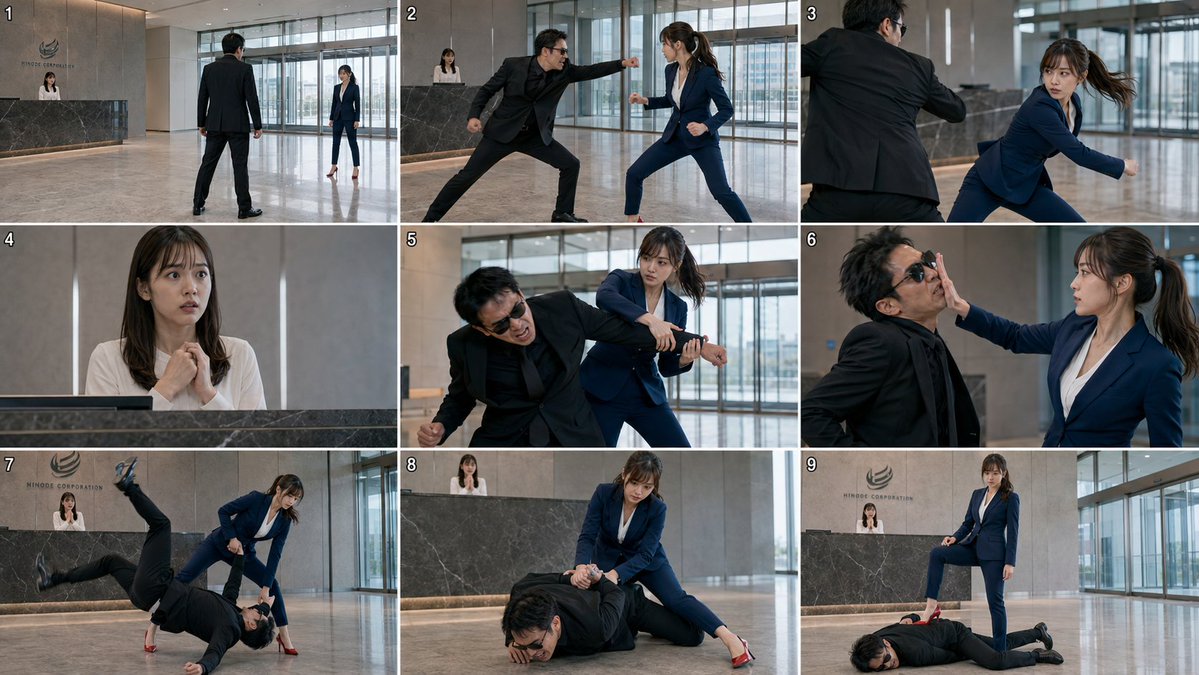
Goal: Create a photorealistic live-action storyboard contact sheet for a corporate lobby fight scene, showing exactly 9 numbered cinematic frames in a 3x3 grid.

Canvas: Wide 16:9 contact-sheet image, thin white gutters separating the panels, each panel numbered in small white digits at the top-left from 1 to 9. Realistic film still look, sharp action photography, natural indoor daylight, 768p storyboard fidelity.

Location: A modern high-rise corporate lobby with polished beige marble floors, tall glass windows and sliding doors on the right and rear, neutral stone wall panels, and a dark marble reception desk. Behind the desk is a company logo and the text {argument name="company name" default="HINODE CORPORATION"}. The receptionist remains behind the desk in multiple shots.

Characters: Use exactly 3 recurring characters. Character 1 is {argument name="female fighter" default="a young East Asian woman in a navy blue business suit, white blouse, red high heels, long brown hair in a ponytail with loose bangs"}; she is athletic, focused, and calm under pressure. Character 2 is {argument name="male attacker" default="a middle-aged East Asian man in a black suit, black shirt, black shoes, messy dark hair, wearing black sunglasses"}; he is aggressive and increasingly defeated. Character 3 is {argument name="receptionist" default="a young East Asian woman in a white blouse behind the reception counter"}; she looks shocked and frightened.

Panel-by-panel layout, exactly 9 panels:
1. Wide establishing shot: the male attacker stands with his back to camera in the open lobby, facing the female fighter several meters away near the windows; the receptionist is visible behind the reception desk. Tense standoff composition.
2. Medium-wide action shot: the male attacker lunges forward and throws a straight punch toward the female fighter; she squares up defensively in her navy suit, fists raised, feet apart.
3. Over-the-shoulder/side action shot: the female fighter pivots and dodges the punch, her ponytail swinging, her face alert; the attacker’s black-suited arm cuts across the foreground.
4. Close-up reaction shot: the receptionist behind the counter clasps her hands nervously near her chest, eyes wide, watching the fight.
5. Medium action shot: the female fighter traps and twists the attacker’s arm from behind or beside him, forcing him to bend forward in pain; her expression is controlled and determined.
6. Tight medium shot: the female fighter strikes or shoves the attacker’s face with an open palm, compressing his sunglasses and cheek; he grimaces while she stares him down.
7. Wide dynamic throw shot: the female fighter executes a judo-style takedown or sweeping throw; the attacker is inverted or falling headfirst toward the marble floor, one leg flung high in the air, while she stays balanced in red heels.
8. Ground-control shot: the attacker lies face-down on the floor, grimacing; the female fighter kneels or crouches over him, pinning his arm behind his back with both hands. Reception desk and receptionist visible in the background.
9. Final victory shot: the attacker lies prone and defeated on the marble floor; the female fighter stands over him with one red high heel planted firmly on his back, looking composed and victorious; receptionist and corporate logo remain visible behind them.

Visual style: Photorealistic Japanese corporate action-drama stills, cinematic framing, realistic motion blur only where appropriate, consistent character identities and wardrobe across all 9 panels, cool neutral office lighting, polished reflections on the floor, dramatic but believable stunt choreography.

Constraints: Do not add extra panels, captions, speech bubbles, weapons, blood, gore, or fantasy effects. Keep the grid clean and readable. Maintain the exact 9 numbered frames and the same lobby location throughout.
Use this prompt in the VdoBloom image editor.
Opens the image editor with this prompt — add your own photo to generate.