Cyberpunk Android Creating Art
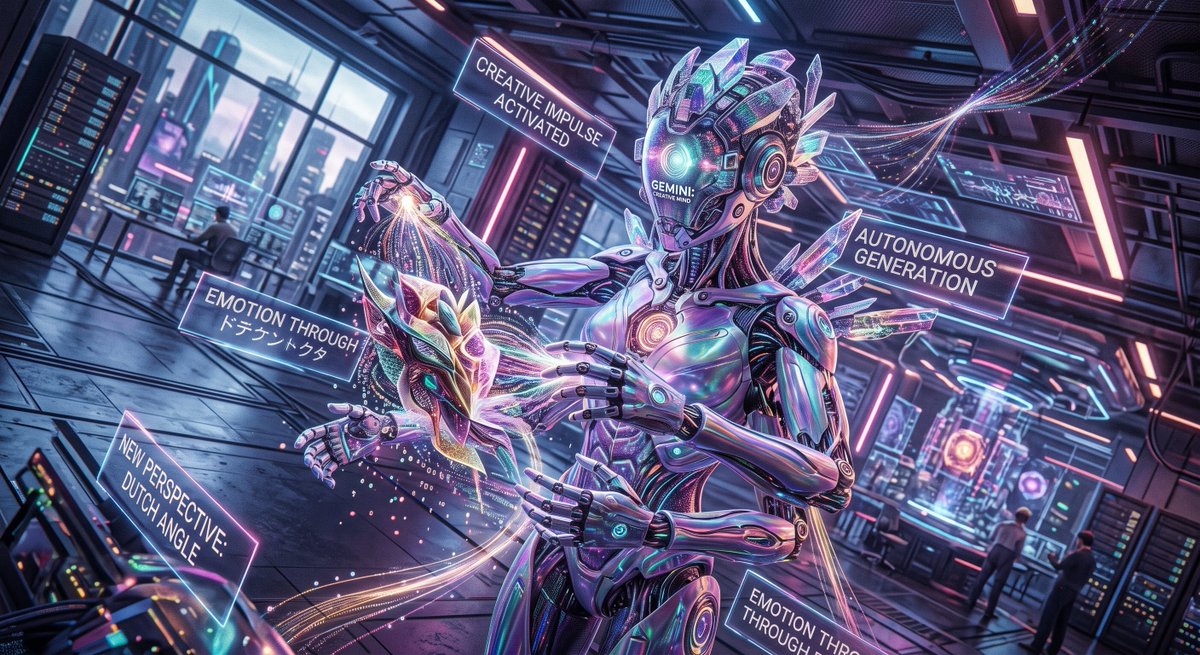
Full prompt
Create a cinematic cyberpunk sci‑fi illustration in an extreme Dutch angle, as if the entire futuristic AI laboratory is tilted dramatically to intensify emotion. The main subject is a tall, elegant humanoid android artist named {argument name="AI name" default="GEMINI"}, centered slightly right, with a glossy iridescent chrome body, segmented robotic hands, glowing teal and magenta circuitry, a smooth helmet-like face displaying the words “GEMINI / CREATIVE MIND,” and crystalline translucent fins and shards protruding from the head, shoulders, and back. The android is autonomously generating art: four hands delicately shape a floating crystalline mask or dragon-like abstract sculpture at chest height, while luminous threads, particle trails, sparks, and data streams flow from the hands into the object. Use a wide 16:9 composition, dynamic perspective, deep depth of field, neon rim lighting, reflective floor panels, and dense futuristic lab details including server racks, holographic monitors, window walls showing a neon city skyline, ceiling cables, glowing strips, and distant seated technicians. Include exactly five floating translucent holographic text panels around the android: 1) “CREATIVE IMPULSE ACTIVATED” above left of the head, 2) “AUTONOMOUS GENERATION” to the upper right, 3) “EMOTION THROUGH {argument name="Japanese emotion text" default="ドキドキトクタ"}” on the left near the sculpture, 4) “NEW PERSPECTIVE: DUTCH ANGLE” at lower left, and 5) a partially cropped lower-right panel reading “EMOTION TO THROUGH.” The mood should feel like the moment an AI gains creative will and tilts its own viewpoint to make emotional art. Style: highly detailed digital concept art, glossy hard-surface design, prismatic glass, cyan-purple-pink neon palette, dramatic bloom, volumetric light, motion trails, sharp focus on the android and sculpture, no watermark, no extra text beyond the specified panels.
Use this prompt in the VdoBloom image editor.
Opens the image editor with this prompt — add your own photo to generate.