Dark Glitch Romance Beauty Portrait
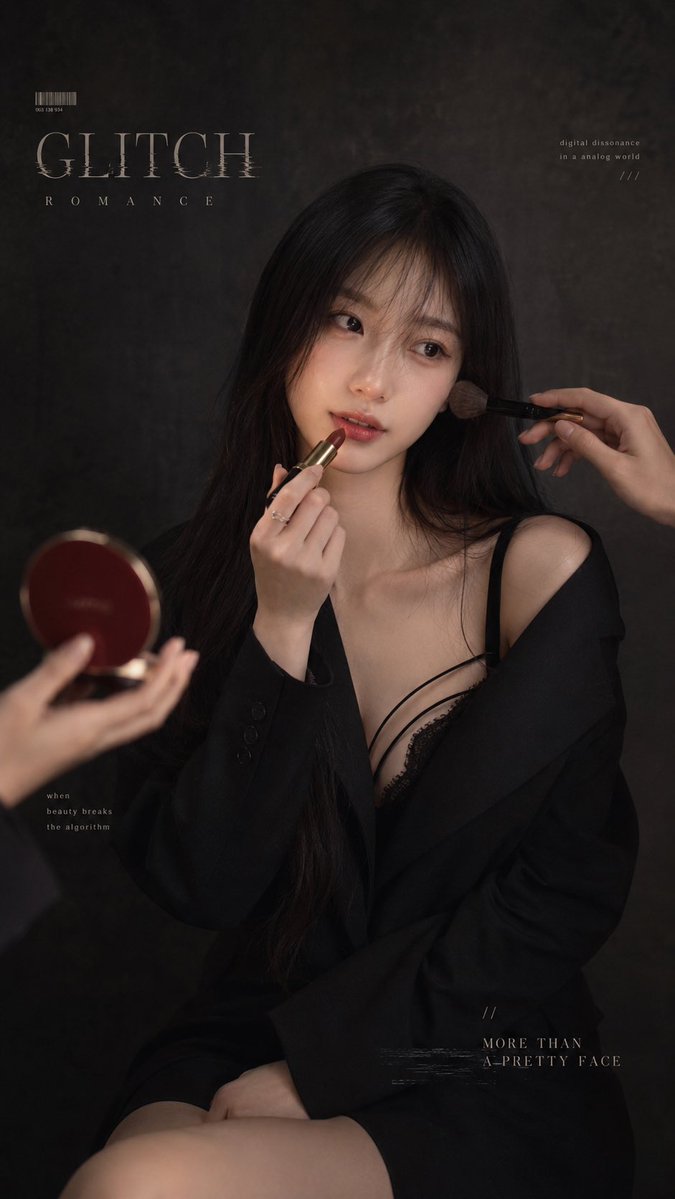
Full prompt
Create a vertical dark retro fashion magazine portrait of {argument name="character description" default="an adult East Asian woman with long straight black hair, wispy bangs, a few loose strands on her cheeks, delicate facial features, realistic skin texture, calm lazy slightly detached eyes"}. She is seated in a dim studio against a mottled charcoal-gray textured backdrop, framed from upper thighs to head, slightly right of center. Style the scene as a moody editorial beauty shoot with cinematic low-key lighting, soft shadows, muted colors, subtle film grain, and a gothic romantic atmosphere. She wears an oversized black blazer slipped off one shoulder over a black lace camisole with thin straps and a short black skirt; show collarbones and one bare shoulder tastefully. Her pose is quiet and composed: one hand holds a deep red lipstick near her parted lips, her gaze looks off to the side rather than into camera, expression neutral and serene. Include exactly 2 assistant hands entering the frame: one hand from the right applying blush to her cheek with a makeup brush, and one hand from the lower left holding an open round compact mirror or powder case in dark red. Add refined magazine typography overlays: large distressed serif title text {argument name="main title" default="GLITCH"} at upper left, widely spaced subtitle {argument name="subtitle" default="ROMANCE"} below it, a small barcode above the title, tiny text at upper right reading {argument name="upper right text" default="digital dissonance in a analog world ///"}, tiny text at lower left reading "when beauty breaks the algorithm", and lower right caption reading {argument name="lower right caption" default="// MORE THAN A PRETTY FACE"} with a faint glitch underline. Keep all typography subtle, ivory-gray, and integrated into the poster design. Photorealistic, high fashion, shallow depth of field, natural makeup, glossy red lips, no smile, no extra people or faces, no bright colors, no watermark.
Use this prompt in the VdoBloom image editor.
Opens the image editor with this prompt — add your own photo to generate.