Arcane Siege Mobile Deck UI
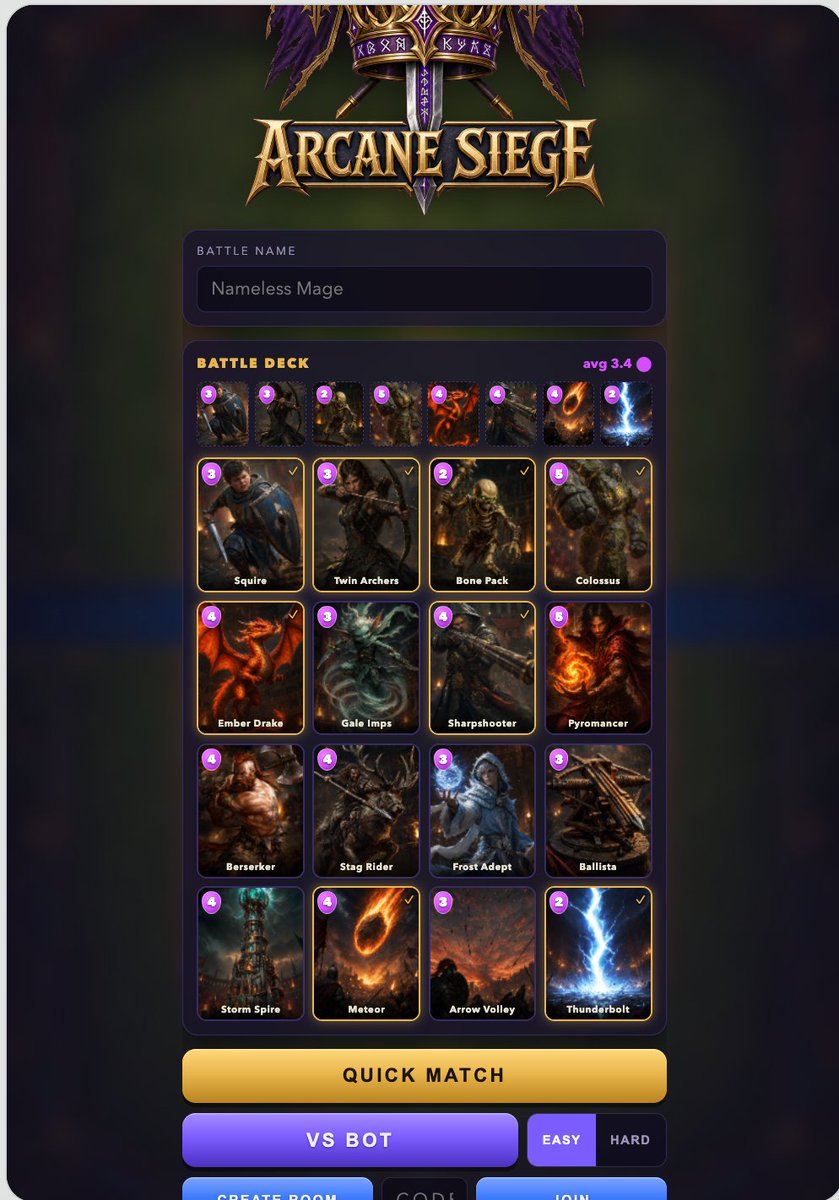
Full prompt
Goal: Create a polished dark fantasy mobile game lobby/deck-building screen for a Clash Royale-like game titled {argument name="game title" default="Arcane Siege"}, shown as a vertical smartphone UI screenshot.

Canvas: Tall portrait mobile screen, about 768×1152, with rounded black phone-screen corners. Use a dark blurred green-and-purple magical battlefield background, subtle vignette, and glowing UI panels.

Top branding: At the top center, place an ornate fantasy emblem with purple banners, gold filigree, crossed weapons, runic details, and a large metallic gold medieval logo reading “{argument name="game title" default="Arcane Siege"}”.

Player panel: Below the logo, add a rounded dark purple input panel. It contains the small uppercase label “BATTLE NAME” and a dark text field showing “{argument name="battle name" default="Nameless Mage"}”.

Deck panel: Under the name field, create one large rounded dark purple card-selection panel. Header text on the left reads “BATTLE DECK” in yellow-gold uppercase. On the right show “avg 3.4” in magenta with a small magenta elixir dot.

Top deck strip: Directly below the deck header, show exactly 8 small selected-card thumbnails in one horizontal row. Each has a tiny purple circular elixir cost badge at the top-left. The visible costs from left to right are: 3, 3, 2, 5, 4, 4, 4, 2. The cards depict gritty fantasy units and spells.

Main card grid: Below the strip, show exactly 16 collectible battle cards in a 4-column by 4-row grid. Each card has a dark fantasy illustration, rounded black frame, purple circular elixir cost badge at top-left, white name label at the bottom, and selected cards have a thin glowing gold outline plus a small gold check mark at top-right. The 16 cards, in reading order, are:
1. cost 3, “Squire”, armored young swordsman with blue cloak, selected.
2. cost 3, “Twin Archers”, hooded archer drawing a bow, selected.
3. cost 2, “Bone Pack”, skeletal undead soldiers, selected.
4. cost 5, “Colossus”, hulking stone giant, selected.
5. cost 4, “Ember Drake”, red-orange dragon, selected.
6. cost 3, “Gale Imps”, icy winged imp creature, unselected.
7. cost 4, “Sharpshooter”, rugged gunner with long rifle, selected.
8. cost 5, “Pyromancer”, fiery mage holding flame, unselected.
9. cost 4, “Berserker”, muscular warrior with axe, unselected.
10. cost 4, “Stag Rider”, dark horned stag mount and rider, unselected.
11. cost 3, “Frost Adept”, blue-white ice mage, unselected.
12. cost 3, “Ballista”, wooden siege crossbow, unselected.
13. cost 4, “Storm Spire”, magical storm tower, unselected.
14. cost 4, “Meteor”, flaming meteor falling from sky, selected.
15. cost 3, “Arrow Volley”, battlefield sky filled with arrows, unselected.
16. cost 2, “Thunderbolt”, bright blue lightning strike, selected.

Bottom controls: Below the deck panel, show exactly 7 visible controls. First is a wide rounded gold button labeled “QUICK MATCH”. Second row has a wide purple button labeled “VS BOT”, followed by two smaller difficulty buttons: “EASY” highlighted in purple and “HARD” dark. At the very bottom edge, partially visible, include three rectangular controls: blue “CREATE ROOM”, dark “CODE”, and blue “JOIN”.

Visual style: High-quality fantasy game UI, cinematic card art, gold and purple color palette, glossy beveled buttons, glowing outlines, clean mobile-game typography, crisp readable labels, dramatic lighting, no real-world branding, no watermark. Keep the layout centered with generous margins and make it look like a finished mobile game asset screen.
Use this prompt in the VdoBloom image editor.
Opens the image editor with this prompt — add your own photo to generate.