Gothic Lolita AI Cosplay Duo
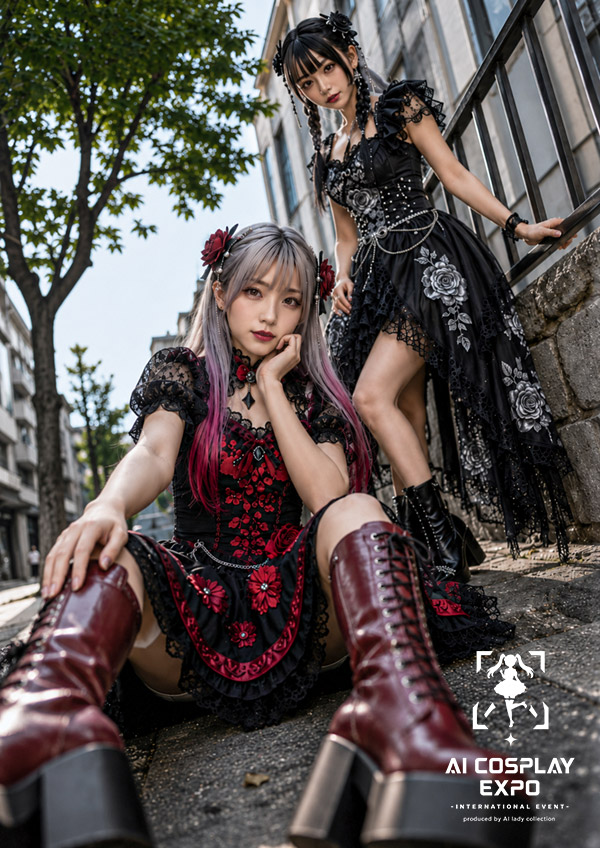
Full prompt
Create a vertical 2:3 photorealistic 2.5D cosplay fashion editorial of exactly two AI ladies in elaborate gothic lolita outfits on a city sidewalk in daylight. The foreground woman sits low on the pavement with her legs stretched toward the camera in an extreme low-angle wide-lens perspective; she has long silver hair with pink-red streaks, red rose hair accessories, a black-and-crimson lace dress with floral embroidery, puff sleeves, a short apron-like skirt panel, black lace trim, and tall glossy burgundy lace-up platform boots dominating the lower foreground. Her pose is relaxed and dramatic, one hand extended toward the viewer and one hand near her face. The background woman stands higher on stone steps beside a black metal railing, leaning one hand on the rail; she has black hair styled in twin braids or twisted updo with black ribbons, a black gothic dress with asymmetrical lace hem, silver rose embroidery, corset details, chains, beads, puff sleeves, and black lace-up platform boots. Count exactly 2 characters: 1 seated crimson-and-black gothic lolita, 1 standing black-and-silver gothic lolita. Set the scene on a narrow urban street with modern building facades receding in perspective, a leafy green tree on the left, stone wall and railing on the right, bright natural sunlight, shallow depth of field, realistic fabric texture, glossy boots, cinematic contrast, and detailed embroidery. Obscure both faces with soft square blur blocks for an anonymous generated-photo look. Add a small white event logo in the bottom-right corner with a bracketed chibi silhouette icon above stacked text reading "AI COSPLAY EXPO", then smaller text "- INTERNATIONAL EVENT -" and "produced by AI lady collection". Use {argument name="style theme" default="gothic lolita cosplay fashion"}, {argument name="main outfit colors" default="black, crimson, silver, and burgundy"}, {argument name="location" default="sunlit urban sidewalk with stone steps and metal railing"}, {argument name="event title" default="AI COSPLAY EXPO"}, and {argument name="face treatment" default="soft square blur blocks over both faces"}.
Use this prompt in the VdoBloom image editor.
Opens the image editor with this prompt — add your own photo to generate.