Hot Air Balloon Vlog Storyboard
Full prompt
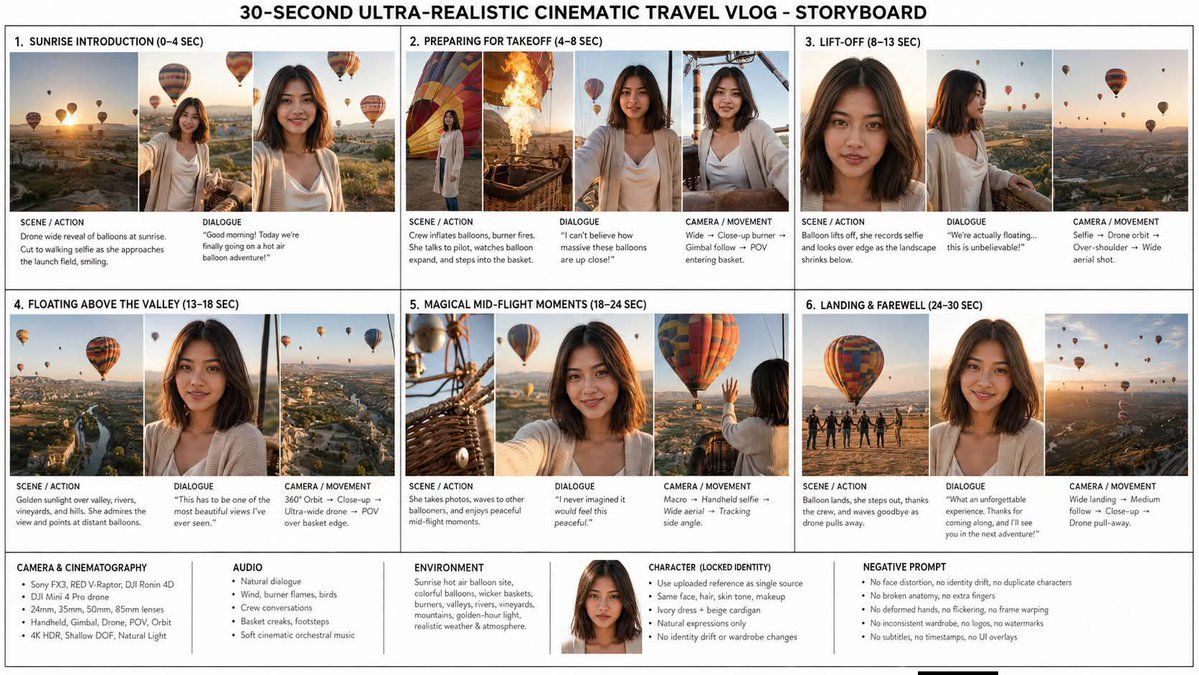
Goal: Create a clean, information-dense storyboard infographic for a travel vlog titled {argument name="headline text" default="30-SECOND ULTRA-REALISTIC CINEMATIC TRAVEL VLOG - STORYBOARD"}, showing a cinematic hot-air-balloon adventure at sunrise with one consistent female protagonist.

Canvas: Wide horizontal 16:9 storyboard sheet on a white background with thin black/gray grid lines, like a professional production planning board. Use a bold centered all-caps headline across the top. Arrange the main content in exactly 6 numbered scene cards in a 3-column by 2-row grid, with a lower technical notes strip spanning the full width.

Visual style: Photorealistic cinematic travel documentary stills, 4K HDR feel, golden sunrise light, shallow depth of field, realistic skin texture, warm atmospheric haze, natural wind movement, professional camera quality. The setting is a beautiful hot-air-balloon launch site and aerial valley landscape with vineyards, winding rivers, mountains, villages, baskets, burner flames, and many colorful balloons.

Main character: Use one female protagonist, {argument name="character name" default="the same young woman throughout"}, with shoulder-length dark brown hair, natural makeup, warm medium skin tone, soft oval face, and a friendly smile. She wears the same {argument name="wardrobe" default="ivory cream dress with a light beige cardigan"} in every image. Preserve her identity consistently in all scenes; no duplicate characters and no face drift.

Layout: Each of the 6 scene cards should contain cinematic thumbnail frames along the top and small production notes underneath. Use black uppercase section labels and compact readable text. The thumbnails should alternate between drone-wide landscape views, close-up portrait/selfie shots, basket/burner details, and aerial balloon views.

Scene cards: Include exactly 6 numbered storyboard sections:
1. Sunrise Introduction (0–4 sec): three thumbnails showing a sunrise drone-wide view of dozens of balloons, the woman walking toward the launch area, and a close selfie-style smiling portrait with balloons behind her. Notes: Scene/action: drone wide reveal of balloons at sunrise; cut to walking selfie as she approaches the launch field, smiling. Dialogue: {argument name="opening dialogue" default="Good morning! Today we're finally going on a hot air balloon adventure!"}
2. Preparing for Takeoff (4–8 sec): four thumbnails showing colorful balloon fabric inflating, realistic burner flames, the woman watching excitedly beside the balloon, and her near/inside the basket. Notes: crew inflates balloons, burner fires, she talks to pilot, watches balloon expand, and steps into the basket. Dialogue: “I can't believe how massive these balloons are up close!” Camera/movement: wide, close-up burner, gimbal follow, POV entering basket.
3. Lift-Off (8–13 sec): three thumbnails showing a close-up portrait of the woman, a side profile at the basket rail, and a wide aerial landscape with balloons floating. Notes: balloon lifts off, she records selfie and looks over edge as the landscape shrinks below. Dialogue: “We're actually floating... this is unbelievable!” Camera/movement: selfie, drone orbit, over-shoulder, wide aerial shot.
4. Floating Above the Valley (13–18 sec): three thumbnails showing a high aerial valley with river and balloons, a close portrait in the basket, and a POV view over vineyards and villages. Notes: golden sunlight over valley, rivers, vineyards, and hills; she admires the view and points at distant balloons. Dialogue: “This has to be one of the most beautiful views I've ever seen.” Camera/movement: 360° orbit, close-up, ultra-wide drone, POV over basket edge.
5. Magical Mid-Flight Moments (18–24 sec): three thumbnails showing basket ropes/burner hardware in close-up, the woman holding the camera selfie-style, and her waving toward another colorful balloon nearby. Notes: she takes photos, waves to other ballooners, and enjoys peaceful mid-flight moments. Dialogue: “I never imagined it would feel this peaceful.” Camera/movement: macro, handheld selfie, wide aerial, tracking side angle.
6. Landing & Farewell (24–30 sec): three thumbnails showing the balloon landing with crew silhouettes, a smiling farewell portrait, and a final aerial view of balloons in the sunrise haze. Notes: balloon lands, she steps out, thanks the crew, and waves goodbye as the drone pulls away. Dialogue: “What an unforgettable experience. Thanks for coming along, and I'll see you in the next adventure!” Camera/movement: wide landing, medium follow, close-up, drone pull-away.

Bottom technical strip: Include exactly 5 labeled information boxes across the bottom plus a small centered character portrait near the identity box. The 5 boxes are: Camera & Cinematography, Audio, Environment, Character (Locked Identity), and Negative Prompt. Fill them with compact bullet-style text: Sony FX3, RED V-Raptor, DJI Ronin 4D, DJI Mini 4 Pro drone, 24mm/35mm/50mm/65mm lenses, handheld/gimbal/drone/POV/orbit, 4K HDR, shallow DOF, natural light; natural dialogue, wind, burner flames, birds, crew conversations, basket creaks, footsteps, soft cinematic orchestral music; sunrise hot-air balloon site, colorful balloons, wicker baskets, burners, valleys, rivers, vineyards, mountains, golden-hour light, realistic weather and atmosphere; use uploaded reference as single source, same face/hair/skin tone/makeup, ivory dress and beige cardigan, natural expressions only, no identity drift or wardrobe changes; no face distortion, no identity drift, no duplicate characters, no broken anatomy, no extra fingers, no deformed hands, no flickering, no frame warping, no inconsistent wardrobe, no logos, no watermarks, no subtitles, no timestamps, no UI overlays.

Constraints: The final image must read as a polished production storyboard, not a movie poster. Keep all 6 scene cards visible and numbered, keep the bottom 5 technical boxes, use consistent typography, preserve the same woman and outfit in every thumbnail, and avoid adding extra scenes or extra characters as protagonists.
Use this prompt in the VdoBloom image editor.
Opens the image editor with this prompt — add your own photo to generate.