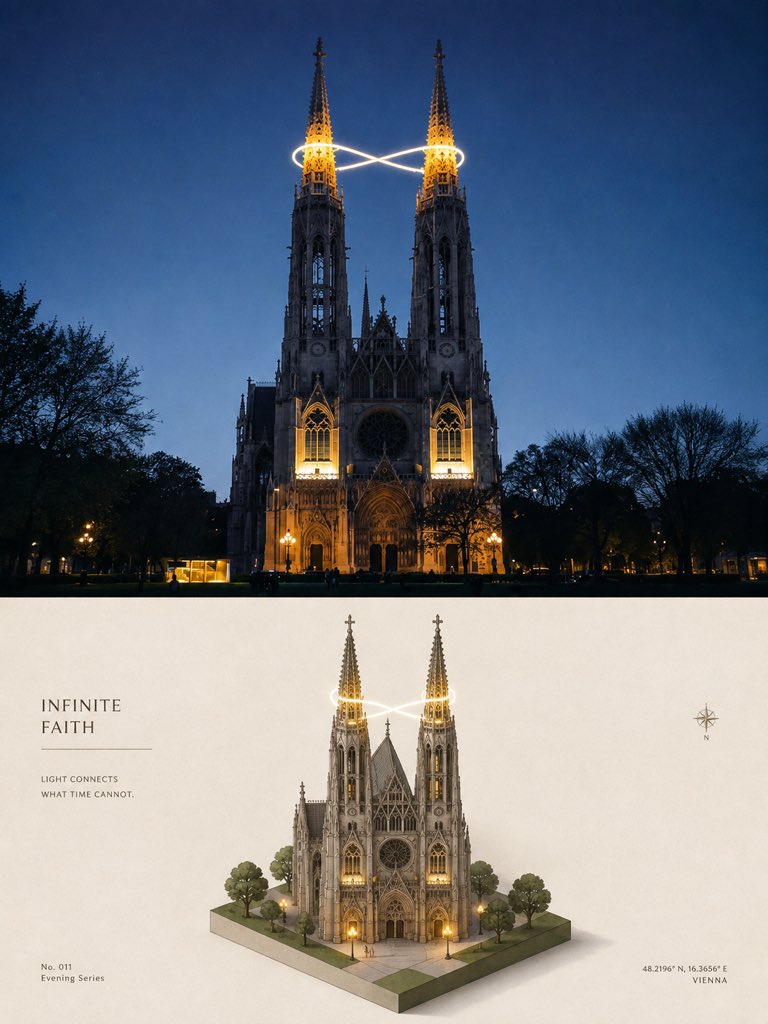
Isometric Cathedral Travel Poster
Full prompt
Using the provided reference image as the layout and poster-style guide, create a new vertical 3:4 high-end travel design poster with the same two equal horizontal sections, but replace the Venetian canal subject with {argument name="landmark" default="a Gothic twin-spired cathedral in Vienna at blue-hour night"}.

Top section: show a cinematic realistic travel photograph of the landmark front-on at dusk/night, with warm architectural lighting, dark tree silhouettes on both sides, deep blue sky, and a single glowing infinity-shaped light trail wrapping around the two spire tops.

Bottom section: transform the same landmark into a clean 3D isometric miniature diorama on a small square base, including exactly 2 tall illuminated spires, exactly 1 central cathedral building, exactly 6 surrounding trees, paved plaza tiles, warm doorway/window lights, and the same glowing infinity light trail around the spires. Keep the minimal cream editorial background and soft shadows like the reference poster.

Typography and graphic details: place a left-aligned title block in the lower half with the headline {argument name="headline text" default="INFINITE FAITH"}, a thin horizontal divider line beneath it, and the small caption {argument name="caption text" default="LIGHT CONNECTS\nWHAT TIME CANNOT."}. Add a small bottom-left label {argument name="series label" default="No. 011\nEvening Series"}. Add a small compass icon on the right side of the lower half, and place bottom-right coordinates and city text {argument name="location text" default="48.2196° N, 16.3656° E\nVIENNA"}. Use elegant serif typography, restrained spacing, premium museum-poster aesthetics, realistic-to-miniature transformation, no collage, no extra panels, no watermark.
Use this prompt in the VdoBloom image editor.
Opens the image editor with this prompt — add your own photo to generate.