Italian Takeaway Brand Board
Full prompt
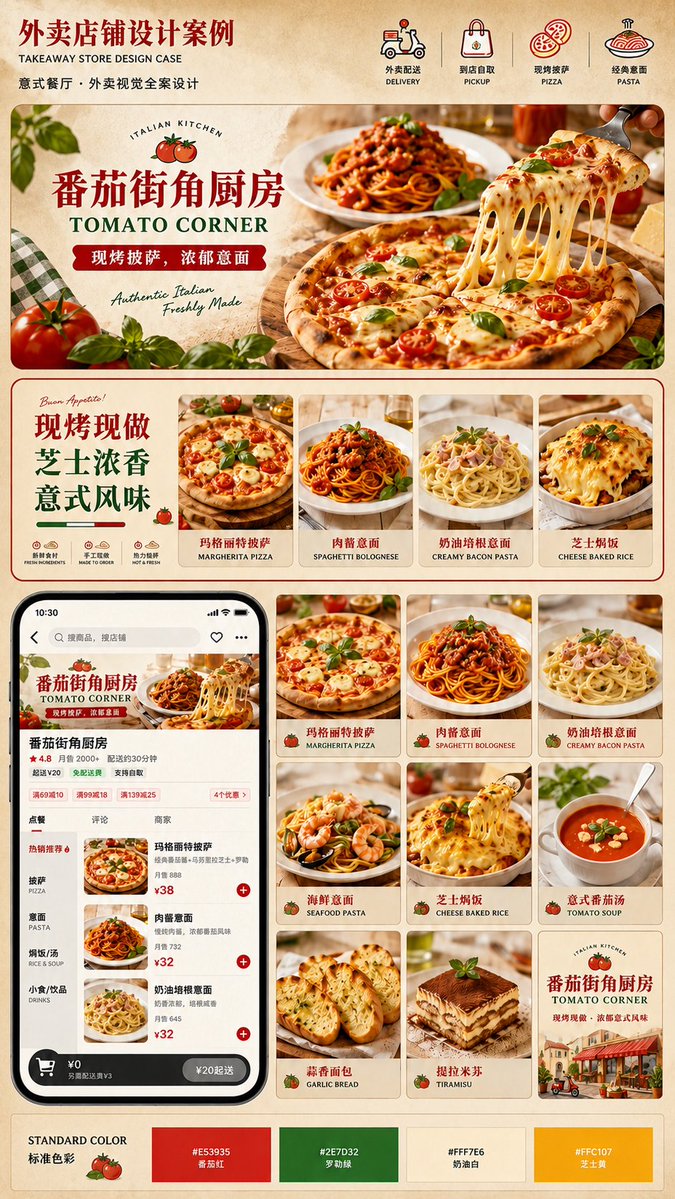
Goal: Create a polished vertical visual identity presentation board for a Western food delivery storefront, focused on an Italian pizza and pasta restaurant brand named {argument name="restaurant name" default="番茄街角厨房"} with the English subtitle {argument name="English brand name" default="TOMATO CORNER"}.

Canvas: Tall portrait poster, 2:3 ratio, warm parchment beige background with subtle paper texture, thin red divider lines, rounded cream content cards, premium food-delivery brand proposal style.

Header: At the top left, large dark red Chinese headline text reading {argument name="main headline" default="外卖店铺设计案例"}, with smaller English subtitle “TAKEAWAY STORE DESIGN CASE” and a smaller Chinese line describing Italian restaurant takeaway visual design. Across the top right, show exactly 4 service/category icons with bilingual labels: 1) scooter delivery, “外卖配送 / DELIVERY”; 2) shopping bag pickup, “到店自取 / PICKUP”; 3) pizza icon, “现烤披萨 / PIZZA”; 4) pasta plate icon, “经典意面 / PASTA”.

Hero section: A large rounded rectangular banner occupying the upper third. Use appetizing photorealistic Italian food photography: a margherita pizza in the foreground with melted cheese being lifted in long strands by a fork, cherry tomatoes and basil leaves on top, spaghetti bolognese behind it, warm restaurant lighting, tomatoes and basil leaves as foreground props, green gingham cloth on the left. Overlay a cream label panel on the left with a small circular tomato logo and “ITALIAN KITCHEN”; large red Chinese brand name, green English brand name, a red ribbon tagline reading {argument name="brand slogan" default="现烤披萨,浓郁意面"}, and handwritten English text “Authentic Italian / Freshly Made”.

Middle promotional strip: Under the hero, create one wide rounded card. On the left, large stacked Chinese promotional copy “现烤现做 / 芝士浓香 / 意式风味”, with a small “Buon Appetito!” script note, decorative tomato icon, and exactly 3 small feature icons labeled “新鲜食材 / FRESH INGREDIENT”, “手工现做 / MADE TO ORDER”, and “热力抢鲜 / HOT & FRESH”. On the right of this strip, place exactly 4 vertical product cards with food photos and bilingual names: 1) Margherita pizza, “玛格丽特披萨 / MARGHERITA PIZZA”; 2) spaghetti bolognese, “肉酱意面 / SPAGHETTI BOLOGNESE”; 3) creamy bacon pasta, “奶油培根意面 / CREAMY BACON PASTA”; 4) cheese baked rice, “芝士焗饭 / CHEESE BAKED RICE”.

Lower layout: Split the lower half into a smartphone mockup on the left and a product grid on the right. The smartphone is a black iPhone-style delivery app screen showing the same restaurant storefront: banner image, brand name, rating 4.8, monthly sales and delivery time details, category tabs, menu list with item thumbnails, red add buttons, prices such as ¥38 and ¥32, and a dark bottom cart bar. Keep the UI realistic and dense but legible.

Product grid: To the right of the phone, create exactly 9 square menu cards in a 3 by 3 grid, each with a food photo, small tomato icon, Chinese name, and English name. The 9 cards must be: 1) “玛格丽特披萨 / MARGHERITA PIZZA”; 2) “肉酱意面 / SPAGHETTI BOLOGNESE”; 3) “奶油培根意面 / CREAMY BACON PASTA”; 4) “海鲜意面 / SEAFOOD PASTA”; 5) “芝士焗饭 / CHEESE BAKED RICE”; 6) “意式番茄汤 / TOMATO SOUP”; 7) “蒜香面包 / GARLIC BREAD”; 8) “提拉米苏 / TIRAMISU”; 9) a brand poster card with Italian street cafe illustration, tomato logo, restaurant name, English subtitle, and red slogan.

Footer: Add a standard color palette bar labeled “STANDARD COLOR / 标准色彩” with a tomato illustration and exactly 4 color swatches: 1) tomato red “#E53935 番茄红”; 2) basil green “#2E7D32 罗勒绿”; 3) cream white “#FFF7E6 奶油白”; 4) cheese yellow “#FFC107 芝士黄”.

Visual style: High-end Chinese design case presentation, clean commercial layout, realistic glossy food photography mixed with small vector icons, warm Italian trattoria mood, tomato-red and basil-green accents, cream card backgrounds, soft shadows, rounded corners, crisp typography, no watermark, no extra sections beyond the specified counts.
Use this prompt in the VdoBloom image editor.
Opens the image editor with this prompt — add your own photo to generate.