Neon Japanese AI IDE Landing Poster
Full prompt
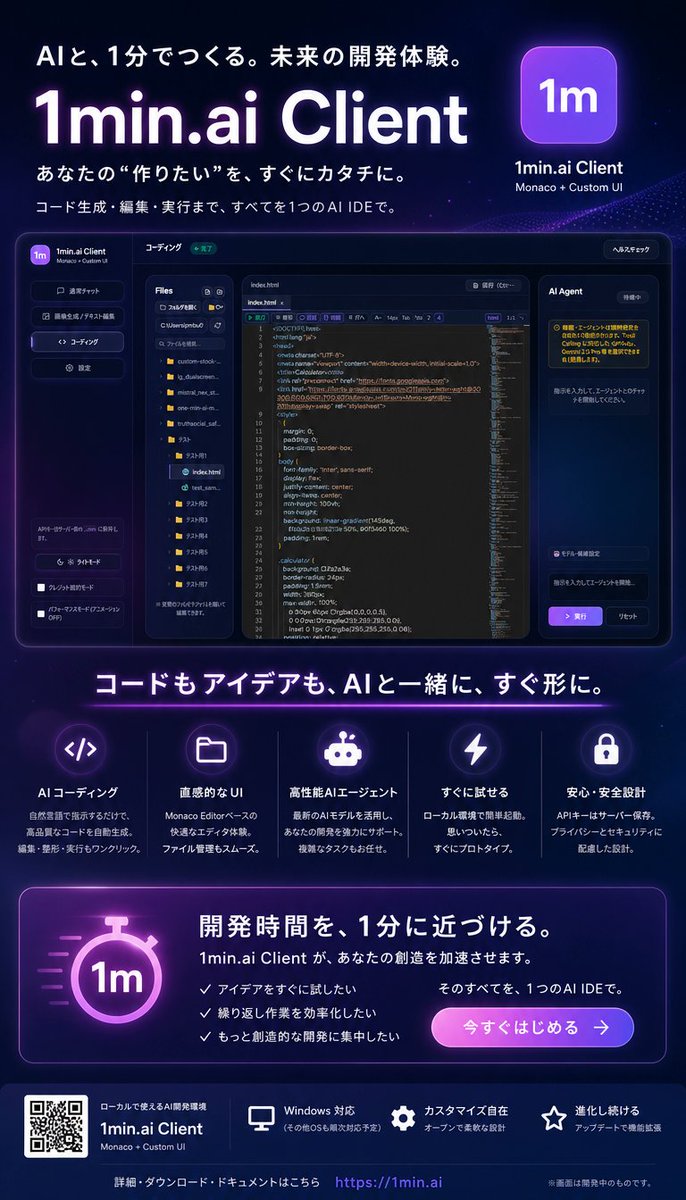
Goal: Create a polished Japanese promotional landing-page style poster for {argument name="product name" default="1min.ai Client"}, advertising an AI IDE that helps users build quickly. The design should feel like a futuristic SaaS launch graphic for developers, with a premium dark neon aesthetic.

Canvas: Vertical 4:5 poster, approximately 720×1040 px, dark navy-to-black gradient background with subtle stars, particles, purple glow, blue highlights, and soft radial light effects. Use crisp modern Japanese typography with large bold white headings and purple neon accents.

Top hero section: At the top left, add the Japanese tagline 「AIと、1分でつくる。未来の開発体験。」. Below it, place a huge glowing title “{argument name="headline text" default="1min.ai Client"}” in white with a purple aura. Under the title, add two Japanese lines: 「あなたの “作りたい” を、すぐにカタチに。」 and 「コード生成・編集・実行まで、すべてを1つのAI IDEで。」. At the top right, show a rounded square purple app icon with “1m” in white, with the label “1min.ai Client” and smaller text “Monaco + Custom UI”.

Central product mockup: Place a large dark glassmorphism desktop app screenshot centered beneath the hero text. The app window has rounded corners, a thin purple-blue border, and multiple panels. Include exactly 4 main app regions: a left vertical sidebar with the 1m logo and navigation buttons, a file explorer panel listing folders and files, a central code editor with syntax-highlighted HTML/CSS-like code and line numbers, and a right “AI Agent” chat/task panel with Japanese helper text and a purple execute button. The app UI should look like a Monaco-editor based IDE, with dark panels, tiny Japanese labels, folder icons, tabs, and status pills.

Middle headline and feature row: Beneath the mockup, add a large centered Japanese headline: 「コードもアイデアも、AIと一緒に、すぐ形に。」 with a thin purple neon underline. Below it, create exactly 5 feature cards in a horizontal row, each separated by subtle vertical lines, each with a glowing circular icon, Japanese title, and short Japanese description. The 5 visible features are: 1) code brackets icon, title 「AIコーディング」; 2) folder icon, title 「直感的なUI」; 3) robot icon, title 「高性能AIエージェント」; 4) lightning bolt icon, title 「すぐに試せる」; 5) lock icon, title 「安心・安全設計」.

Call-to-action panel: Near the lower third, add a wide rounded rectangle card with purple border glow. On the left, include a large glowing stopwatch icon containing “1m”. On the right, add the bold Japanese headline 「開発時間を、1分に近づける。」, followed by text saying 「1min.ai Client が、あなたの創造を加速させます。」. Include exactly 3 check-mark bullet points: 「アイデアをすぐに試したい」, 「繰り返し作業を効率化したい」, 「もっと創造的な開発に集中したい」. Add supporting text 「そのすべてを、1つのAI IDEで。」 and a rounded purple-to-pink gradient button labeled 「今すぐはじめる →」.

Footer: At the bottom, use a darker footer strip. On the left place a visible QR code block, next to product text “1min.ai Client” and “Monaco + Custom UI”. Across the footer, show exactly 3 small capability items with icons: monitor icon 「Windows 対応」, gear icon 「カスタマイズ自在」, star icon 「進化し続ける」. Along the very bottom center, include 「詳細・ダウンロード・ドキュメントはこちら」 followed by the URL “{argument name="website URL" default="https://1min.ai"}”. Add a tiny note on the bottom right: 「※画面は開発中のものです。」

Visual style: High-end cyberpunk developer-tool advertisement, dark glass UI, neon purple and electric blue lighting, soft bloom, sharp interface details, realistic SaaS mockup, clean spacing, luminous icons, Japanese tech startup branding. Keep all text legible and aligned. No people, no extra logos, no watermark.
Use this prompt in the VdoBloom image editor.
Opens the image editor with this prompt — add your own photo to generate.