Japanese Luxury Condo Sales Flyer
Full prompt
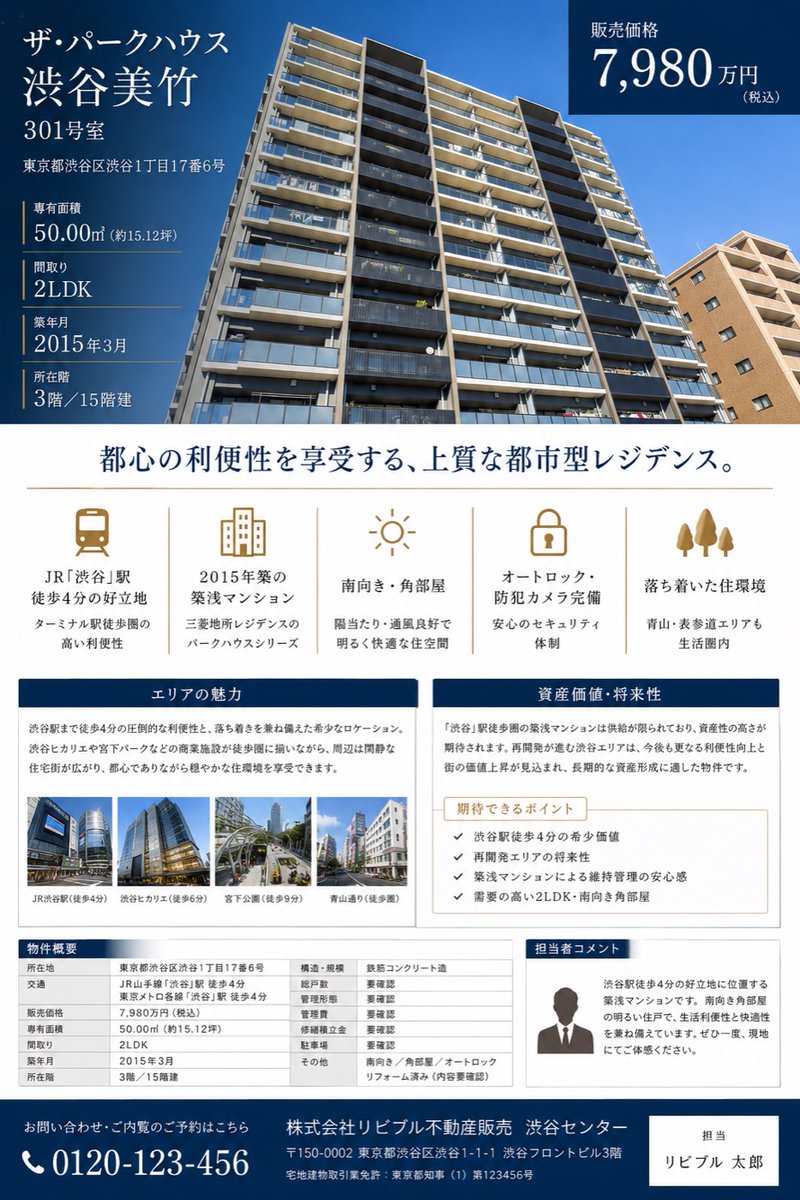
Goal: Create a polished Japanese real estate sales brochure flyer for a condominium listing, suitable for a property appraisal or sales proposal.

Canvas: Portrait A4 flyer, clean luxury real-estate design, white background with deep navy and muted gold accents. Use elegant Japanese Mincho-style serif typography for headings and readable sans-serif for tables and body copy.

Top hero section: Fill the upper half with a wide low-angle exterior photo of a modern high-rise condominium under a clear blue sky. Overlay a dark navy translucent information block on the left and a dark navy price box on the top right.

Main listing text in the left overlay: Show the building name and unit prominently: 「{argument name="property name" default="ザ・パークハウス 渋谷美竹"}」, 「{argument name="unit number" default="301号室"}」. Beneath it show the address: 「東京都渋谷区渋谷1丁目17番6号」. Then list exactly 5 property specs separated by thin gold rules: dedicated area 「50.00㎡(約15.12坪)」, floor plan 「2LDK」, construction date 「2015年3月」, floor 「3階/15階建」, and other listing details as compact real-estate facts.

Top-right price box: Dark navy rectangle with white text reading 「販売価格」 and the large price 「{argument name="sale price" default="7,980万円"}」 with small 「(税込)」.

Center headline: Large centered Japanese headline in navy: 「都心の利便性を享受する、上質な都市型レジデンス。」 with a thin gold horizontal divider below.

Feature icon row: Create exactly 5 evenly spaced feature columns with muted-gold line icons and Japanese labels. The 5 icons are: 1) train icon, label 「JR『渋谷』駅 徒歩4分の好立地」 with subtext about Terminal station convenience; 2) apartment building icon, label 「2015年築の築浅マンション」 with subtext about Mitsubishi Estate Residence Park House series; 3) sun icon, label 「南向き・角部屋」 with subtext about sunlight and ventilation; 4) lock icon, label 「オートロック・防犯カメラ完備」 with subtext about security; 5) three trees icon, label 「落ち着いた住環境」 with subtext mentioning Aoyama and Omotesando within living range.

Middle content panels: Use two side-by-side bordered cards with navy title bars. Left card title 「エリアの魅力」 with a paragraph describing the convenience of being 4 minutes from Shibuya Station and a calm residential environment. Include exactly 4 small landscape thumbnail photos along the bottom, each with captions: 「JR渋谷駅(徒歩4分)」, 「渋谷ヒカリエ(徒歩5分)」, 「宮下公園(徒歩9分)」, 「青山通り(徒歩8分)」. Right card title 「資産価値・将来性」 with a paragraph about scarcity and asset value near Shibuya Station. Inside it place a beige sub-box titled 「期待できるポイント」 containing exactly 4 checkmark bullet points: 1) 「渋谷駅徒歩4分の希少価値」, 2) 「再開発エリアの将来性」, 3) 「築浅マンションによる維持管理の安心感」, 4) 「需要の高い2LDK・南向き角部屋」.

Bottom section: Create exactly 3 bottom blocks. Left: a property overview table titled 「物件概要」 with multiple rows for location, access, sale price, dedicated area, floor plan, construction date, floor, structure, total units, management type, management company, parking, and other notes. Middle/right: a bordered staff comment card titled 「担当者コメント」 with a simple gray silhouette portrait and Japanese sales comment explaining the 4-minute Shibuya location, southern corner room brightness, and recommendation to visit. Far bottom: a full-width dark navy contact footer with a phone icon and large number 「{argument name="phone number" default="0120-123-456"}」, company name 「株式会社リビブル不動産販売 渋谷センター」, address and license text in small white type, plus a white contact-person box on the right reading 「担当」 and 「{argument name="agent name" default="リビブル 太郎"}」.

Visual style and constraints: Make it look like a finished premium Japanese real-estate brochure, not a wireframe. Keep all text crisp and aligned, use navy #003057, white, light gray, and gold accent lines. Maintain a professional editorial grid, balanced margins, realistic building photography, small realistic urban thumbnails, no extra logos, no watermark, no QR code, and no unrelated decorative elements.
Use this prompt in the VdoBloom image editor.
Opens the image editor with this prompt — add your own photo to generate.