Japanese Personality Settings UI
Full prompt
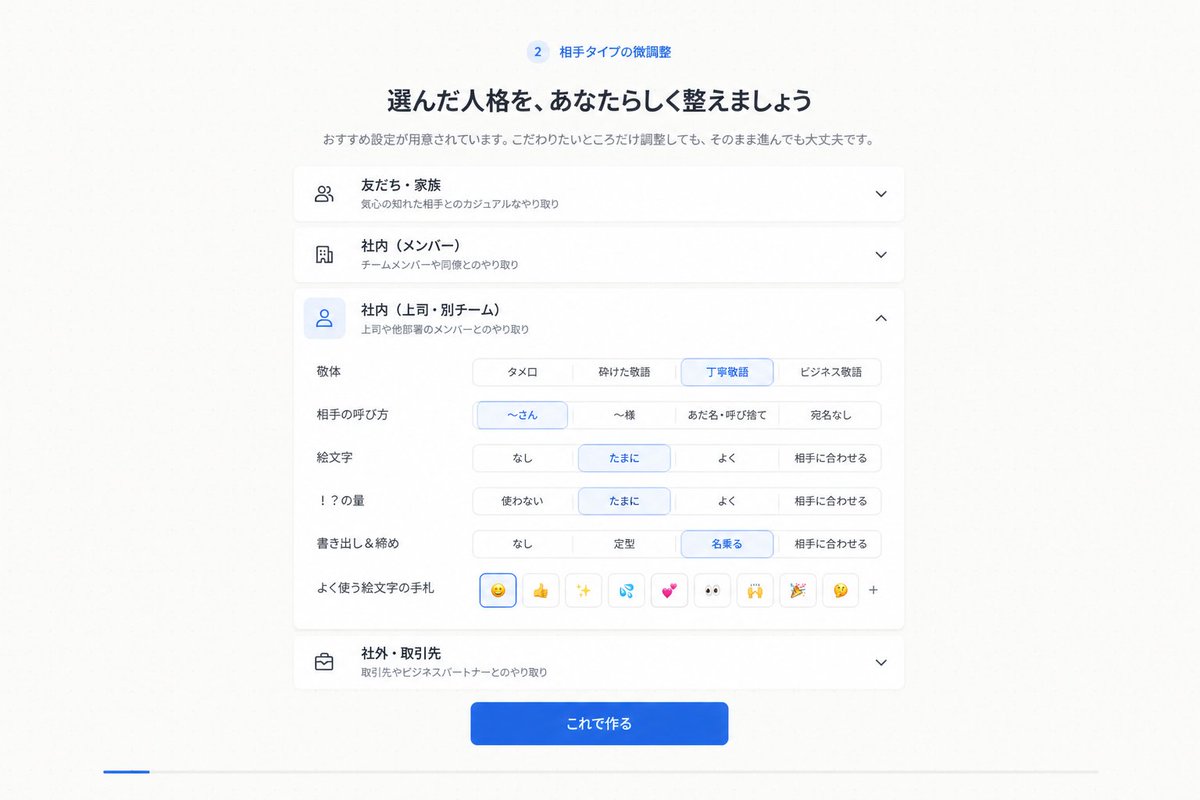
Goal: Create a clean Japanese web app onboarding/settings screen for step 2, showing fine-tuning of a selected communication personality or relationship type.

Canvas: 16:9 desktop screenshot, white to very pale gray background, centered content column about 720 px wide with generous margins, soft shadows, rounded cards, minimal SaaS UI style.

Header: At the top center, show a small blue circular badge with “2” followed by the label 「相手タイプの微調整」. Under it place a bold Japanese headline: 「選んだ人格を、あなたらしく整えましょう」. Under the headline add a smaller gray subtitle: 「おすすめ設定が用意されています。こだわりたいところだけ調整しても、そのまま進んでも大丈夫です。」

Main layout: Stack exactly 4 accordion cards vertically. Each card has a left line icon, a bold Japanese title, a smaller gray description, and a chevron on the right. The 4 cards are: 1) closed card with people icon, title 「友だち・家族」, description 「気心の知れた相手とのカジュアルなやり取り」, downward chevron; 2) closed card with building icon, title 「社内(メンバー)」, description 「チームメンバーや同僚とのやり取り」, downward chevron; 3) expanded selected card with blue-highlighted user icon, title 「社内(上司・別チーム)」, description 「上司や他部署のメンバーとのやり取り」, upward chevron; 4) closed card with briefcase icon, title 「社外・取引先」, description 「取引先やビジネスパートナーとのやり取り」, downward chevron.

Expanded card details: Inside the third card, create exactly 6 setting rows with Japanese labels on the left and segmented pill controls on the right. Row 1 label 「敬体」 has 4 options: 「タメ口」, 「砕けた敬語」, selected 「丁寧敬語」, 「ビジネス敬語」. Row 2 label 「相手の呼び方」 has 4 options: selected 「〜さん」, 「〜様」, 「あだ名・呼び捨て」, 「宛名なし」. Row 3 label 「絵文字」 has 4 options: 「なし」, selected 「たまに」, 「よく」, 「相手に合わせる」. Row 4 label 「!?の量」 has 4 options: 「使わない」, selected 「たまに」, 「よく」, 「相手に合わせる」. Row 5 label 「書き出し&締め」 has 4 options: 「なし」, 「定型」, selected 「名乗る」, 「相手に合わせる」. Row 6 label 「よく使う絵文字の手札」 shows exactly 9 small square emoji buttons followed by a plus sign: selected smiling face emoji, thumbs up, sparkles, sweat droplets, two hearts, eyes, raised hands, party popper, thinking face, then “+”.

Footer: Beneath the accordion stack, center a prominent rounded blue gradient primary button with white text 「これで作る」.

Visual style: Crisp modern Japanese product UI, thin light gray borders, subtle card shadows, blue accent color for selected controls and active icon backgrounds, black/dark navy headings, gray secondary text. Keep the composition symmetrical and spacious. No browser chrome, no watermark, no extra text. Use {argument name="accent color" default="bright blue"} as the active selection color and keep all visible UI text in Japanese.
Use this prompt in the VdoBloom image editor.
Opens the image editor with this prompt — add your own photo to generate.