Korean Hip-Hop Anime MV Screenshot
Full prompt
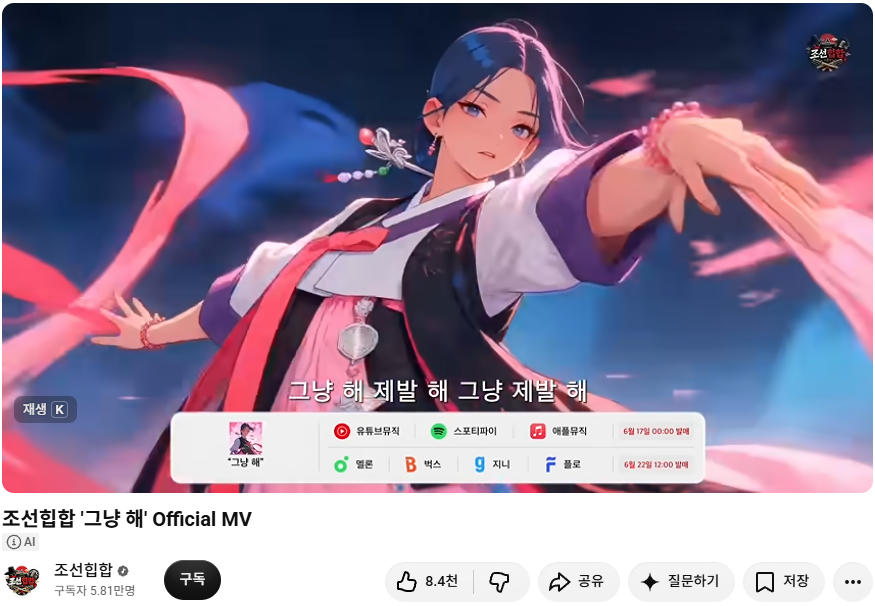
Goal: Create a realistic YouTube watch-page screenshot mockup for an official Korean hip-hop music video, showing a dramatic anime-style music video frame at the top and the YouTube interface below.

Canvas: 875×638 horizontal screenshot with rounded video corners, clean white YouTube page background, cropped as if captured from a desktop browser.

Video frame: A high-quality cinematic anime scene of a beautiful young Korean woman in motion, centered slightly right, wearing a modernized hanbok-inspired performance outfit with white sleeves, black vest, purple cuffs, red ribbon tie, and pink skirt accents. She has dark blue-black hair swept to one side, a long ornamental hairpin with beads, earrings, and a confident intense expression. Her right arm reaches toward the camera in strong foreshortening while pink silk ribbons swirl across the foreground and background. The lighting is glossy and dramatic, with neon pink highlights, deep blue night background, motion blur, and a polished music-video look. Add a small circular Korean hip-hop logo watermark in the top-right of the video frame.

On-video text and overlays: Add Korean subtitle text centered near the bottom of the video frame: “그냥 해 제발 해 그냥 제발 해”. At the lower-left inside the video, show a small dark translucent keyboard hint reading “재생 K”. Place a white rounded music-distribution banner overlay across the lower center of the video. This banner contains exactly 10 visible items: 1 small album cover at far left labeled “그냥 해”; 2 YouTube Music icon and label “유튜브뮤직”; 3 Spotify icon and label “스포티파이”; 4 Apple Music icon and label “애플뮤직”; 5 red release date text “6월 17일 00:00 발매”; 6 Melon icon and label “멜론”; 7 Bugs icon and label “벅스”; 8 Genie icon and label “지니”; 9 Flo icon and label “플로”; 10 red release date text “6월 22일 12:00 발매”. Keep the platform banner legible but secondary.

YouTube interface below: Under the video, show the bold title “{argument name="video title" default="조선힙합 '그냥 해' Official MV"}”. Under the title at left, include a small gray “AI” badge. Show the channel row with a circular channel avatar using the same Korean hip-hop logo, channel name “{argument name="channel name" default="조선힙합"}” with a verification check, subscriber count “구독자 5.81만명”, and a black rounded subscribe button labeled “구독”. To the right, show exactly 7 action controls: 1 like button with thumbs-up and “8.4천”; 2 dislike button with thumbs-down; 3 share button labeled “공유”; 4 ask button labeled “질문하기” with sparkle icon; 5 save button labeled “저장”; 6 overflow menu with three dots; 7 the subscribe button is separate in the channel row, not counted among the right-side controls.

Visual style: Combine a crisp browser screenshot aesthetic with a vivid anime MV still. Use Korean UI typography, soft shadows, rounded pills, accurate spacing, and realistic YouTube proportions. The screenshot should feel like a real official music video page for the motivational song “{argument name="song title" default="그냥 해"}” by “{argument name="artist name" default="조선힙합"}”.

Constraints: Keep all visible text in Korean exactly where specified. Do not add extra UI panels, comments, recommendations, or browser chrome. Maintain the same composition: anime video frame occupying the upper 77% of the image and YouTube metadata/actions occupying the lower area.
Use this prompt in the VdoBloom image editor.
Opens the image editor with this prompt — add your own photo to generate.