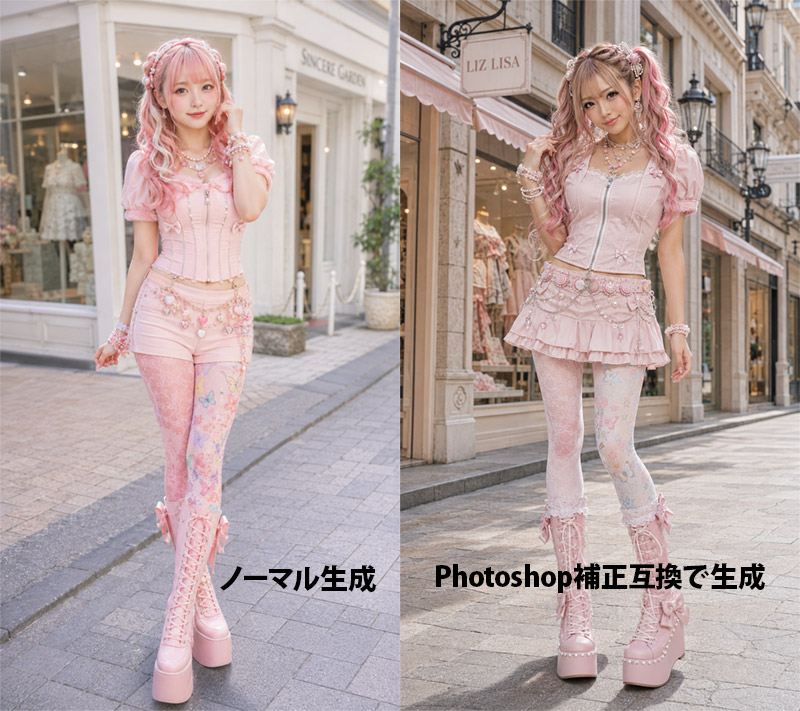
Pink Lolita Color Correction Comparison
Full prompt
Goal: Create a side-by-side comparison image showing an AI-generated fashion portrait before and after Photoshop-style color correction, featuring the same young woman in pastel pink sweet lolita/gyaru street fashion on a European boutique shopping street.

Canvas: Landscape 4:3 image, split exactly into two equal vertical panels with a hard center divide. Photorealistic fashion editorial style, full-body subject in both panels, street-level perspective, shallow depth of field, soft daylight.

Left panel: Show the uncorrected version labeled in bold black Japanese text near the bottom: 「ノーマル生成」. The model stands in front of a bright cream-white boutique facade with large display windows and a pale sign. Overall color is slightly flat, pale, low-contrast, airy, and softly washed out. The model faces forward with a gentle smile, one hand near her hair, wearing a pastel pink corset top with puff sleeves, pink short bottoms, decorative waist chains, patterned pastel tights, and tall pink lace-up platform boots.

Right panel: Show the corrected version labeled in bold black mixed text near the bottom: 「Photoshop補正互換で生成」. The same model stands on a similar elegant shopping street in front of a boutique with a visible hanging sign reading {argument name="shop sign text" default="LIZ LISA"}. The lighting and color correction should look more polished: warmer highlights, richer contrast, clearer skin tones, slightly deeper shadows, brighter pinks, crisp details, and a more professional retouched fashion-photo finish. The model poses with one hand in her hair and one leg slightly bent, smiling at the camera.

Subject details: A cute young Japanese fashion model with fair skin, long wavy twin-tail hair in {argument name="hair color" default="pink blonde"}, soft bangs, ribbons and pearl hair accessories, glossy idol-like makeup, large bright eyes, and a friendly expression. Outfit color theme is {argument name="outfit color theme" default="pastel pink"}. Include many kawaii accessories: layered pearl necklaces, bracelets, bows, lace, floral charms, decorative belt chains, and platform boots.

Visible text: Exactly 2 large bottom labels: left label 「ノーマル生成」 and right label 「Photoshop補正互換で生成」. Keep the labels bold, black, horizontal, and placed over the pavement area without outlines.

Constraints: Make both panels look like variations of the same fashion shoot, not a collage of unrelated characters. Use realistic anatomy, full-body framing, no extra logos except the boutique sign, no watermark, no additional captions, no borders other than the central split.
Use this prompt in the VdoBloom image editor.
Opens the image editor with this prompt — add your own photo to generate.