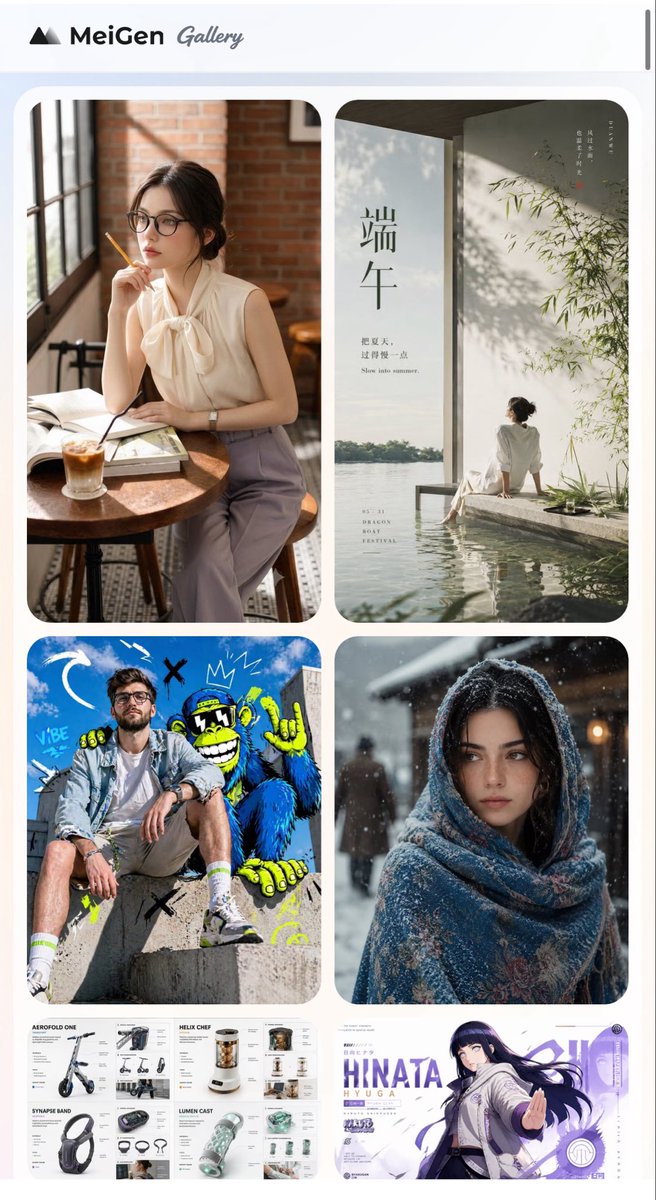
MeiGen AI Gallery Mobile Screenshot
Full prompt
Goal: Create a polished mobile webpage screenshot for an AI image prompt gallery called {argument name="gallery name" default="MeiGen Gallery"}, shown as a vertically scrollable feed of visual prompt examples.

Canvas: Tall smartphone screenshot, 720×1200 px, white and very pale blue background, rounded browser-like page edges, with a thin dark vertical scroll indicator on the far right near the top.

Header: At the top, place a minimalist black mountain-like triangular logo followed by the bold text “MeiGen” and a gray handwritten script word “Gallery”. Keep the header clean with generous white space.

Layout: Below the header, create a two-column masonry gallery inside a softly rounded light container. Use large rounded-rectangle image cards with consistent gutters and soft shadows. Show exactly 6 visible gallery cards:
1. Top-left large card: warm lifestyle portrait of {argument name="cafe subject" default="an elegant woman in a sleeveless cream blouse with a bow collar and lavender trousers"} seated at a round wooden cafe table beside tall industrial windows and a brick wall, holding a pencil near her lips, with an open book and iced coffee on the table; cozy cinematic sunlight.
2. Top-right large card: minimalist Chinese Dragon Boat Festival poster by water, vertical composition with a seated woman in white near a reflective pool, bamboo shadows on a pale wall, calm lake horizon, large Chinese characters “端午”, small English text “Slow into summer”, and subtle vertical Chinese typography.
3. Middle-left large card: energetic streetwear photo of {argument name="streetwear subject" default="a young man in a denim jacket, white shirt, beige shorts, white socks, and sneakers"} sitting on concrete steps in front of a bright blue graffiti mural with a cartoon gorilla, doodle arrows, crowns, X marks, and neon yellow accents.
4. Middle-right large card: snowy winter portrait of {argument name="winter subject" default="a woman wrapped in a thick blue patterned shawl"} standing outdoors at night or dusk, snowflakes visible, warm blurred lights in the background, moody cinematic depth of field.
5. Bottom-left partially visible wide card: clean product design/spec sheet collage with four labeled sections for futuristic gadgets: “AEROFOLD ONE” electric scooter, “HELIX CHEF” compact kitchen device, “SYNAPSE BAND” headphones or wearable band, and “LUMEN CAST” translucent tech device; include small renders, annotations, icons, and neat grid typography.
6. Bottom-right partially visible wide card: anime-style character banner featuring {argument name="anime character name" default="HINATA HYUGA"} in a white and purple action pose with long dark hair, purple UI accents, bold large text “HINATA HYUGA”, circular badges, and dynamic motion lines.

Visual style: The overall screenshot should look like a modern AI prompt inspiration website: crisp UI, soft rounded corners, realistic mixed media thumbnails, high-resolution images, balanced spacing, clean typography, and no clutter.

Constraints: Preserve the two-column gallery arrangement, show exactly 6 cards as listed, make the bottom two cards cropped by the lower edge as if the page continues, avoid extra cards, avoid watermarks, and keep all text legible where specified.
Use this prompt in the VdoBloom image editor.
Opens the image editor with this prompt — add your own photo to generate.