Minimalist City Greeting Poster
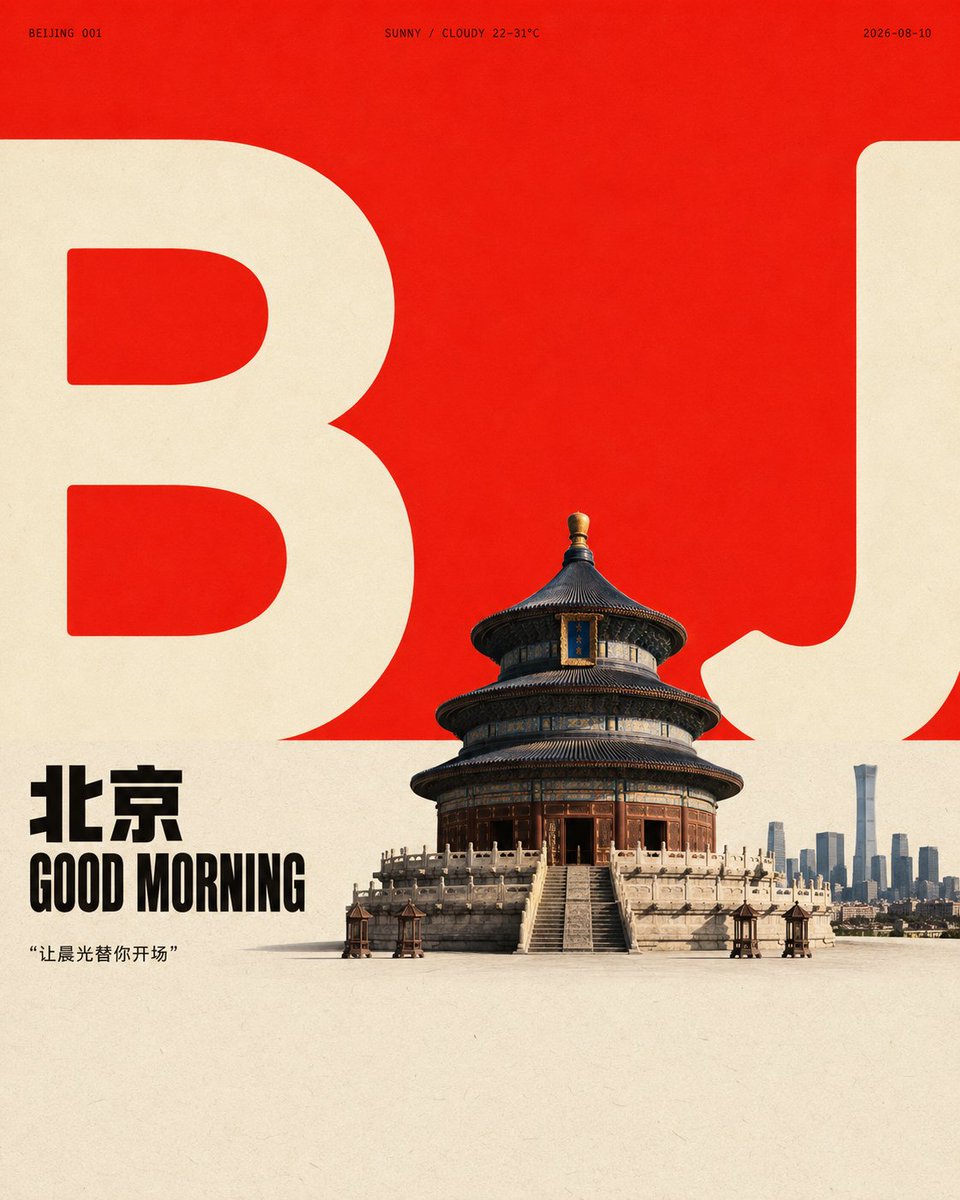
Full prompt
Generate a design for the subject {argument name="subject" default="Good morning + greeting + GOOD MORNING + city + quote + weather + 2026-08-10"} with flat poster order and a realistic focal image. First, establish open white space with a large area of vivid, high-brightness color field at the top, and then connect a nearly equal area of low-saturation, light-colored paper area at the bottom to form a clean and clear horizontal color domain boundary. Let the core form of the subject be translated into two sets of oversized, low-detail, thick and rounded light-colored character graphics that span the boundary line and bleed to the left and right edges, retaining clear internal cavities, thickness contrast, and cuts truncated by the boundary; the graphics are not decoration but a scale ruler and visual skeleton in the background. Compress the subject body or core object into a small-to-medium-scale figurative focus, place it near the boundary, partially obscuring the giant graphics, so that the foreground object, graphic outline, and white space have clear front-to-back interleaving. The focal object is represented with natural photography or high-figural texture, retaining real surface details, soft side-top light, grounded short and loose shadows, and neutral dark layers that do not overpower. Two lines of short titles related to the subject are placed on the left near the boundary, using heavy, compact, and clearly geometric sans-serif uppercase glyphs, with tight line spacing and blocks neatly left-aligned, forming a small area of strong anchors with black or the subject's deepest structural color; add extremely small, wide-spaced meta-information and numbered short tags on both sides of the upper edge of the giant graphics to form a sparse editorial design rhythm, but the text only carries order, scale, and information prompts, not fixed copy. Color determines the hue and material source based on the subject's semantics, but maintains the area, brightness, saturation, and emotional tension relationship of the high-brightness, high-purity main color field to the soft light base; giant graphics use a lighter color that is more eye-catching or neutral than the light base, and dark text and focal shadows only occupy a small amount. When the subject's color temperature changes, maintain large color block contrast, clean boundaries, and limited emphasis colors, without spreading color evenly. The whole looks like clean graphic printing on matte paper, with fine uniform fibers and particles, slight density unevenness in the light base and color field, and clear but not overly sharp edges for real objects and printed graphics; color boundaries remain crisp, avoiding heavy aging, yellowing, dirt, extra decoration, and modern gradients. Let the background white space, giant graphics, short titles, micro tags, focal objects, and grounded shadows together form a reading path from the large color field to the text and then to the subject; if the graphic shielding, color domain boundary, or scale contrast is removed, the image should immediately lose this restrained yet tense design identity.
Original prompt
围绕{argument name="主题" default="早安+问候+GOOD MORNING+城市+金句+天气+2026-08-10"}对象生成具有平面海报秩序与真实焦点形象的设计:先以一块占据上部的大面积鲜明高明度色场建立开阔留白,再在下部接入一块近乎等量、低饱和的浅色纸面区域,形成干净明确的水平色域交界;让主题的核心形态被转译成两组超大、低细节、厚重圆润的浅色字符化图形,横跨交界线并向左右边缘出血,保留清晰的内部空腔、粗细对比与被边界裁断的切口,图形不是装饰而是背景中的尺度标尺和视觉骨架。把主题主体或核心对象压缩为中小尺度的具象焦点,放在交界附近,局部遮挡巨型图形,使前景对象、图形轮廓与留白发生明确的前后穿插;焦点对象以自然摄影或高度具象的质感表现,保留真实表面细节、柔和的侧上方光线、接地的短而松散的投影,以及不喧宾夺主的中性深色层次。左侧靠近交界的区域放置主题相关的两行短标题,使用粗重、紧凑、几何感明确的无衬线大写字形,行距偏紧、字块整齐左对齐,以黑色或主题最深结构色形成小面积强锚点;在巨型图形上缘两侧加入极小号、宽字距的元信息与编号式短标签,形成稀疏的编辑设计节奏,但文字只承担秩序、尺度 and 信息提示,不复制固定文案。颜色由主题语义决定色相与材质来源,但维持高明度高纯度主色场对柔和浅底的面积、明度、饱和度和情绪张力关系,巨型图形使用比浅底更醒目或更中性的浅色,深色文字与焦点阴影只占少量;主题色温改变时仍保持大色块对比、清洁边界和有限强调色,不把颜色平均铺满。整体像在哑光纸上进行干净的平面印刷,纸张有细微均匀纤维与颗粒,浅底和色场存在轻微密度不匀,实拍对象边缘与印刷图形边缘清楚但不过度锐利,色块交界保持利落,避免厚重做旧、泛黄、脏污、额外装饰和现代渐变;让背景留白、巨型图形、短标题、微型标签、焦点对象和接地阴影共同形成从大色场到文字再到主体的阅读路径,若去掉图形遮挡、色域交界或尺度反差,画面应立即失去这种克制而有张力的设计识别度。
Use this prompt in the VdoBloom image editor.
Opens the image editor with this prompt — add your own photo to generate.