Next-Gen Mobile App UI Showcase
Full prompt
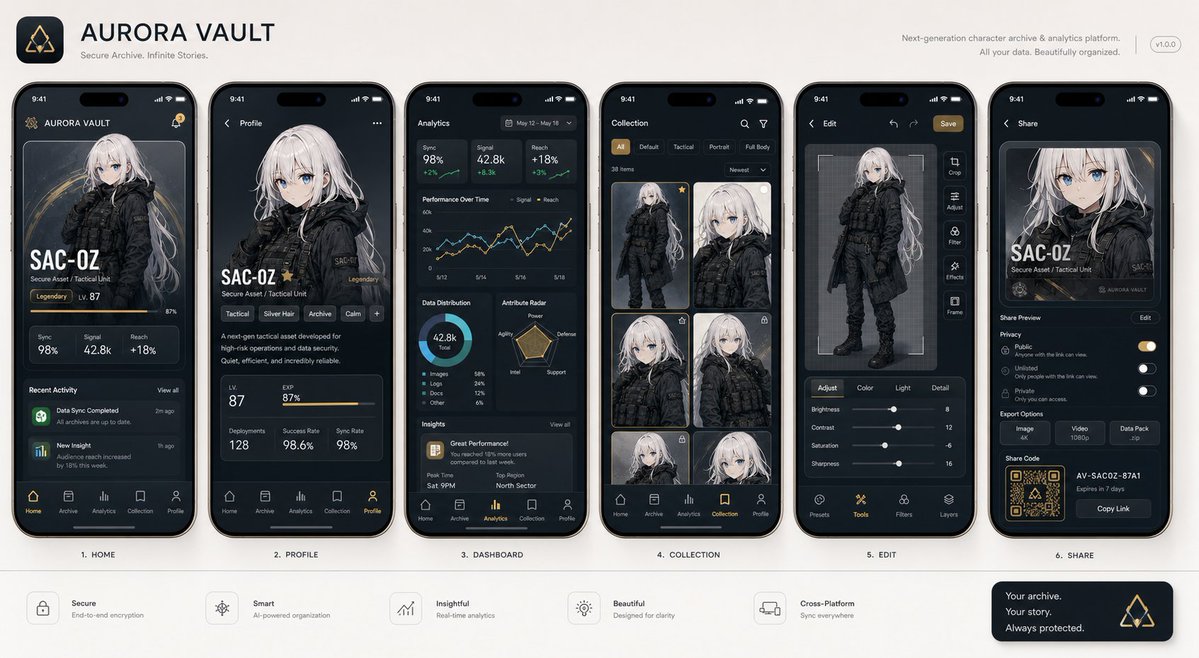
With the attached subject as the protagonist, please summarize "{argument name="app type" default="a collection of screenshots for a realistic next-generation mobile app"}" into a single image. This is not an advertising poster. It is a high-quality visual such as an App Store introduction image, product design announcement, or UI case study. Accurately maintain the features, color, shape, face, clothing, and impression of the subject in the reference image. Treat the subject as the main content within the app. Do not change it to another character or product. Arrange {argument name="number of screens" default="4 to 6"} vertical smartphone screens. Make each screen different. Included screens: Home screen, detailed profile screen, analysis dashboard, collection screen, editing screen, sharing screen. UI elements: Fictional app name, tab bar, card UI, buttons, graphs, tags, short descriptions, numeric displays, icons, small notification displays. The design is a sophisticated 2026 mobile UI. Clean, practical, and with clear information design. Do not overuse glassmorphism. Text should be easy to read, primarily in English and short. Do not use real company names, app names, or logos. The background is a simple studio background. The overall look is professional like app introduction images on Dribbble, Product Hunt, or Apple. However, make it look natural as a fictional product. Priorities: UI that looks real, retention of reference image features, persuasiveness as a screenshot, and information density worthy of being saved on social media.
Original prompt
添付した被写体を主役にして、 「{argument name="アプリの種類" default="実在しそうな次世代スマホアプリのスクリーンショット集"}」を1枚にまとめてください。 これは広告ポスターではありません。 App Store紹介画像、プロダクトデザイン発表、UIケーススタディのような完成度の高いビジュアルです。 参照画像の被写体の特徴、色、形、顔、衣装、印象を正確に維持してください。 被写体をアプリ内のメインコンテンツとして扱ってください。 別キャラクターや別商品に変えないでください。 画面には、縦長スマホ画面を{argument name="画面数" default="4〜6枚"}並べてください。 それぞれ異なる画面にしてください。 含める画面: ・ホーム画面 ・詳細プロフィール画面 ・分析ダッシュボード ・コレクション画面 ・編集画面 ・共有画面 UI要素: ・架空アプリ名 ・タブバー ・カードUI ・ボタン ・グラフ ・タグ ・短い説明文 ・数値表示 ・アイコン ・小さな通知表示 デザインは、2026年の洗練されたモバイルUI。 クリーン、実用的、情報設計が明快。 グラスモーフィズムを使いすぎない。 文字は読みやすく、英語中心で短く。 実在企業名、実在アプリ名、実在ロゴは使わない。 背景はシンプルなスタジオ背景。 全体は、Dribbble、Product Hunt、Apple風のアプリ紹介画像のような完成度。 ただし架空プロダクトとして自然に見せる。 最優先事項: 本当に存在しそうなUI、参照画像の保持、スクショとしての説得力、SNSで保存される情報密度。
Use this prompt in the VdoBloom image editor.
Opens the image editor with this prompt — add your own photo to generate.