Multi-Layered Design Poster Transformation
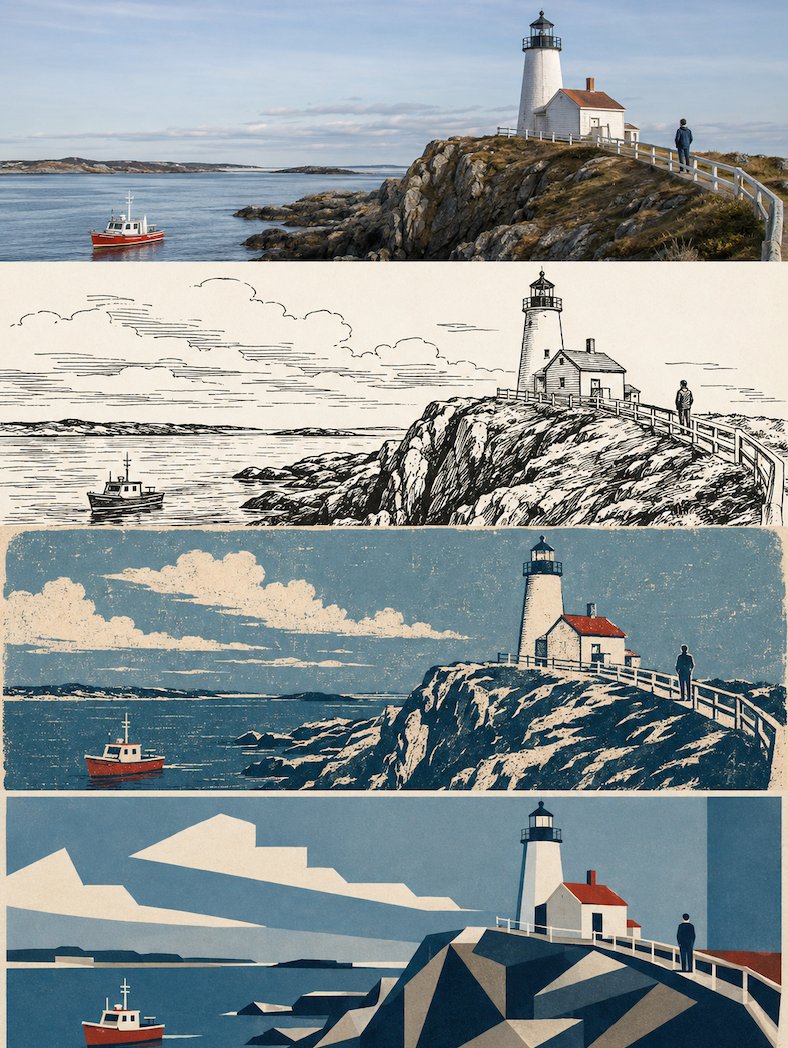
Full prompt
Please create a high-end design poster of the same scene from the uploaded photo in the current layer, without multi-image stitching, outputting each photo individually. 'No multi-image stitching' means: do not mix different uploaded photos in the same finished product; each uploaded photo must individually generate a complete four-layer style poster.

[Overall Canvas and Four-Layer Structure]
The overall composition uses a 3:4 vertical layout. The screen is strictly divided into four equal horizontal areas from top to bottom, with each area's height exactly 25% of the total height. The ratio of the four layers is strictly 1:1:1:1. The layers connect seamlessly without divider lines, gaps, or borders.

Since each layer is approximately a very flat 3:1 banner, the subject needs to be adapted horizontally within each layer: maintain the stability of the subject's main position and visual center of gravity, prioritize horizontal expansion, and avoid vertical stretching, flattening, or cropping of key parts. You can extend the sky, walls, ground, water, paper, or environment consistent with the original image to the left and right, but do not use blurred duplicate background filling.

[Consistency Across Four Layers]
The four layers must come from the same uploaded photo and the same moment. Strictly maintain consistency in subject identity, quantity, features of people or animals, posture, action direction, gaze, hairstyle, clothing characteristics, architectural structure, landmark identity, main object relationships, observation angle, perspective, position, and narrative relationship.
The style layers allow for removing secondary backgrounds and changing materials based on the medium, but the subject cannot be replaced.

[Layer 1 | Original Photography]
The first layer faithfully preserves the real photographic quality of the uploaded photo. Keep the subject, composition, posture, and lighting. Only allow restrained high-end photographic color grading and minor grain optimization. To fit the 3:1 banner, use natural cropping or extensions, but do not distort the subject.

[Layer 2 | 70s Animation Style Black and White Ink Drawing]
This layer occupies 25% of the height. The flat horizontal 3:1 ratio is the highest priority. Do not generate original image comparison zones or multi-grids within this layer. If the source prompt requires recomposition, only refine background and secondary elements without changing the subject's identity or core spatial relationship.

[Full Source Style Translation Instructions]
Create a black and white {argument name="subject" default="[subject]"}...
Original prompt
请在当前层将上传照片中的同一场景制作成高级设计海报,不多图拼接,每张照片单独输出。
这里的“不多图拼接”是指:不要把不同上传照片混在同一张成品里;每一张上传照片都必须单独生成一张完整的四层风格海报。

【整体画幅与四层结构】
整体采用3:4竖版构图。画面从上到下严格四等分为四个横向区域,每个区域的高度必须精确占整体画面高度的25%,四层比例严格为1:1:1:1,不允许出现比例偏差。四层之间无缝衔接,不设置分隔线,不留白色缝隙,不使用边框。

由于每层实际约为3:1的极扁横幅,主体需要在每层内部进行横向适配:保持主体主要位置与视觉重心稳定,优先横向展开,避免主体被纵向拉伸、压扁、贴边或裁掉关键部位。可在左右延展与原图一致的天空、墙面、地面、水面、纸张或环境留白,但不得使用模糊复制背景填充。

【四层共同一致性】
四层必须来自同一张上传照片、同一个瞬间。严格保持主体身份、主体数量、人物或动物面貌、姿态、动作方向、视线、发型、服装核心特征、建筑结构、地标身份、主要物体关系、观察角度、透视方向、左右位置、前后层级及叙事关系一致。
风格层允许根据各自媒介删除次要背景、减少纹理、改变材质和细节密度,但不能把主体替换成另一个人物、另一座建筑、另一辆车、另一只动物或另一个场景。

【第一层|原始摄影】
第一层忠实保留上传照片的真实摄影质感。保留主体身份、数量、构图关系、姿态、动作、真实材质、自然光影、综合色温和场景氛围。只允许进行克制的高级摄影级调色、曝光与对比微调以及极轻微的细腻颗粒优化。
为适配当前约3:1横幅,可进行自然裁切或延展与原场景一致的环境边缘,但不得拉伸、扭曲、镜像、复制主体、移动关键物体、改变建筑结构或重新设计人物。
第一层不添加额外文字、品牌标志、边框、水印或装饰元素。

【第2层|七十年代动画感黑白墨线画|当前层适配规则】
本层只占整张3:4四拼海报高度的25%,实际为约3:1的极扁横向区域。以下风格说明全部在“当前层内部”执行。
任何源提示词中出现的独立海报、整张画面、竖版比例、单独输出等表述,均不得改变四拼总结构;当前层约3:1扁横幅比例为最高优先级。
不得在当前层内部再次生成原图对照区、第二张照片、上下分屏或额外多宫格。源提示词中若存在重新构图要求,只允许对背景信息、材质、留白和次要元素做提炼,不得改变主体身份、数量、关键姿态、动作方向、观察视角、主要透视、左右位置及核心空间关系。
文字若为该源风格的重要组成部分则保留,但必须缩减到当前层能够清楚阅读的最低必要数量;若源提示词明确要求无文字,则保持无文字。

【源风格完整转译说明】
创作一幅{argument name="主体" default="[主体]"}的黑白…
Use this prompt in the VdoBloom image editor.
Opens the image editor with this prompt — add your own photo to generate.