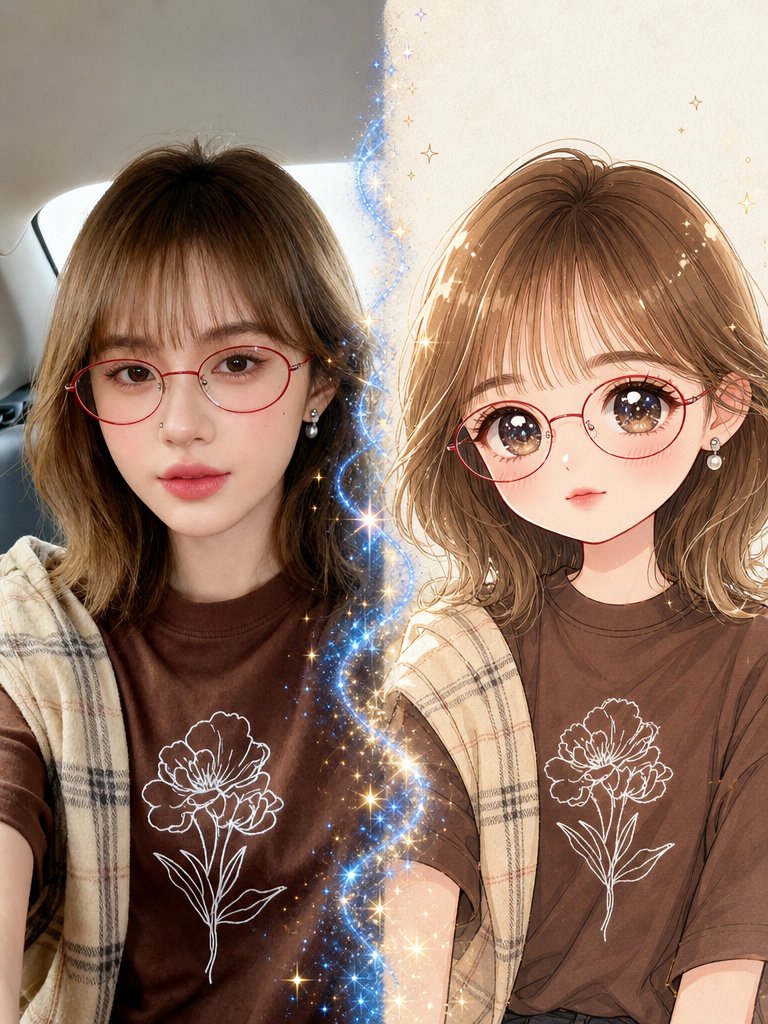
Real Photo to Anime Soul Split Portrait
Full prompt
Create a vertical cinematic 1x2 split-screen portrait showing a magical transformation from realism into anime. Canvas: 3:4 vertical image, left half realistic photo style, right half polished shoujo anime illustration, divided by a glowing wavy vertical ribbon of blue-white magic with many golden sparkles and tiny star bursts. Left side: a young woman taking a casual selfie inside a car, soft natural daylight, rear car window and gray interior visible behind her. She has {argument name="hair color" default="light brown shoulder-length wavy hair with airy bangs"}, large natural brown eyes, smooth fair skin, soft pink lips, a tiny nose piercing, red round wire-frame glasses, and pearl drop earrings. She wears a {argument name="shirt color" default="dark chocolate-brown T-shirt"} with a white line-art flower printed on the chest, plus a beige plaid shawl or scarf draped over her shoulders. Right side: transform the same woman into a cute anime version with matching hairstyle, red round glasses, pearl earrings, brown eyes enlarged with starry highlights, delicate blush, small lips, soft face shape, and the same brown flower-print shirt and beige plaid shawl. Background on the anime side is warm cream parchment with subtle texture and small gold stars. Style: left side must look like a real photograph with realistic skin, hair, lens perspective, and car lighting; right side must look like a high-quality romantic anime portrait with clean linework, glossy eyes, warm shading, and soft watercolor-like highlights. The magical divider should contain exactly 1 continuous blue sparkling energy stream running vertically between the two halves, with many tiny golden and blue star particles radiating outward. Mood: enchanting, cute, cinematic, "what if your photo had an anime soul" transformation. Constraints: keep the two versions aligned at similar head height and pose, preserve the outfit details and red glasses on both sides, no text, no watermark, no extra people.
Use this prompt in the VdoBloom image editor.
Opens the image editor with this prompt — add your own photo to generate.