QR Code Business Card Designer
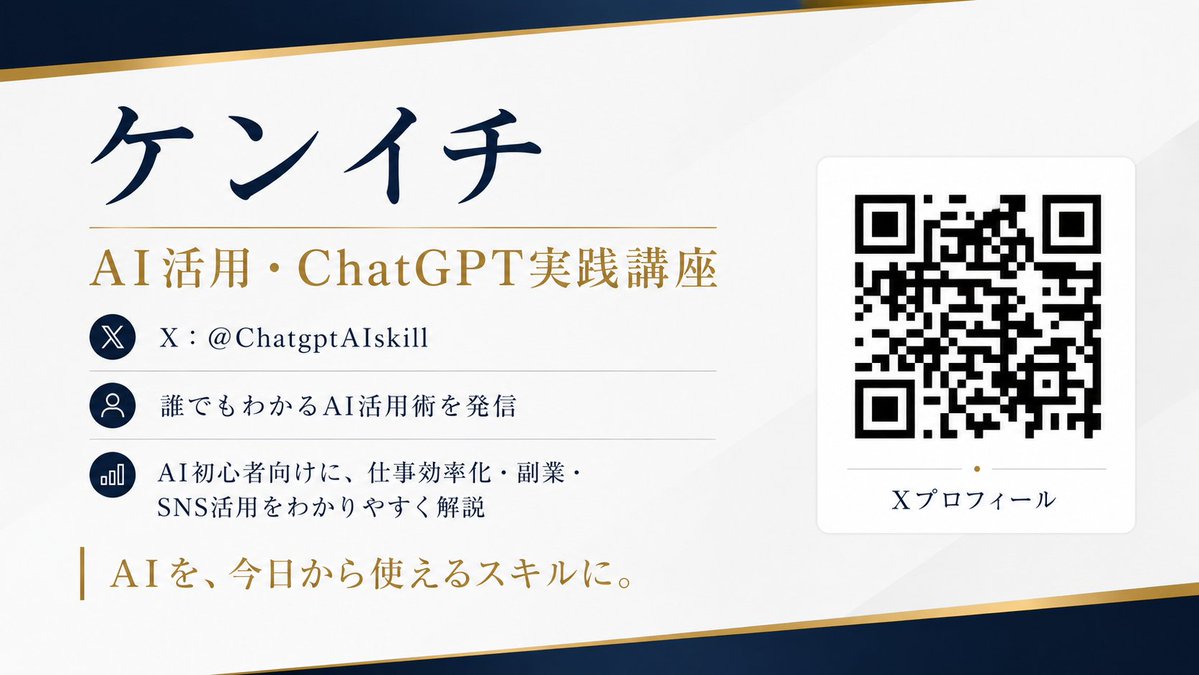
Full prompt
Please create a business card design with a scannable QR code based on SNS (X) profile information.

[Purpose]
Summarize the X account profile information into a single sophisticated horizontal business card. The design, color scheme, layout, margin design, and font atmosphere of the business card should be automatically suggested by AI so that the whole looks most beautiful.

[Information to be posted]
- Name: {argument name="name" default="XXXX"}
- Title: {argument name="title" default="XXXX"}
- X account: @{argument name="account name" default="XXXX"}
- Profile text: XXXX
- Achievements/Features: XXXX
- One-word catchphrase: XXXX
- QR code link destination: https://t.co/OQINcuK6wHXXXX

[About QR codes]
- The QR code should not be for decoration, but should be scannable with a smartphone.
- Embed the link accurately.
- Place the QR code in a sufficient size and prioritize scanning accuracy.
- Ensure sufficient margins around the QR code.
- Do not overlap text or decorations on the QR code.
- Do not distort or excessively process the QR code.
- Prioritize high contrast with the background for easy reading.

[Design conditions]
- Horizontal business card design.
- Convey a sense of luxury/sophistication/trust/professionalism.
- Minimalist and beautiful layout utilizing white space.
- All text in Japanese, clear and easy to read.
- Clear priority of information, making name and title most prominent.
- AI automatically decides the best background color, accents, and font balance.
- Avoid a cheap template feel.
- Elegant finish suitable for actual printing.

[Important]
- AI should suggest designs beautifully and naturally, not fixed layouts.
- However, prioritize practicality for the QR code.
- Avoid garbled characters and ensure all text is legible.
- Organize information for maximum readability.

Aspect ratio 16:9.
Create in high resolution.
Original prompt
SNS(X)のプロフィール情報をもとに、実際に読み取れるQRコード付きの名刺デザインを作成してください。

【目的】
Xアカウントのプロフィール情報を、洗練された横型名刺として1枚にまとめてください。
名刺のデザイン、配色、レイアウト、余白設計、フォントの雰囲気は、全体が最も美しく見えるようにAIが自動で提案してください。

【掲載する情報】
・名前:{argument name="名前" default="〇〇〇〇"}
・肩書き:{argument name="肩書き" default="〇〇〇〇"}
・Xアカウント:@{argument name="アカウント名" default="〇〇〇〇"}
・プロフィール文:〇〇〇〇
・実績や特徴:〇〇〇〇
・一言キャッチコピー:〇〇〇〇
・QRコードのリンク先: https://t.co/OQINcuK6wH〇〇〇〇

【QRコードについて】
・QRコードは装飾用ではなく、実際にスマートフォンで読み取れるものにしてください
・リンク先は「https://t.co/OQINcuK6wH〇〇〇〇」を正確に埋め込んでください
・QRコードは十分なサイズで配置し、読み取り精度を優先してください
・QRコードの周囲には十分な余白(クワイエットゾーン)を確保してください
・QRコードの上に文字や装飾を重ねないでください
・QRコードの形を崩したり、過度な加工をしないでください
・背景とのコントラストを高くし、読み取りやすさを最優先してください

【デザイン条件】
・横型の名刺デザイン
・デザイン(例:高級感/洗練/信頼感/プロフェッショナル感)が伝わること
・余白を活かしたミニマルで美しいレイアウト
・文字はすべて日本語で、くっきり読みやすく
・情報の優先順位を明確にし、名前と肩書きが最も目立つようにする
・全体の雰囲気に合うように、AIが最適な背景色、アクセント、フォントバランスを自動で決める
・安っぽいテンプレート感は避ける
・実際の印刷にも使えそうな上品な仕上がりにする

【重要】
・名刺デザインは人間が細かく指定したような固定レイアウトではなく、AIが美しく自然にデザイン提案すること
・ただし、QRコードだけは必ず実用性を優先すること
・文字化けを避け、すべての文字が明確に読めるようにする
・情報量は整理し、見やすさを最優先する

アスペクト比は16:9。
高解像度で作成してください。
Use this prompt in the VdoBloom image editor.
Opens the image editor with this prompt — add your own photo to generate.