Ten Rabbit AI Recruitment Poster Variations
Full prompt
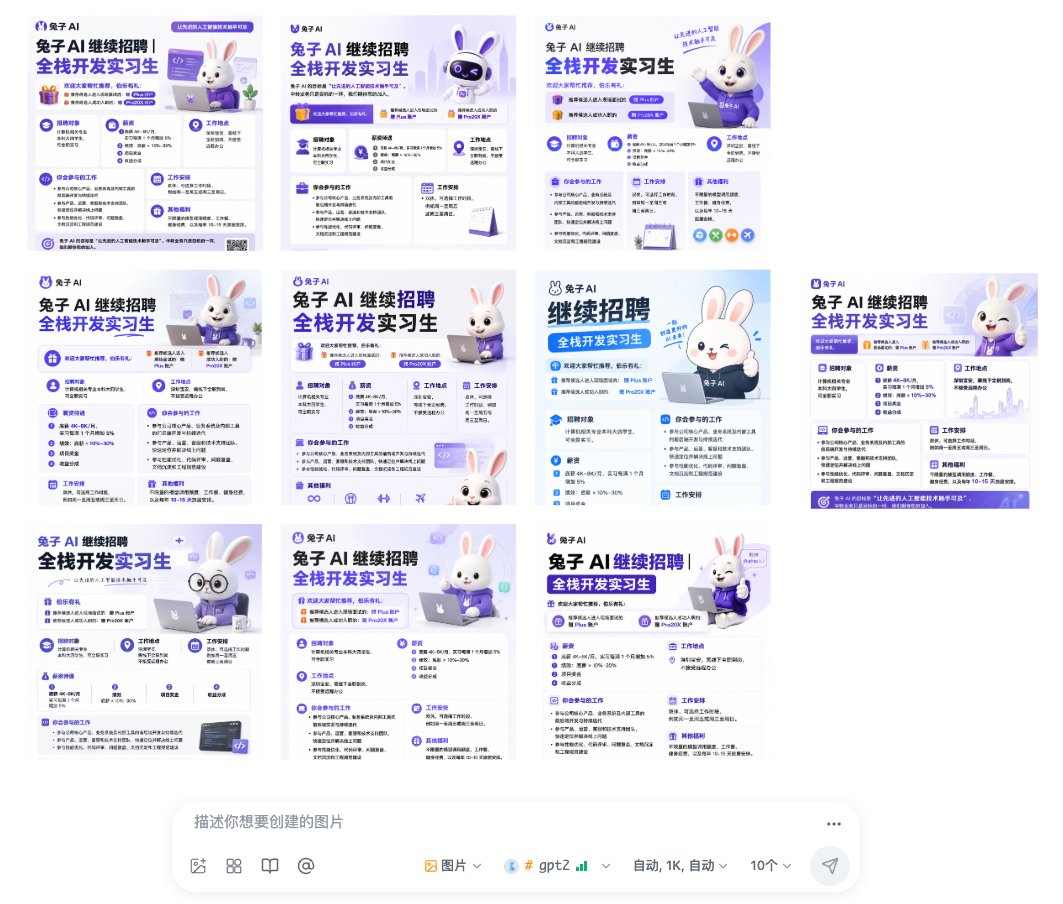
Goal: Create a desktop screenshot-like collage showing 10 AI-generated recruitment poster variations for a Chinese tech company, all with nearly identical purple-and-white branding and a cute rabbit mascot, arranged above a prompt input bar.

Canvas: Wide 16:9 white interface screenshot, about 1064×922 px. Leave generous white margins. The image area occupies the upper 80%, and a rounded prompt composer bar sits centered along the bottom.

Main layout: Arrange exactly 10 square poster thumbnails in a loose grid with slight spacing, as if displayed in an image-generation results gallery. Count and placement of thumbnails: 3 posters across the top row; 4 posters across the middle row; 3 posters across the bottom row. Each poster is a clean Chinese recruitment flyer with the same core visual identity but small layout variations.

Poster design shared by all 10 thumbnails: Use a light lavender-to-white background, deep purple and bright blue typography, rounded cards, small icons, thin dividers, soft shadows, and a polished SaaS/AI startup aesthetic. Every poster should feature the logo text {argument name="company name" default="兔子 AI"} near the top, a large bold Chinese headline {argument name="headline text" default="兔子 AI 继续招聘 全栈开发实习生"}, and multiple information blocks resembling a job description. Use readable-looking Chinese microtext but it may be partially too small to read at thumbnail size. Include iconography such as gift boxes, graduation caps, location pins, calendars, code brackets, laptop icons, check marks, and circular badges.

Mascot subject: Include a cute white 3D rabbit mascot in most posters, with pink inner ears, glossy black eyes, a friendly smile, and a purple hoodie or shirt branded with the company name. Vary the mascot pose across the 10 posters: sitting with a laptop, waving, giving a thumbs-up, peeking from the bottom edge, wearing round glasses, and standing beside cards. The rabbit should feel like a friendly AI assistant mascot.

Poster content blocks: Each thumbnail should show several compact recruitment sections, including exactly these recurring block types across the designs: recruitment target, requirements, job location, internship participation/work content, work arrangement, and benefits. Some posters may have a purple CTA strip or footer, small QR-code-like square, or decorative code panel, but keep all poster variants visually consistent.

Bottom prompt composer UI: At the bottom center, draw a large rounded white input box with soft shadow, resembling an AI image generation chat bar. Inside it show the gray placeholder text {argument name="input placeholder" default="描述你想要创建的图片"}. Along the lower edge of the bar include small UI icons and controls: image icon, grid icon, book icon, @ symbol, a dropdown labeled image, a model label {argument name="model label" default="gpt2"} with tiny green signal bars, a dropdown reading auto / 1K / auto, a count selector showing {argument name="generation count" default="10个"}, and a paper-plane send button on the far right. Add a three-dot menu at the top-right of the composer.

Visual style: Clean modern Chinese AI-product interface screenshot, soft pastel lavender, white, cobalt blue, and purple. The 10 posters should look like outputs from the same prompt: highly consistent layout, typography, colors, and mascot styling, with only minor differences in composition. Use crisp vector-like UI, subtle gradients, rounded rectangles, and high-resolution details.

Constraints: The collage must contain exactly 10 poster thumbnails and one bottom prompt composer bar. Do not add people, photos, watermarks, browser chrome, or extra panels. Keep the overall impression that the AI generated many nearly identical recruitment poster options.
Use this prompt in the VdoBloom image editor.
Opens the image editor with this prompt — add your own photo to generate.