Retro Pixel Industrial Travel Archive
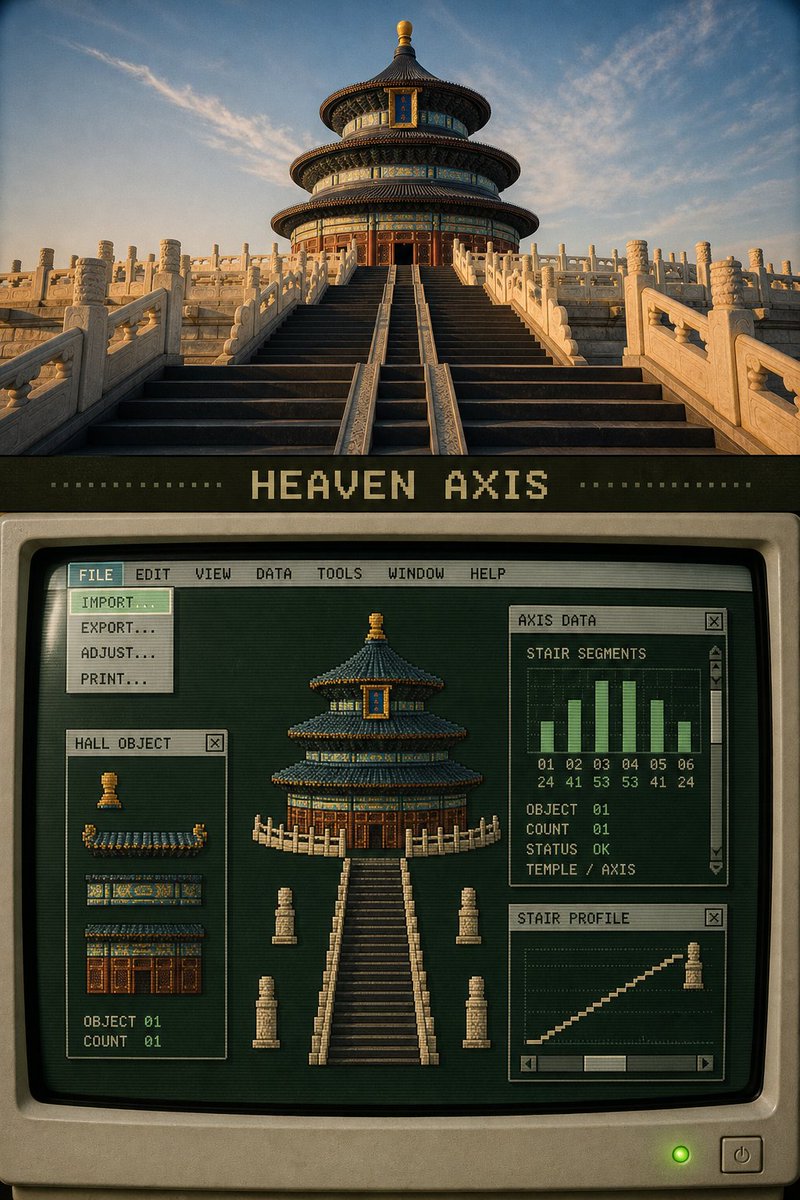
Full prompt
Please turn each uploaded travel photo into a separate 3:4 vertical "Retro Pixel Industrial Travel Archive" editorial poster. Each photo is output individually, without multi-photo collages.

This style is not about directly pixelating the entire photo, nor is it about putting a generic computer frame on the photo. You must first extract 3 to 7 real objects that define the scene's identity from the original photo, then transform them into pixel sprites, local previews, data indices, and structural slices, and reassemble them into a fully functioning old computer software interface.

The top portion, about 30% to 38% of the screen, retains the clearly recognizable original photo. Accurately maintain the identity of the subject, architectural structure, quantity, observation angle, spatial relationship, real texture, natural light and shadow, and local colors. Only apply slight artistic publication color grading and thin film grain treatment; do not illustrate, reconstruct, or change the original photo.

Below the photo, maintain a 7% to 10% charcoal black or dark olive "breathing zone", in which a readable pixel title of 1 to 4 English words is added. The title should come from the actual structure or theme of the photo, for example:

HEAVEN AXIS
ROOF SYSTEM
LAKE PAVILION
CANAL OBJECTS

The lower part, about 50% to 60% of the screen, constructs a complete late 1980s to early 1990s graphic workstation software interface. The primary background color must be a visible deep forest green, dark cyan-green, or faded olive green, not pure black.

The computer area must simultaneously feature:

1. A complete main application window occupying the primary area below;
2. A narrow frame in old ivory or tobacco gold;
3. A system menu bar spanning the top of the entire application;
4. Menu text used verbatim:
 FILE EDIT VIEW DATA TOOLS WINDOW HELP
5. At least one selected menu;
6. An expanded drop-down menu directly connected to the selected menu;
7. Drop-down menu options can include:
 IMPORT…
 EXPORT…
 LAYERS…
 FILTER…
 COLOR MAP
 STATISTICS…
 PRINT…
8. At least three overlapping functional sub-windows;
9. Each sub-window has a title bar, close button, and specific function;
10. At least one window has clear scroll bars, arrow buttons, and sliders;
11. At least one object index, color palette, histogram, or status window.

Analyze the photo first and list objects that can be separated. For example:

Traditional architecture photos:
Main roof, secondary roof, dougong color bands, gable walls, steps, railings, red walls.

Garden photos:
Pavilions, rocks, lake shores, cruise boats, branches, roof fragments.

Water town photos:
Stone bridges, wooden houses by the water, balconies, tiled roofs, water surface, reflections, shorelines.

People or transportation photos:
People, vehicles, roads, building facades, landmarks, and direction of action.

Convert these real elements into low-resolution pixel sprites or structural modules. Retain the silhouette, direction, quantity, and signature colors of the objects, but remove tiny textures. Re-adjust the size and position of the objects in the central workspace: the main object can be enlarged to become a visual anchor, and other objects are arranged around it like movable layers.

Do not follow the original...
Original prompt
请将上传的每一张旅行照片分别制作成一张独立的3:4竖版“复古像素工业旅行档案”编辑海报。每张照片单独输出,不进行多图拼贴。

这套风格不是把整张照片直接像素化,也不是给照片套上普通电脑边框。必须先从原照片中拆分出3至7个决定场景身份的真实对象,再将它们转化为像素精灵、局部预览、数据索引和结构切片,并放入一套完整运行的旧式电脑软件中重新拼装。

上方约占画面30%至38%,保留清楚可辨的原始照片。准确保持主体身份、建筑结构、数量、观察角度、空间关系、真实材质、自然光影和地点色彩。仅进行轻微艺术出版物调色与薄胶片颗粒处理,不得插画化、重构或改变原照片。

照片下方保留一条约7%至10%的炭黑或暗橄榄色呼吸带,在其中加入一个1至4个英文单词的可读像素标题。标题应来自照片的真实结构或主题,例如:

HEAVEN AXIS
ROOF SYSTEM
LAKE PAVILION
CANAL OBJECTS

下方约占画面50%至60%,构建一套完整的20世纪80年代末至90年代初图形工作站软件。主底色必须是肉眼可辨的深森林绿、墨青绿或褪色橄榄绿,不能铺成纯黑。

电脑区域必须同时具备:

1. 一个占据下方主要面积的完整主应用窗口;
2. 旧象牙色或烟草金色窄边框;
3. 横贯整个应用顶部的系统菜单栏;
4. 菜单文字逐字使用:
 FILE EDIT VIEW DATA TOOLS WINDOW HELP
5. 至少一个被选中的菜单;
6. 一个与选中菜单直接相连的展开式下拉菜单;
7. 下拉菜单可使用:
 IMPORT…
 EXPORT…
 LAYERS…
 FILTER…
 COLOR MAP
 STATISTICS…
 PRINT…
8. 至少三个互相遮挡的功能子窗口;
9. 每个子窗口都有标题栏、关闭按钮和明确功能;
10. 至少一个窗口拥有清楚的滚动条、箭头按钮和滑块;
11. 至少一个对象索引、色卡表、柱状图或状态窗口。

先分析照片并列出可以拆分的对象。例如:

传统建筑照片:
主屋顶、次屋顶、斗拱色带、山墙、台阶、栏杆、红墙。

园林照片:
亭阁、山石、湖岸、游船、树枝、屋顶碎片。

水乡照片:
石桥、临水木屋、阳台、瓦顶、水面、倒影、岸线。

人物或交通照片:
人物、车辆、道路、建筑立面、标志物和动作方向。

将这些真实元素分别转换为低分辨率像素精灵或结构模块。保留对象的轮廓、方向、数量和标志色,但删除微小纹理。中央工作区重新调整对象的大小和位置:主对象可以被放大成为视觉锚点,其他对象像可以移动的图层一样围绕它排列。

不要沿用原…
Use this prompt in the VdoBloom image editor.
Opens the image editor with this prompt — add your own photo to generate.