Retro RPG Item Grid Prompt
Full prompt
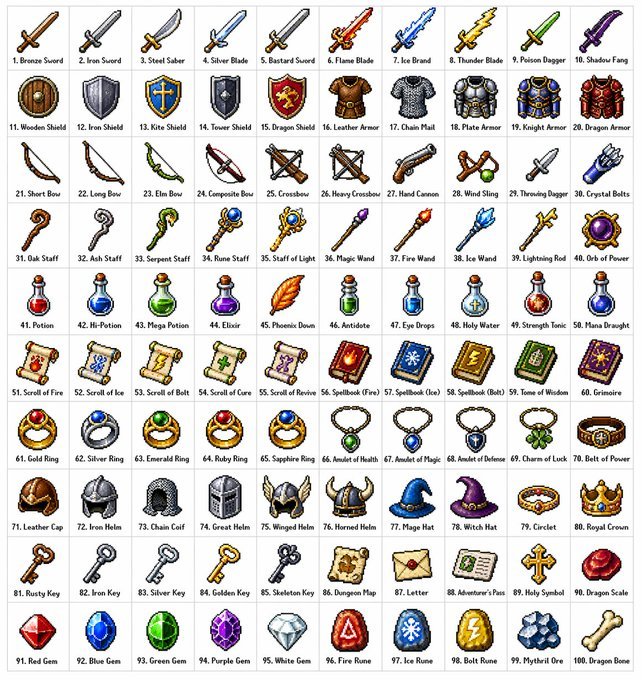
Create a {argument name="grid size" default="10x10"} grid containing {argument name="item count" default="100"} different fantasy role-playing game (RPG) items in a {argument name="art style" default="classic pixel art style"} (16-bit or 32-bit sprite style, similar to Japanese RPGs from the SNES/GBA era). Each item should occupy a square tile individually with a short, clear label below. The grid should be neatly arranged on a white background. Ensure each item is visually unique and every label is spelled correctly. Use clean pixel edges, a limited palette for each sprite, and subtle dithering for shadows. Use the following row themes: Row 1: Swords and blades; Row 2: Shields and armor; Row 3: Bows, crossbows, and ranged weapons; Row 4: Staves, wands, and magical implements; Row 5: Potions, elixirs, and bottles; Row 6: Scrolls, grimoires, and spellbooks; Row 7: Rings, amulets, and enchanted accessories; Row 8: Helmets, crowns, and headgear; Row 9: Keys, relics, and quest items; Row 10: Gems, runes, and crafting materials. Display each tile as a centered item sprite on a clean background square, presented in the form of classic inventory icons—similar to what you'd see in a fantasy RPG menu. Maintain consistency and coherence in the overall style, reminiscent of beloved retro fantasy RPGs—charming and refined, yet clear even at small sizes.
Original prompt
创建一个 {argument name="网格尺寸" default="10×10"} 的网格,其中包含 {argument name="物品数量" default="100"} 种不同的奇幻角色扮演游戏 (RPG) 物品,采用{argument name="艺术风格" default="经典的像素艺术风格"}(16 位或 32 位精灵图风格,类似于 SNES/GBA 时代的日式角色扮演游戏)。每个物品应单独占据一个正方形图块,并在下方附上简短清晰的标签。网格应整齐排列在白色背景上。确保每个物品在视觉上都独具特色,并且每个标签的拼写都正确。使用清晰的像素边缘,每个精灵使用有限的调色板,并使用轻微的抖动效果来表现阴影。使用以下行主题:第 1 行:剑和刀剑;第 2 行:盾牌和盔甲;第 3 行:弓、弩和远程武器;第 4 行:法杖、魔杖 and 魔法法器;第 5 行:药水、药剂 and 药瓶;第 6 行:卷轴、典籍 and 魔法书;第 7 行:戒指、护身符 and 附魔饰品;第 8 行:头盔、王冠 and 头饰;第 9 行:钥匙、圣物 and 任务物品;第 10 行:宝石、符文 and 制作材料。将每个图块显示为居中的物品精灵,置于干净的背景方块上,并以经典的物品栏图标形式呈现——类似于你在奇幻角色扮演游戏菜单中看到的那种。保持整体风格的一致性、连贯性,并让人联想起备受喜爱的复古奇幻角色扮演游戏——既迷人又精致,即使在小尺寸下也清晰易读。
Use this prompt in the VdoBloom image editor.
Opens the image editor with this prompt — add your own photo to generate.