Symmetric Roland Garros Paris Poster
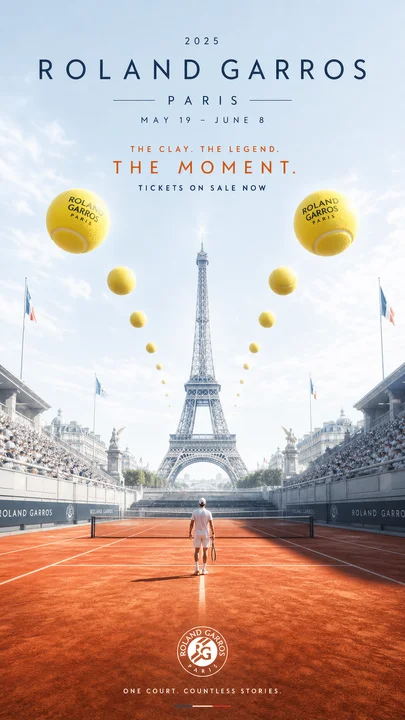
Full prompt
Create a vertical cinematic sports event poster for {argument name="tournament name" default="Roland Garros"} in Paris, using a perfectly centered axial symmetry composition. A red clay tennis court fills the lower half, with crisp white court lines and a tiny lone tennis player in white standing exactly on the center line facing away toward the horizon. On both sides are packed stadium stands with small crowds, dark sponsor boards, and French flags, mirrored left and right. In the distance, place the Eiffel Tower centered behind the court, rising into a pale blue morning sky with soft clouds and a bright airy atmosphere. Add a surreal symmetrical procession of yellow tennis balls floating in the sky along the central perspective axis: exactly 12 balls total, with 2 very large balls near the upper left and upper right foreground labeled “ROLAND GARROS PARIS,” 2 medium balls below them, and 8 progressively smaller balls receding toward the Eiffel Tower, evenly balanced on both sides. Use refined luxury travel-poster aesthetics, realistic photo-composite lighting, elegant minimal typography, warm clay orange contrasted with sky blue and tennis-ball yellow. Top text layout: small spaced “2025” centered at the very top; huge wide-letterspaced “ROLAND GARROS”; smaller centered “PARIS” with thin horizontal lines on both sides; date line “MAY 19 - JUNE 8”; orange uppercase tagline “THE CLAY. THE LEGEND.”; larger orange uppercase headline “THE MOMENT.”; small white uppercase line “TICKETS ON SALE NOW.” Bottom center: a white Roland Garros circular logo on the clay, and beneath it the slogan {argument name="bottom slogan" default="ONE COURT. COUNTLESS STORIES."}. Keep all typography clean, uppercase, widely tracked, premium, and centered. No extra people besides the single player, no extra logos except the tennis-ball labels and bottom circular logo, no watermark.
Use this prompt in the VdoBloom image editor.
Opens the image editor with this prompt — add your own photo to generate.