Nine-Model Scarecrow Yokai Comparison
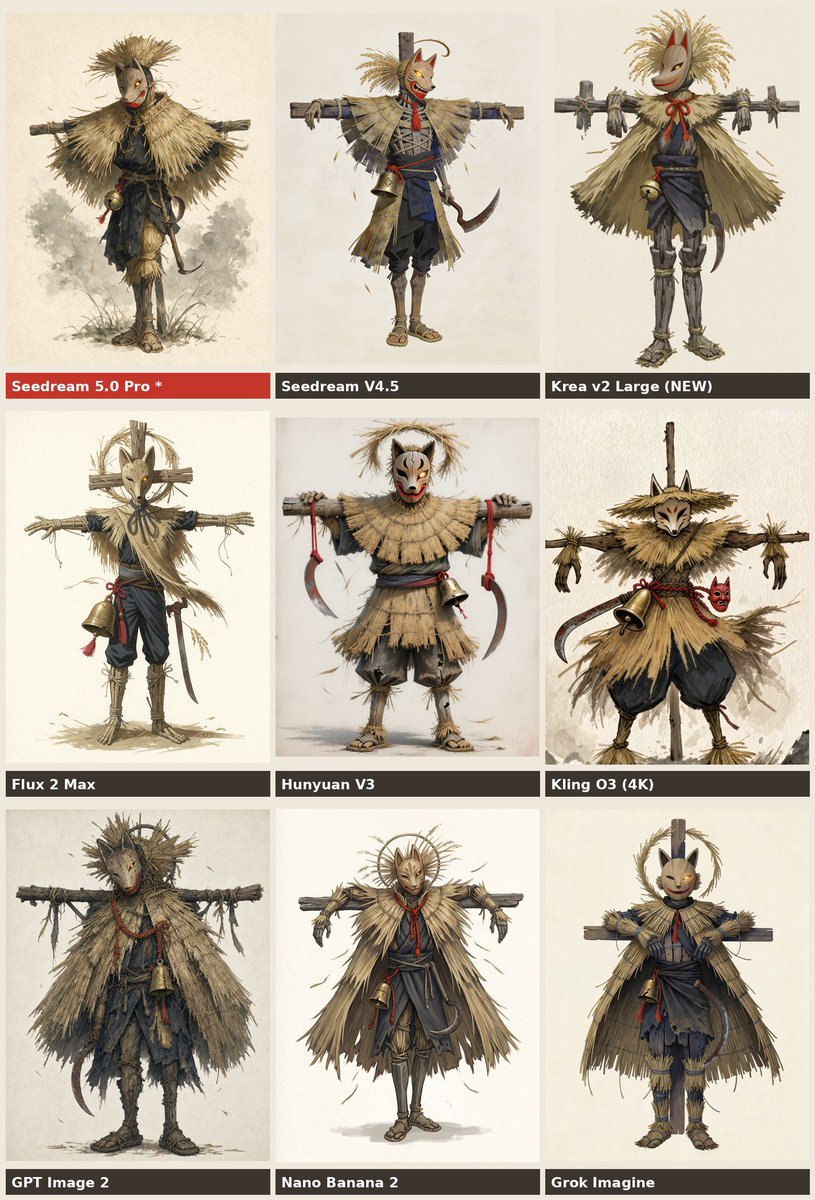
Full prompt
Goal: Create a 3 by 3 comparison chart showing nine different AI image model outputs for the same character concept: a full-body Japanese straw scarecrow yokai warrior wearing a fox or oni-style mask, posed front-facing with arms stretched horizontally on a wooden crossbeam like a scarecrow.

Canvas: Vertical poster, 768 x 1152 aspect ratio, warm off-white parchment background, thin gutters between panels, each panel containing one full-body character illustration centered on a pale paper backdrop. Use a muted beige, straw, charcoal, navy, and red color palette.

Layout: Arrange exactly 9 rectangular panels in a 3-column by 3-row grid. Each panel has a dark label bar along the bottom edge with bold white sans-serif text; the first label bar is red to highlight the preferred model. Keep all labels readable and aligned left.

Text content: Use exactly these 9 panel labels, in this order from top-left to bottom-right: 1) {argument name="highlighted model label" default="Seedream 5.0 Pro *"}, 2) Seedream V4.5, 3) Krea v2 Large (NEW), 4) Flux 2 Max, 5) Hunyuan V3, 6) Kling O3 (4K), 7) {argument name="bottom left model label" default="GPT Image 2"}, 8) Nano Banana 2, 9) Grok Imagine.

Subject details: In every panel, depict the same core subject with variation in rendering style: a Japanese harvest-spirit scarecrow figure made of dry straw, ragged cloth, and wood, wearing a pale fox mask or demon mask with red markings, a straw cape or thatched mantle, dark indigo peasant trousers, rope bindings, sandals, a red cord accent, and a small brass bell hanging from the waist or chest. Include a curved sickle or hook-shaped blade at the side in several variations. The character should look like folklore concept art: eerie but charming, handmade, weathered, and ritualistic. The arms should be tied or resting along a horizontal wooden beam in most panels. Add subtle straw fragments, loose fibers, and small sketchy shadows near the feet.

Panel-by-panel variation: Top-left: delicate watercolor concept art, rounder straw cloak, darker face mask, small bell near the waist, misty gray wash behind the legs. Top-middle: cleaner anime-concept rendering with an orange fox mask, red scarf, blue-black outfit, straw shoulder cape, wooden post behind the head, sickle at the right hip. Top-right: simplified cute mask, broad straw poncho, tall straw hair plume, red bow cord at the neck, wooden beam visible across the shoulders. Middle-left: tall thin scarecrow with a pale mask, large circular halo-like straw frame behind the head, brass bell on the left side, long dangling red tassel. Middle-center: stockier figure with a white oni mask, layered straw skirt, both hands gripping the crossbeam, two curved sickles hanging from red cords. Middle-right: more dynamic rough painted version with sharp fox mask, straw hat-like hood, large bell on the waist, red small demon mask charm at the side, black balloon trousers. Bottom-left: grittiest and most textured version, dark muddy clothing, heavy ragged straw cloak, shadowy face mask, brass bell in front, scythe-like blade at the lower left. Bottom-middle: elegant refined figure with radiant circular straw halo, narrow fox mask, symmetrical straw cape, red neck cord, bell and hook at the waist. Bottom-right: friendly toy-like fox-masked scarecrow, compact body, neat straw cloak, wooden post behind head, indigo kimono-like clothing and straw shin guards.

Visual style: Hand-painted fantasy character-sheet comparison, Japanese folklore design, watercolor and gouache texture, ink sketch accents, high detail, warm parchment paper, slightly rough AI-model-comparison aesthetic. Make the illustration dense and textured, with visible fibers, dry brush marks, and subtle paper grain.

Constraints: Do not add extra panels, extra labels, logos, watermarks, captions, or background scenery. Keep every character full-body and centered. Ensure the exact count of 9 labeled model panels is clear.
Use this prompt in the VdoBloom image editor.
Opens the image editor with this prompt — add your own photo to generate.