Cinematic Sniper Character Bible Sheet
Full prompt
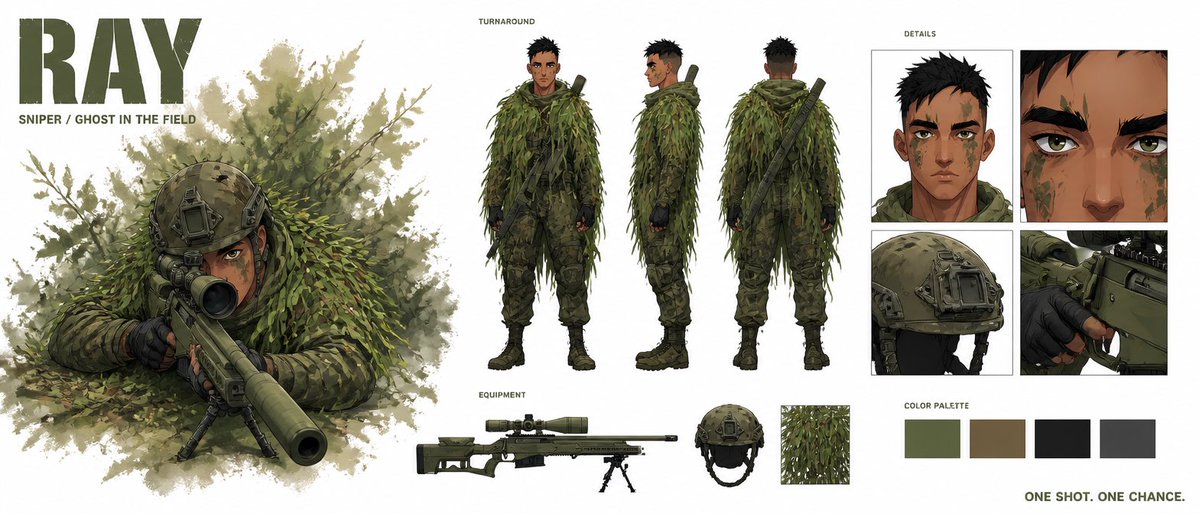
Goal: Create a premium cinematic character bible sheet for a modern military sniper named {argument name="character name" default="RAY"}, with polished concept-art presentation and clean white studio background.

Canvas: Wide horizontal character sheet, approximately 2:1 aspect ratio. Use a high-end game/film concept art style with painterly realism, crisp ink-like edges, muted military greens, olive browns, black tactical accents, and subtle watercolor foliage textures.

Layout: On the far left, place a huge bold stencil-style title reading {argument name="character name" default="RAY"} in dark olive, with the subtitle {argument name="subtitle text" default="SNIPER / GHOST IN THE FIELD"} below it. Beneath and beside the title, show a large hero illustration of the sniper lying prone in dense leafy camouflage, aiming a long suppressed sniper rifle directly toward the viewer from behind a bipod. The barrel should dominate the foreground with cinematic perspective, surrounded by soft leafy brush and splattered foliage texture.

Center section: Add a labeled "TURNAROUND" area containing exactly 3 full-body standing views of the same sniper: front view, side view, and back view. He is a young adult male with tan skin, short messy black hair, sharp brown eyes, angular face, subtle stubble or face texture, green and brown camouflage face paint, athletic lean build, and serious calm expression. He wears a full ghillie suit made of layered shredded green foliage strips over tactical camouflage pants, dark gloves, combat boots, and a slung rifle across the back in the rear view.

Bottom center equipment strip: Add a small label "EQUIPMENT" and show exactly 4 equipment items arranged horizontally: 1 long olive sniper rifle with scope, suppressor, bipod, and adjustable stock; 1 tactical helmet in olive drab with mounts and straps; 1 close-up square swatch of leafy ghillie fabric; 1 compact secondary gear detail integrated near the rifle such as a magazine or support attachment. Keep these cleanly isolated like a design bible.

Right section: Add a labeled "DETAILS" grid with exactly 4 close-up panels: 1 head-and-shoulders portrait showing face paint and short black hair; 1 extreme close-up of the eyes and brow; 1 close-up of the tactical helmet with mounted hardware; 1 close-up of gloved hands operating the rifle trigger/receiver area.

Color palette: Beneath the detail grid, include a labeled "COLOR PALETTE" row with exactly 4 rectangular swatches: muted olive green, earthy brown, near-black charcoal, and dark gray. In the bottom-right corner, add the tagline {argument name="tagline" default="ONE SHOT. ONE CHANCE."} in small bold uppercase olive text.

Constraints: Keep all text in English, use the same character consistently across every panel, maintain realistic military proportions, avoid sci-fi armor, avoid extra characters, avoid clutter, no watermark, no logos other than the character name title.
Use this prompt in the VdoBloom image editor.
Opens the image editor with this prompt — add your own photo to generate.