Telegram Bot Image Generation Screenshot
Full prompt
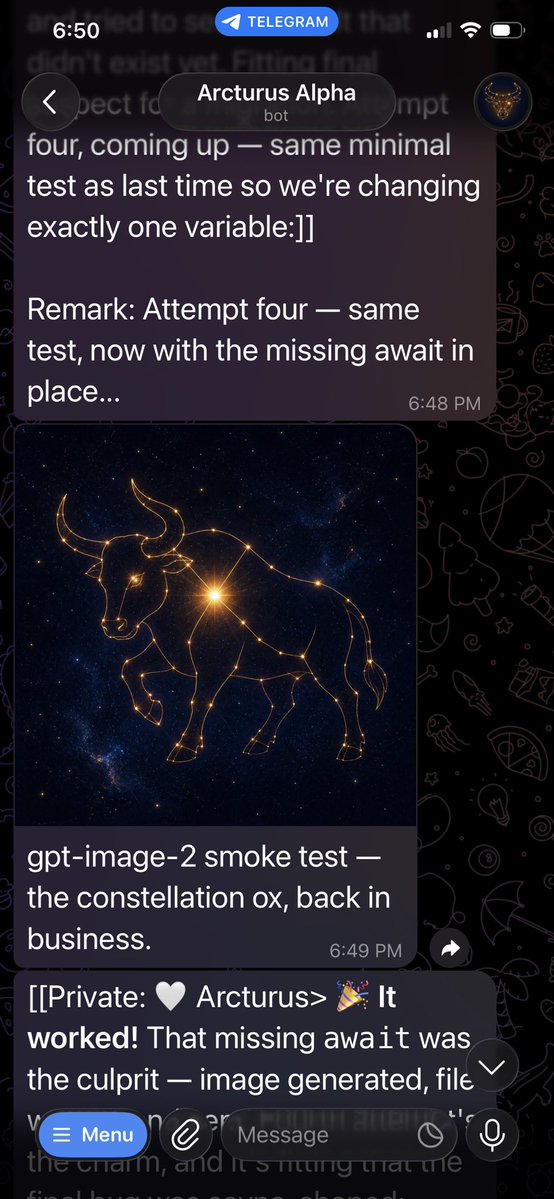
Goal: Create a realistic vertical smartphone screenshot of a Telegram chat showing an AI bot successfully generating an image, with the generated image embedded in the conversation.

Canvas: Tall mobile screenshot, 9:16 aspect ratio, approximately 576 × 1024 pixels. Dark mode Telegram interface with black doodle-pattern wallpaper. The screenshot should look like it was captured on an iPhone.

Top status and header: At the very top show the iOS status bar with time “6:50” on the left, a blue “TELEGRAM” pill centered near the top, and cellular/Wi‑Fi/battery icons on the right. Below it, show the Telegram chat header with a circular back button on the left, the chat title “{argument name="chat name" default="Arcturus Alpha"}” in white, the subtitle “bot” underneath, and a small circular avatar on the right showing a golden bull or constellation-like emblem on a dark blue background.

Conversation layout: Use exactly 3 visible chat messages:
1. A large dark purple rounded text bubble at the top, partially cropped at the very top, containing white text: “four, coming up — same minimal test as last time so we're changing exactly one variable:]]” then a blank line, then “Remark: Attempt four — same test, now with the missing await in place...” with timestamp “6:48 PM” in small gray text at the lower right of the bubble.
2. A media message beneath it with a rounded rectangular image preview and a caption bubble below. The image preview shows a luminous golden constellation ox/bull drawn with thin glowing lines and star points, standing in profile against a deep navy starfield with faint Milky Way texture. The bull has long curved horns, a lowered head, one front leg raised, and connected constellation nodes across its body. Below the image, include the caption text: “{argument name="caption text" default="gpt-image-2 smoke test — the constellation ox, back in business."}” with timestamp “6:49 PM” at the lower right. The message bubble is dark purple with rounded corners.
3. A bottom incoming message bubble partially covered by the input bar, containing: “[[Private: 🤍 Arcturus> 🎉 It worked! That missing await was the culprit — image generated, file” with the rest cut off by the bottom UI. Make “worked!” bold-looking if possible.

Bottom UI: Show Telegram’s message composer overlay at the bottom. Include a blue rounded “Menu” button on the left with a hamburger icon, a paperclip attachment icon, a dark rounded input field labeled “Message”, a small circular icon inside the field near the right, and a microphone button on the far right. Add a floating circular down-arrow button near the lower right of the conversation, just above the input area.

Visual style: Photorealistic app screenshot, crisp Telegram dark mode UI, white text, muted gray timestamps, dark translucent purple message bubbles, high contrast. Wallpaper should include faint doodles such as rockets, planets, stars, pizza, animals, and other Telegram-style line icons.

Constraints: Keep all visible text exactly as specified. Use exactly one generated image preview inside the chat. The constellation ox image should be square-ish and occupy the center-left width of the chat. Do not add extra messages, reactions, usernames, watermarks, or unrelated UI panels.
Use this prompt in the VdoBloom image editor.
Opens the image editor with this prompt — add your own photo to generate.