ChatGPT Transparent Pizza Result
Full prompt
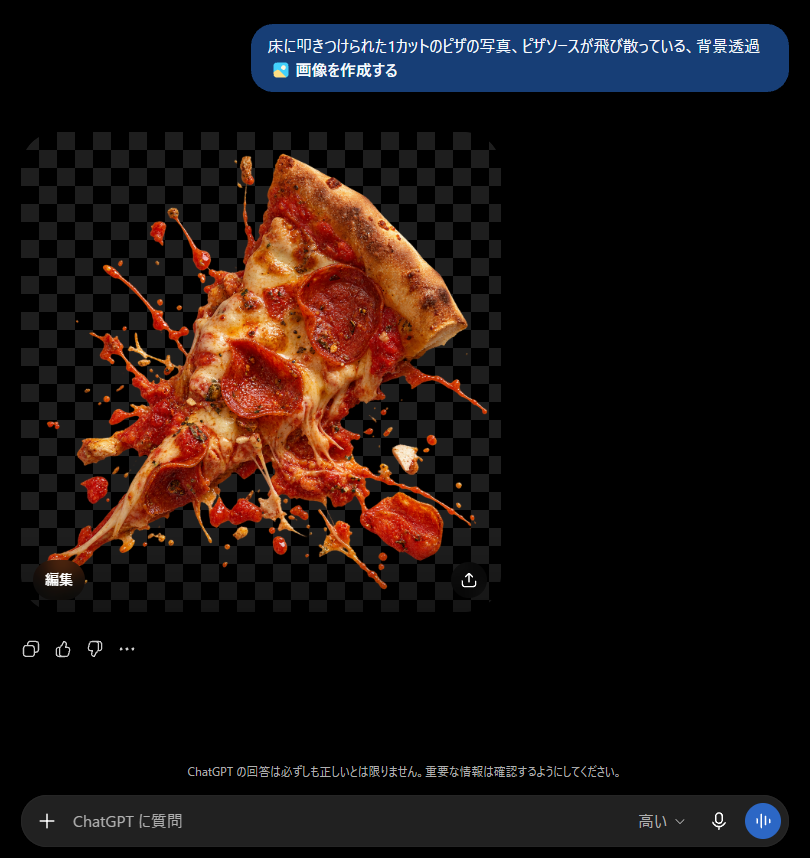
Goal: Create a realistic screenshot of a dark-mode ChatGPT conversation showing an image generation result about a transparent-background pizza slice.

Canvas: Square-ish desktop screenshot, approximately 820×847 px, with a pure black ChatGPT-style dark interface background.

Layout: At the top right, place one rounded blue user message bubble containing Japanese text and a small image icon line. Below it, aligned left, show one generated image preview: a square transparent-background checkerboard area with a cutout photo of a pizza slice exploding into scattered sauce and toppings. Under and around the image preview, include small ChatGPT interface controls, then a bottom input bar.

Text content: The top message bubble must read exactly: 「床に叩きつけられた1カットのピザの写真、ピザソースが飛び散っている、背景透過」 on the first line, and 「🖼️ 画像を作成する」 on the second line. Add a small dark pill button labeled 「編集」 near the lower-left corner of the image preview. Add a small circular share/download-style icon near the lower-right corner of the image preview. Near the bottom center, add the faint Japanese disclaimer: 「ChatGPT の回答は必ずしも正しいとは限りません。重要な情報は確認するようにしてください。」 The bottom input placeholder should read 「ChatGPT に質問」, with a plus icon on the left and small microphone/voice icons on the right, plus the label 「高い」.

Generated image details: The preview should show exactly 1 triangular slice of pepperoni pizza, tilted diagonally upward to the right, with a browned crust at the top right, melted mozzarella cheese stretching downward, red tomato sauce splashing outward, and pepperoni pieces visible on the slice. Surround it with many irregular sauce droplets, cheese strands, and flying topping fragments as if the slice was slammed onto a floor. The cutout should have an alpha/transparent look represented by a dark gray checkerboard background behind the pizza. Make the pizza highly photorealistic, glossy, messy, and sharply lit, with no plate and no visible floor.

Interface details: Use a modern ChatGPT mobile/desktop hybrid dark UI aesthetic, black background, rounded blue user bubble, soft gray icons, and a rounded dark input field at the bottom. Include exactly 4 small reaction/action icons below the generated image area on the left: copy, thumbs up, thumbs down, and an ellipsis. Keep all UI elements subtle and crisp.

Constraints: Do not add extra messages, avatars, watermarks, or browser chrome. The main focus should be the transparent PNG-style pizza cutout inside the chat interface. Use {argument name="pizza prompt text" default="床に叩きつけられた1カットのピザの写真、ピザソースが飛び散っている、背景透過"} as the visible user request, {argument name="subject" default="one pepperoni pizza slice smashed with sauce splashing"}, and {argument name="interface language" default="Japanese"}.
Use this prompt in the VdoBloom image editor.
Opens the image editor with this prompt — add your own photo to generate.