Wireframe to High-Fidelity UI Design
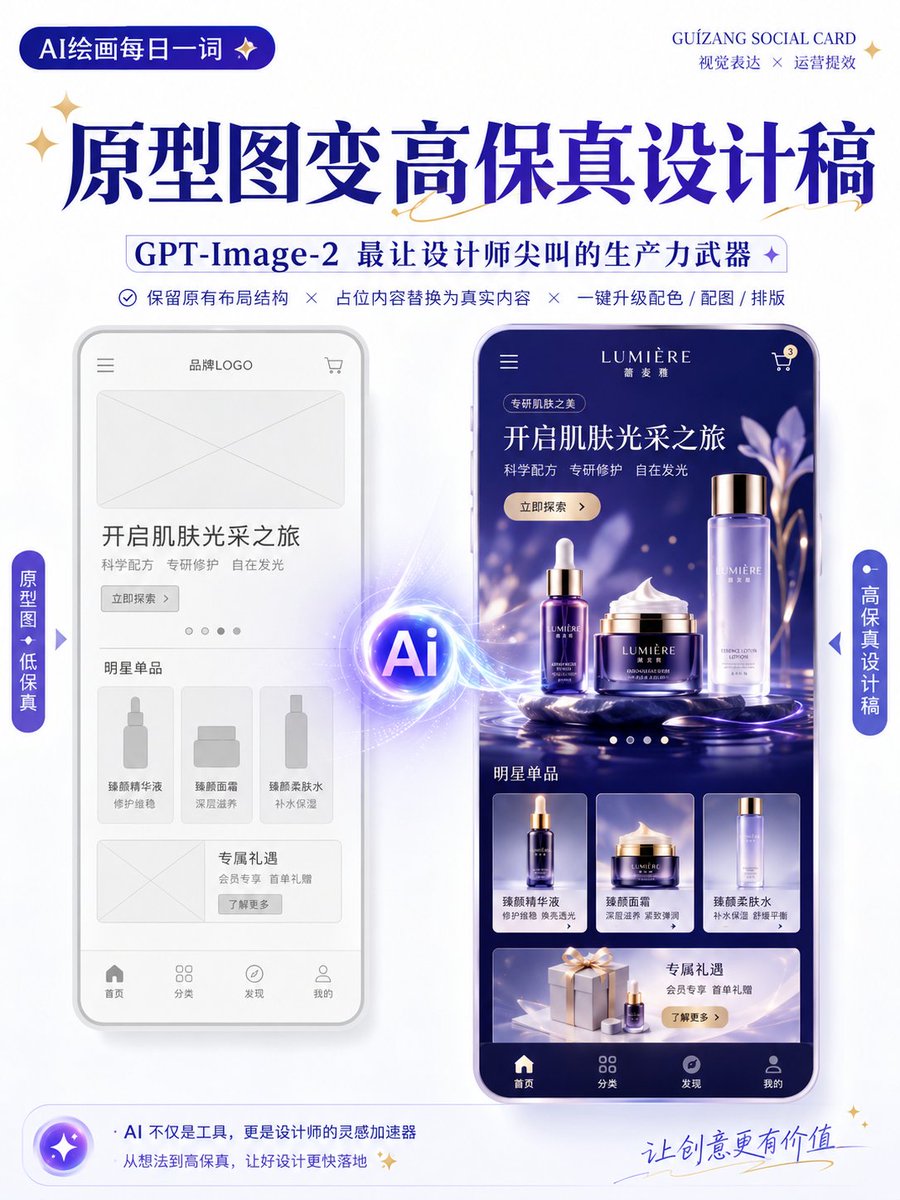
Full prompt
Generate a high-fidelity design draft based on the uploaded wireframe/prototype as a reference.

Design Type: {argument name="design type" default="Promotion Page / App Interface / H5 Page / E-commerce Detail Page / Official Website / Infographic"}

Requirements:
1. Retain the original layout structure, information hierarchy, and module division of the page.
2. Replace placeholders in the wireframe with actual content.
3. Automatically add color schemes, images, icons, and typography details.
4. Enhance the visual hierarchy, white space, alignment, and module relationships of the page.
5. Output as a complete, high-fidelity design draft.

Visual Style: {argument name="visual style" default="Minimalist Modern / Tech / Skeuomorphic / Fresh / Brand Identity / Premium"}
Primary Color: {argument name="primary color" default="blue"}
Secondary Color: [Enter color]
Aspect Ratio: [e.g., 9:16 / 4:3 / 16:9]

Note:
Keep the original structure and do not disrupt the order of modules.
Focus on optimizing visual presentation and realistic content to make it look like a complete design draft ready for proposal presentations.

Keep the original information architecture of the wireframe unchanged, only enhancing visual completeness and realism.
Original prompt
以上传的线框图 / 原型图为参考,生成一张高保真设计稿。

设计类型:【{argument name="设计类型" default="运营活动页 / App界面 / H5页面 / 电商详情页 / 官网页面 / 信息图"}】

要求:
1. 保留原始页面的布局结构、信息层级和模块划分
2. 将线框图中的占位符替换为真实内容
3. 自动补充配色、图片、图标和排版细节
4. 强化页面的视觉层级、留白、对齐和模块关系
5. 整体输出为高完成度的高保真设计稿

视觉风格:【{argument name="视觉风格" default="简约现代 / 科技感 / 轻拟物 / 清新 / 品牌感 / 高级感"}】
主色调:【{argument name="主色调" default="蓝色"}】
辅色:【填写颜色】
画幅比例:【如 9:16 / 4:3 / 16:9】

注意:
保留原始结构,不要随意打乱模块顺序。
重点优化视觉表现和真实内容呈现,使其像一张可用于提案展示的完整设计稿。

保持线框图原有的信息架构不变,只提升视觉完成度与真实感。
Use this prompt in the VdoBloom image editor.
Opens the image editor with this prompt — add your own photo to generate.