Xiaohongshu 3D Creator Profile Card
Full prompt
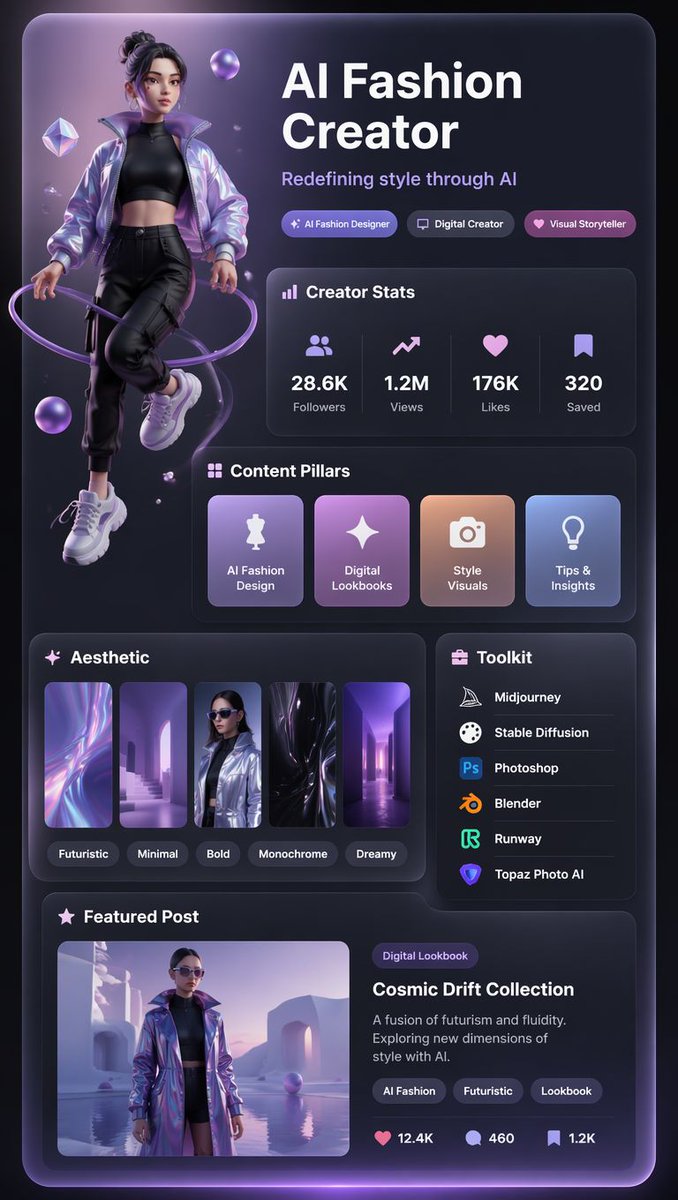
Goal: Create a vertical Xiaohongshu-style 3D creator profile card for {argument name="creator niche" default="AI Fashion Creator"}, with a futuristic purple-black aesthetic, glossy glassmorphism panels, soft neon lighting, and a premium social-media portfolio layout.

Canvas: Portrait 9:16 mobile poster, dark charcoal-to-black background, rounded outer card with a subtle violet glow along the edges, high-contrast white typography, lavender accents, and soft bloom lighting. The overall look should feel like a polished 3D UI profile card, combining fashion editorial imagery with app-dashboard components.

Main subject: On the left side, place one full-body stylized 3D female fashion creator avatar floating slightly above the bottom, wearing a shiny iridescent lavender bomber jacket, black cropped top, black cargo jogger pants, and chunky white sneakers. Her hair is tied in a high messy bun, her face is intentionally softly blurred or anonymized, and she is surrounded by a glowing purple ring wrapping around her body plus several floating translucent purple orbs and crystal shapes.

Layout: Large headline block in the upper right reading “{argument name="headline text" default="AI Fashion Creator"}” in bold white sans-serif type, with a subtitle underneath reading “{argument name="subtitle text" default="Redefining style through AI"}”. Below the subtitle, include exactly 3 pill badges: “AI Fashion Designer”, “Digital Creator”, and “Visual Storyteller”, each with a small icon and purple gradient styling.

Creator Stats panel: Add one rounded glass panel titled “Creator Stats” with a small bar-chart icon. Inside it, show exactly 4 stat columns separated by faint vertical dividers: 28.6K Followers with a people icon, 1.2M Views with an upward trend icon, 176K Likes with a heart icon, and 320 Saved with a bookmark icon.

Content Pillars panel: Add one rounded glass panel titled “Content Pillars”. Inside it, show exactly 4 square gradient cards with icons and labels: “AI Fashion Design” with a dress mannequin icon, “Digital Lookbooks” with a sparkle icon, “Style Visuals” with a camera icon, and “Tips & Insights” with a lightbulb icon.

Aesthetic panel: Add one rounded panel titled “Aesthetic”. Include exactly 5 vertical thumbnail cards showing futuristic abstract/fashion imagery, each with a small rounded label underneath: “Futuristic”, “Minimal”, “Bold”, “Monochrome”, and “Dreamy”. Use purple, lilac, black, chrome, and soft blue color accents.

Toolkit panel: Place a narrower right-side rounded panel titled “Toolkit” with a small briefcase icon. List exactly 6 tools with recognizable small app-style icons and white text: Midjourney, Stable Diffusion, Photoshop, Blender, Runway, and Topaz Photo AI. Separate rows with subtle horizontal dividers.

Featured Post panel: At the bottom, create a wide rounded panel titled “Featured Post”. On the left, include one rectangular image preview of the same avatar in an iridescent coat standing in a surreal lavender futuristic architectural scene beside reflective water. On the right, add a small purple category pill reading “Digital Lookbook”, the post title “{argument name="featured post title" default="Cosmic Drift Collection"}”, and description text: “A fusion of futurism and fluidity. Exploring new dimensions of style with AI.” Add exactly 3 tag pills: “AI Fashion”, “Futuristic”, and “Lookbook”. At the bottom of this panel, show exactly 3 engagement metrics with icons: heart 12.4K, comment 460, bookmark 1.2K.

Visual style: 3D rendered social profile UI, dark glassmorphism, rounded rectangles, violet neon rim light, soft shadows, glossy gradient cards, crisp modern sans-serif typography, premium creator-branding aesthetic, highly detailed but clean and readable. Keep all text in English, maintain exact counts for badges, stat columns, content cards, aesthetic thumbnails, tools, tags, and engagement metrics. No watermark, no browser chrome, no extra panels, no extra text.
Use this prompt in the VdoBloom image editor.
Opens the image editor with this prompt — add your own photo to generate.