AI Music Video Generator: From One Photo to a Performance
The VdoBloom AI Music Video Generator turns one photo of an artist into a performance clip — stage lighting, camera movement that feels cut to a tempo, and a colour grade that belongs in a release video, with the performer's face held true to the source image. No venue booking, no lighting hire, no shoot day and no crew to feed.
Three scenes ship as templates, and between them they cover most of what a release actually needs. Neon Stage is saturated magenta and cyan beams through haze with beat-timed push-ins — pop, hyperpop, electronic. Golden Hour Rooftop is warm backlight, natural flares, wind moving hair and clothing, and a slow orbit around the artist — singer-songwriter, R&B, anything whose chorus needs air. Underground Energy is handheld, low-key and strobe-accented for hip-hop, rock and techno. The prompt field is open text, so a desert highway or an empty cathedral is one sentence away.
The workflow this tool is built for is not 'one clip, done'. Most models here render silent, and the handful that can generate sound in the same pass — Vidu Q3, PixVerse v5.5 and v6, LTX-2 Fast, Veo 3.1 — expose an audio toggle you should leave switched off, because what they produce is AI-invented sound rather than your song. Either way your master goes underneath in an editor and you decide where the cuts land. The pattern that works is three or four scenes generated from the same artist photo with the venue changed between them, then edited against the track: verse on the rooftop, chorus on the neon stage, bridge in the club.
New accounts get 10 free credits, and a 4-second 720p render on Seedance 1.5 Pro costs 6, so a first scene test costs nothing. What free credits do not cover is delivery: downloads made on them carry a VdoBloom watermark, which a distributor, a label or a looping visual slot will bounce. A paid plan downloads the identical render watermark-free — so do the exploring on free credits and be on a plan before anything ships.
Examples
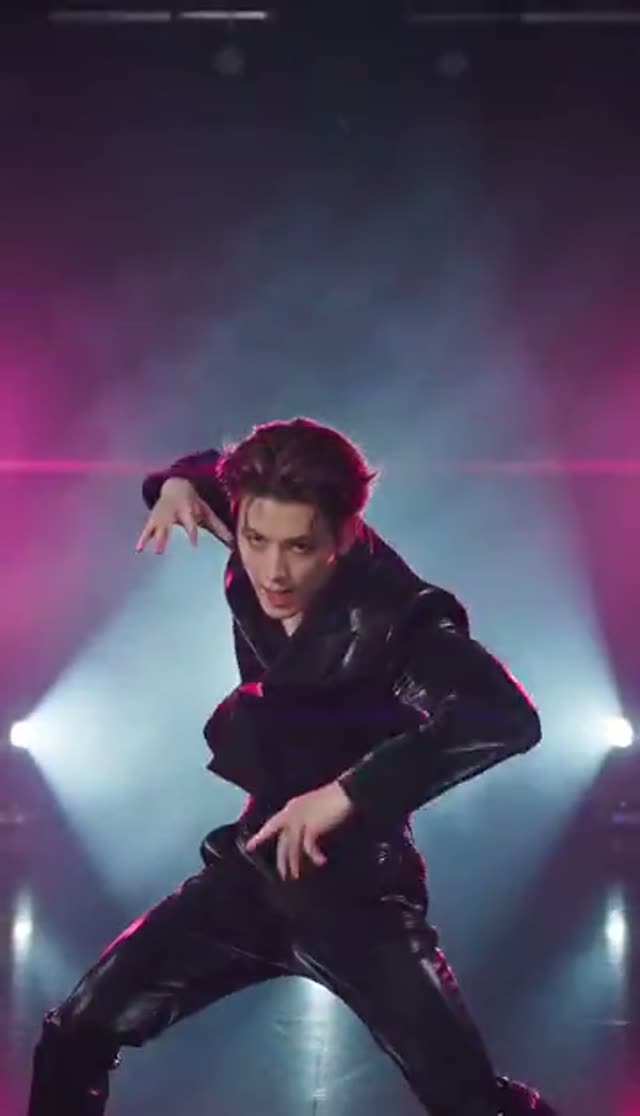
Neon Stage
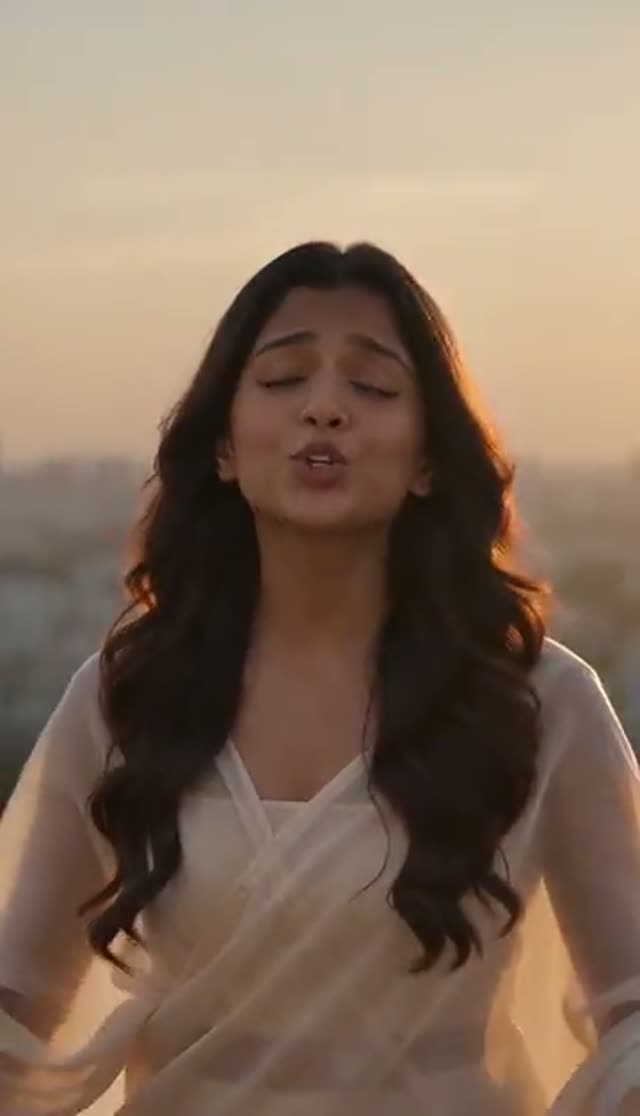
Golden Hour Rooftop
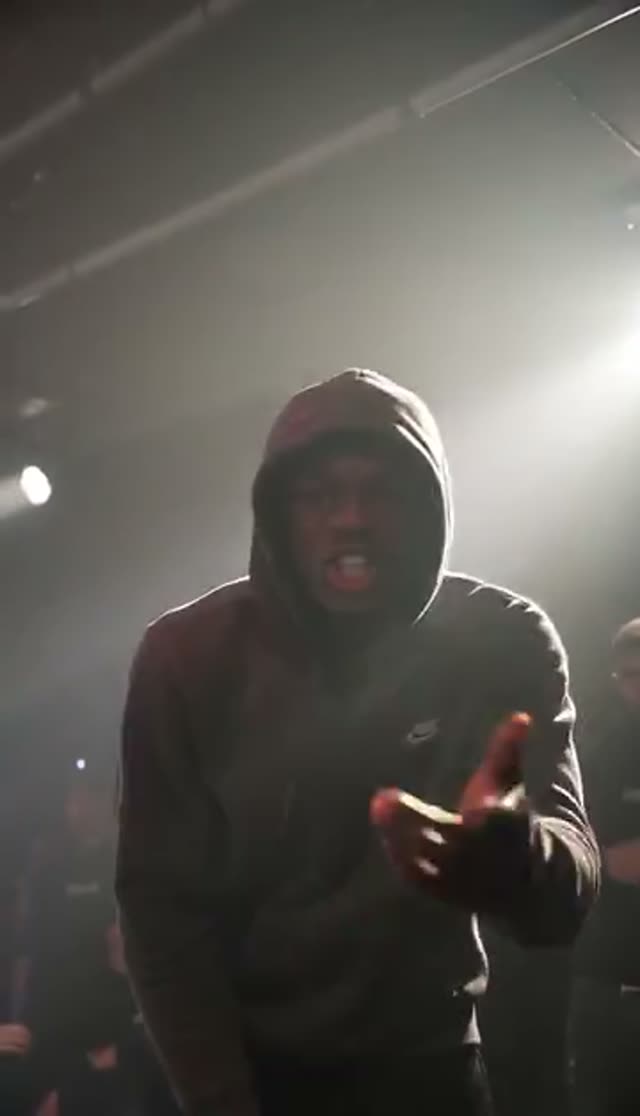
Underground Energy
How it works
- 1
Upload an artist photo
One clear image of the performer, face well lit and reasonably front-on. A press shot of your own artist, or a good phone portrait, both work. Only upload a photo you have the right to animate — your own image, or one of an artist who has agreed to it. The clip inherits the likeness in the photo, so whatever the photo gets wrong, the video will repeat.
- 2
Pick a venue
Neon Stage, Golden Hour Rooftop or Underground Energy. If you already know the single's mood, choose the scene that matches the chorus rather than the verse — that is the shot you will end up cutting to most often, and the one worth spending the better render on.
- 3
Add the genre detail
The prompt takes wardrobe, instrument, era and crowd. 'Holding a Telecaster, sweat, front-row hands in frame' lands very differently from 'solo at a grand piano in an empty hall', even starting from the same photo. Keep the likeness instruction in the preset intact and add your detail around it.
- 4
Choose model, length and frame
Forty-four image-to-video variants are selectable on this tab. Aspect ratio is a setting on most of them — Runway, Seedance, PixVerse and Vidu give you 9:16 for Reels, TikTok and Shorts, or 16:9 for a YouTube upload. Square is not offered by every family, and some image-to-video models expose no ratio control at all and follow your photo's shape, so crop the upload first if the placement is fixed.
- 5
Generate a few scenes, not one
Run the same photo through two or three venues. Variety across shots is what makes an edit read as a music video rather than a single AI clip playing on repeat, and it costs the same per render whether the venues match or not.
- 6
Cut it to your track
Download the MP4s, lay your master underneath in any editor and cut on the beat. With the audio toggle left off there is nothing arriving with the footage to fight your mix, and the shortest clips do the most work over the fastest sections.
Why use this tool
Likeness held through the shot
Every preset prompt instructs the model to preserve the exact face from your photo while the lighting, camera and performance energy change around the artist.
Three venues, plus anything you write
Neon Stage, Golden Hour Rooftop and Underground Energy as one-tap starts, with an open prompt field for a rainy alley, a desert highway, a drained swimming pool or an empty concert hall.
Camera moves built to be cut
Push-ins, slow orbits and handheld energy rather than a locked frame, so every shot has somewhere to land against a beat when you assemble the edit.
Silent by default, so your master leads
Most models here return video with no audio. A few families — Vidu Q3, PixVerse v5.5 and v6, LTX-2 Fast, Veo 3.1 — can generate sound in the same pass and show a toggle for it; leave it off for a music video, since that audio is invented by the model, not your record.
One photo, several formats
Vertical for Shorts, wide for the main upload, all from the same source image with no reshoot between formats — on the models that expose an aspect-ratio setting. Others follow the shape of the photo you upload.
Watermark-free on a paid plan
Paid-plan downloads have nothing burned into the frame, so the clip can go to a distributor, a label or straight onto a channel. Renders downloaded on the free signup credits carry a VdoBloom mark, which is fine for auditioning a scene and not fine for delivery.
Frequently asked questions
Can I sync the video to my actual song?
Yes, in your editor. Most models on this tab return video with no audio at all, and the ones that can generate sound — Vidu Q3, PixVerse v5.5 and v6, LTX-2 Fast, Veo 3.1 — put it behind a toggle you can leave off. Either way you drop your own master under the footage and control exactly where the beats land. The approach that holds up is to generate two or three clips in different venues and cut between them on the beat, giving the fastest sections the shortest clips. One AI clip on loop reads as an AI clip; three cut against a chorus reads as a music video.
Is the AI music video generator free to try?
Trying it is free; finishing a video is not. Ten credits arrive with a new account and a 4-second 720p render on Seedance 1.5 Pro costs 6, so the allowance covers a single audition — enough to learn whether your artist photo survives being put on a stage. It does not cover the edit this page recommends: three scenes at that same size is 18 credits, before you re-run the one that came back with the face drifting. Budget the free credits for the question 'does this photo work', then move to credits or a plan for the shots you actually cut.
Do the videos have a watermark?
On a paid plan they do not — the MP4 downloads with no logo, corner badge or end card. Downloads taken on the free signup credits carry a VdoBloom watermark, and that is a delivery problem rather than a cosmetic one: a distributor, a label's asset review, or a platform's looping-visual slot will reject third-party branding sitting over your artwork, and there is no crop that removes a mark without also removing part of the frame you generated. Audition on free credits, deliver from a plan, and the render you already made comes down clean.
Do I need to sign up, and are my uploads private?
An account is needed — email only, no card. It is what the 10 free credits attach to and where your clips are stored for later re-download, which is useful when the look for a single is still under embargo: uploads and finished videos live in your own Creations library, visible only to your account, with nothing published automatically and a delete option on every item. Only upload photos you have the right to use — your own shots, or photos of an artist who has agreed to being animated.
Will the artist actually look like themselves, and what photo works best?
The preset prompts are written to preserve facial likeness from your uploaded photo while adding performance energy, lighting and camera movement around the artist. The strongest resemblance comes from a sharp, front-facing photo with even light on the face and the head reasonably large in the frame. Sunglasses, hard backlight, extreme angles and low-resolution crops all cost likeness for the same reason — the model simply has less of the face to hold on to. If you have a choice between a dramatic press shot and a plain, well-lit portrait, the plain one will animate better.
What styles of music does this suit?
All of them, because genre in this tool is really lighting plus location plus camera behaviour, and you control all three. The three built-in scenes cover pop and electronic on the neon stage, singer-songwriter and R&B at golden hour, and hip-hop, rock or techno underground. Beyond those the prompt is open text — country on a desert highway, gospel in a cathedral, drill under a motorway flyover, ambient in a drained swimming pool. Describe the light before you describe the room and the result usually lands closer to the reference in your head.
Can I put two artists or a duo in one shot?
Yes, if both are in the photo you upload, and only if both have agreed to it. Name them in the prompt — 'both performers front of stage, trading lines' — so the model treats them as a duo rather than promoting one and letting the other blur into the background. For a feature where the two artists were never photographed together, generate separate clips and intercut them, which is how most real videos handle a remote guest verse anyway.
How long are the clips, and how long does a render take?
Clip length follows the model you choose. Short durations of a few seconds are the norm and are exactly what you want for cutting; some families go considerably longer in a single generation if you need one continuous shot for a title sequence or a loop. Rendering usually takes a few minutes, runs server-side, and lands in your Creations library — so queue the next venue rather than watching the first one render, and review all three together when they arrive.
Which video model should I pick for a music video?
Decide by what breaks in performance footage. Stage haze, strobe flicker and skin under saturated coloured light are the three things that separate a clip that looks shot from one that looks generated: haze needs to hold volume as the camera moves, strobes need to fire cleanly rather than smearing across frames, and a face lit magenta needs to keep its skin tone rather than turning to plastic. Cheap models will tell you whether the framing and the venue work — Seedance 1.5 Pro is 6 credits for 4 seconds at 720p, ByteDance V1 Pro Fast is 7 for 5 seconds. The heavier families hold the lighting together across a longer take and cost accordingly: Kling 2.6 image-to-video is 22 credits for 5 seconds at 720p, Veo 3.1 Fast is 40 for 8 seconds. If a render drifts off the face, shorten the clip before you change anything else — drift accumulates with duration, and a shorter take on a cheap model often beats a longer one on an expensive model.
Can I post these on TikTok, Instagram Reels and YouTube Shorts?
Yes. Generate at 9:16 on a model that exposes an aspect-ratio setting and the clip fills the frame on all three with nothing to crop; if you are using one of the image-to-video families that inherits the ratio from your upload, start from a vertical photo instead. Artists use these as pre-save teasers, backdrops for a hook snippet and looping visuals under a release announcement — one photo can carry a rollout's worth of posts if you vary the venue and the framing between them, and a paid-plan download keeps the frame free of anything that is not your artwork.