Character Replacement
Put your character into any video: same motion, new person
Input video
Replacement image
Same motion, your character. Photo 300px+, ratio 2:5 to 5:2.
Example
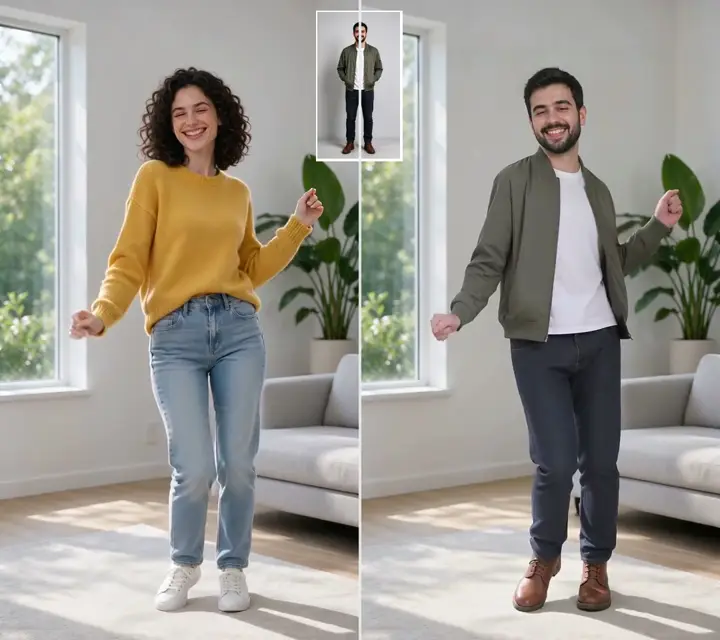
Character Replacement
Left: the source dance clip. Right: the man from the reference photo (inset) doing the same moves
AI Character Replacement Video: Replace a Person in Any Clip
Updated
Short answer: Animate Replace swaps the person in your video for the person in one photo while keeping the original motion, camera and scene, billed as a flat 10-second job: 24 credits on P-Video Replace at 720p, 60 to 125 on WAN 2.2 Animate Replace, 91 or 121 on Kling 3.0 Motion Control. The 10 free signup credits do not cover a job, and free-tier results carry a VdoBloom watermark.
AI character replacement swaps the person in an existing video for someone else from a single photo, while the original movement, timing, camera and setting stay the same. On VdoBloom you upload the source clip and a picture of the new character, choose a model and resolution, and the AI re-renders the footage with the new subject performing every move. No green screen, mask painting, prompt writing or reshoot.
What it costs: every job is billed as a flat 10-second estimate, so the price per job is fixed by model and resolution. P-Video Replace is 24 credits at 720p or 48 at 1080p, WAN 2.2 Animate Replace is 60, 95 or 125 credits at 480p, 580p or 720p, and Kling 3.0 Motion Control is 91 or 121 credits at 720p or 1080p. The 10 free signup credits are not enough for a replacement job; the Lite pack is 300 credits for $19.50 one-time (never expires) or $15 a month.
It is used for re-casting footage without a new shoot, swapping a presenter in recorded material, testing different characters on one dance or performance take, localizing ads with a different face, and turning a real performance into a stylized or animated character.
How it works
- 1
Pick a mode and model
Replace (WAN 2.2 Animate Replace or P-Video Replace) puts your character into the original scene. Animate (Kling 3.0 Motion Control) drives your character image with the motion from the video.
- 2
Upload the source video
The clip whose motion you want to keep. MP4 up to 100 MB; Kling Motion Control also accepts MOV and needs a 3 to 30 second clip.
- 3
Upload the character photo
A sharp image of the replacement person or character, JPG, PNG or WebP up to 10 MB. Kling needs JPG/PNG of at least 300 px with an aspect ratio between 2:5 and 5:2.
- 4
Choose the resolution and generate
WAN offers 480p, 580p and 720p; Kling and P-Video offer 720p and 1080p. The price per job is shown before you confirm.
- 5
Review and download
The output follows the length of your source clip and is saved to My Creations. If the render fails or is blocked, the credits are refunded automatically.
Why use this tool
Motion, camera and timing preserved
Gestures, footwork, expressions and camera moves come from your footage; only the subject changes.
Three engines, two modes
Replace mode keeps the original background (WAN 2.2 Animate Replace, P-Video Replace). Animate mode moves your character image with the video's motion (Kling 3.0 Motion Control).
Fixed price per job
Each job is billed at a flat 10-second estimate, so you know the cost before you upload, whatever the clip length.
Real people or stylized characters
Use a photo of a consenting person, an illustrated character, a 3D mascot or an AI-generated character as the replacement.
Up to 1080p output
Kling 3.0 Motion Control and P-Video Replace render at 720p or 1080p; WAN 2.2 renders at 480p, 580p or 720p.
Character library support
Pick a saved character from your VdoBloom library instead of uploading the same photo again.
Quick facts
What one replacement job takes and costs.
- Input: a source video (MP4 under 100 MB) plus one photo of the new character.
- Kling 3.0 Motion Control: 3 to 30 second clips, MP4 or MOV.
- Price per job (flat 10-second estimate): P-Video Replace 24 cr (720p) or 48 (1080p); WAN 2.2 Animate Replace 60/95/125 (480p/580p/720p); Kling 3.0 Motion Control 91/121 (720p/1080p).
- Output length follows your source clip.
- Failed or blocked jobs are refunded automatically.
- Free-tier results are watermarked; any pack or plan removes it.
Which character replacement model should I use?
All three take a video plus one image. They differ in what they keep and what they cost. Credits are per job.
- With the Lite pack (300 credits) that is 12 P-Video jobs at 720p, 5 WAN jobs at 480p or 3 Kling jobs at 720p.
- Free-tier results carry a VdoBloom watermark; any paid plan or credit pack removes it.
- P-Video Replace
- What it does:Swaps the character, keeps motion, camera and scene
- Resolutions:720p / 1080p
- Credits per job:24 / 48
- Best for:Budget swaps and quick tests
- WAN 2.2 Animate Replace
- What it does:Replaces the subject with your image inside the original footage
- Resolutions:480p / 580p / 720p
- Credits per job:60 / 95 / 125
- Best for:Full-body swaps in the original setting
- Kling 3.0 Motion Control
- What it does:Animates your character image with the motion from the video
- Resolutions:720p / 1080p
- Credits per job:91 / 121
- Best for:Motion transfer onto your own character and scene
| Model | What it does | Resolutions | Credits per job | Best for |
|---|---|---|---|---|
| P-Video Replace | Swaps the character, keeps motion, camera and scene | 720p / 1080p | 24 / 48 | Budget swaps and quick tests |
| WAN 2.2 Animate Replace | Replaces the subject with your image inside the original footage | 480p / 580p / 720p | 60 / 95 / 125 | Full-body swaps in the original setting |
| Kling 3.0 Motion Control | Animates your character image with the motion from the video | 720p / 1080p | 91 / 121 | Motion transfer onto your own character and scene |
Replace vs animate: which mode do you need?
Replace mode is what most people mean by "replace a person in a video": the room, lighting, props and camera move from your footage stay, and only the person changes. Use WAN 2.2 Animate Replace or P-Video Replace.
Animate mode works the other way round. Your character image supplies the look and the setting, and the video only supplies the movement, so a dance or gesture from the clip is performed by your character in the picture's world. That is Kling 3.0 Motion Control, and it is the better choice when you want your own background rather than the original one.
Is AI character replacement free?
Not on VdoBloom. New accounts get 10 free credits, and the lowest-priced replacement job on this tab (P-Video Replace at 720p) is 24 credits, so you need a credit pack or plan to run one. One-time pack credits never expire, there is no subscription required, and a failed or blocked job refunds itself.
What people use AI character replacement for
Anywhere one good performance should be reused with a different face or character:
- Re-casting a scene or short film without reshooting it.
- Ad localization: the same product demo presented by a different person for each market.
- Trend and dance videos performed by your own character or mascot.
- Previsualization: testing how a costume, character design or actor would look in a blocked-out shot.
- Training and onboarding clips with a new presenter swapped into existing footage.
- Turning a real performance into a cartoon, anime or 3D character for social content.
Tips for a clean person swap
The models track the person they can see. Give them an easy subject and a matching reference.
- Use footage with one clearly visible main person, steady framing and little motion blur.
- Match the reference to the clip: similar framing (full body for full-body shots), angle and lighting.
- Use a sharp, front-facing reference with the whole outfit visible if clothes should change too.
- Avoid scenes where the subject is often hidden behind objects or leaves the frame.
- Test on P-Video Replace first, then render the keeper on WAN 2.2 or Kling at a higher resolution.
- Because each job bills a flat 10-second estimate, trim the source to the moment you need before uploading.
Limits: what character replacement does not do
Good to know before you spend credits:
- One replacement character per job; you cannot pick which of several people to swap.
- Source video must be under 100 MB; Kling Motion Control needs a 3 to 30 second clip.
- It replaces people and characters, not individual objects or props. For swapping objects or the whole location, use Genjutsu.
- Photos of public figures and explicit images are refused, with credits refunded. You need consent from anyone whose likeness you use.
- Fast, blurry or heavily occluded footage can produce flicker or soft edges.
Frequently asked questions
Can I put my face on someone else's dance video?
Yes, if you have the right to use the video and the face. Upload the dance clip and your photo; the new character performs the same moves. Public figures are refused.
Why does a short clip cost the same as a long one?
Every job is billed at a flat 10-second estimate, so the price is fixed by model and resolution, not clip length.
Which model is cheapest for replacing a person in a video?
P-Video Replace at 720p, 24 credits per job.
How do I replace a person in a video with AI?
Open the Animate & Replace tab, upload the video, upload a photo of the new person or character, choose WAN 2.2 Animate Replace or P-Video Replace, pick a resolution and generate. The AI keeps the original motion, camera and scene and renders your character in place of the original person.
How much does AI character replacement cost?
Each job is billed at a flat 10-second estimate: 24 credits (720p) or 48 (1080p) on P-Video Replace, 60, 95 or 125 credits on WAN 2.2 Animate Replace at 480p, 580p or 720p, and 91 or 121 credits on Kling 3.0 Motion Control at 720p or 1080p. The Lite pack is 300 credits for $19.50 one-time or $15 a month.
Is there a free AI character replacement tool?
VdoBloom gives 10 free credits at signup, but the lowest-priced replacement job on this tab is 24 credits, so a credit pack is needed. Credits from one-time packs never expire, and failed jobs are refunded automatically.
Does it keep the original background?
In Replace mode, yes: WAN 2.2 Animate Replace and P-Video Replace keep the scene, lighting and camera from your footage and change only the person. Kling 3.0 Motion Control instead uses your character image's setting and borrows only the motion from the video.
Does it preserve movement and camera motion?
Yes. The source video drives the body movement, gestures, timing and camera, so the output follows the original performance beat for beat with the new character.
Can I turn a real person into a cartoon or anime character?
Yes. Upload an illustrated, anime, 3D or AI-generated character as the reference image and the model renders that character performing the original footage's motion.
What is the difference between character replacement and face swap?
A face swap changes only the face and keeps the original body, hair and clothes. Character replacement swaps the whole person, including body, outfit and hair, while keeping the motion and scene of the clip.
What reference photo works best?
A sharp, well-lit image of one person or character, facing the camera, framed similarly to the person in the video (full body for full-body footage). Avoid sunglasses, heavy shadows or cropped limbs if those parts appear in the video.
Why does my result flicker, and how do I reduce it?
Flicker usually comes from motion blur, a subject that is often hidden, or a reference that does not match the video's angle or lighting. Use steadier footage, a closer-matching reference photo, and a higher resolution for the final render.
How long can the video be?
The output follows the length of the clip you upload, and the source must be under 100 MB. Kling 3.0 Motion Control accepts clips from 3 to 30 seconds. Pricing does not change with length because every job is billed at a flat 10-second estimate.