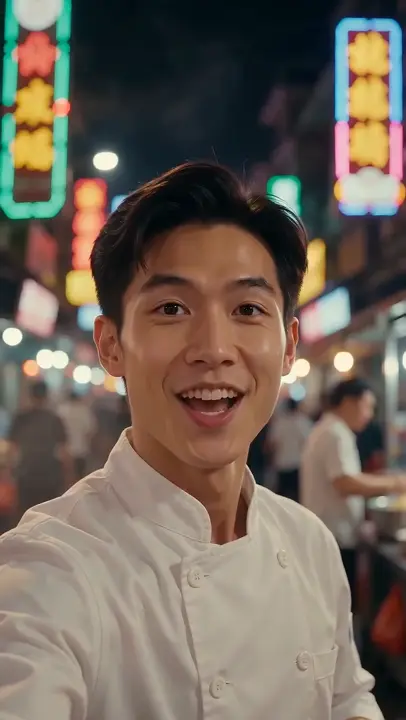
A topic becomes a hook, a caption and a selfie-style clip
AI writes the hook, a caption with hashtags and the video prompt
Upload a photo or drop it hereJPG, PNG or WebP
Model
Example
Viral Video
Topic "street food in Vietnam" → an AI hook, caption and a selfie-style viral clip
AI Viral Video Generator: Type a Topic, Get a Scroll-Stopping Clip
Updated
The VdoBloom AI Viral Video Generator turns a one-line topic into a finished short video. Type something like “street food in Vietnam” or “arctic survival”, and the AI writes a short viral idea built around a character, describes the scene (where it happens, what is in the background, who is in it and how it is shot), turns that into a video prompt for the model you picked, and renders the clip. You never write the prompt yourself.
Is it free? New accounts get 10 free credits, which covers one 5-second clip on Runway Gen-3 at 720p (10 credits) or Seedance 2 Mini at 480p (8 credits). The idea and prompt writing cost nothing extra; you pay only for the video model, and the cost shows before you generate. More credits come in one-time packs that never expire (Lite: 300 credits for $19.50) or a monthly plan from $15.
Quick answer: type a topic, choose a model, and get a 9:16 clip for Reels, TikTok or Shorts with the idea and prompt written for you. Clips start at 8 credits (Seedance 2 Mini, 5 s, 480p), the idea writing is free, and failed renders are refunded. It cannot promise views, so the smart move is to make three or four takes on one topic and post the strongest.
It is built for creators and small brands who post short-form video every day and run out of ideas or filming time. Because each run produces a fresh idea from the same topic, generating several clips on one topic is a fast way to test hooks before you commit to one.
Examples
Topic “street food in Vietnam”: selfie-style viral clip
Watch the tutorial
How to Make a Viral Video with AI (Topic to Clip Tutorial) | VdoBloom
Turn one topic into a viral-style clip with VdoBloom's Viral Video tool. Type a topic and AI writes the hook, a caption with hashtags and the video prompt. A photo is optional. Pick a model (we used Hailuo 02, 6…
A niche, a place, a hobby or a situation: “urban farming”, “street food in Vietnam”, “a cat who runs a café”. Specific topics give sharper ideas than broad ones.
2
Pick a model and format
Choose the video model, the aspect ratio (9:16 for TikTok, Reels and Shorts), the duration and the resolution the model supports. The credit cost updates as you change them.
3
Generate
The AI writes the idea and scene, builds the video prompt for your model and starts the render. Most clips finish in a few minutes.
4
Review, regenerate, post
Download the clip from My Creations. Run the same topic again for a different idea, or tweak the topic to steer it.
Why use this tool
Idea, scene and prompt written for you
Each run produces a viral-style moment under 13 words, a matching scene description and a model-ready prompt from your topic alone.
Choice of video models
Runway Gen-3 for cheap tests, Seedance 2 Mini, Fast, 2 and 2.5 for motion and sound, VEO 3.1 for cinematic shots.
Pay only for the clip
Writing the idea and prompt is included. Credits are charged for the video render alone and refunded if it fails.
Made for vertical feeds
Render in 9:16 for TikTok, Instagram Reels and YouTube Shorts, or 16:9 and 1:1 for other placements.
Quick facts
The short version before you spend a credit.
Input
One topic in plain words; no prompt needed
Written for you
A viral idea (under 13 words), a scene line and the model prompt
Models
Runway Gen-3, Seedance 2 Mini, 2 Fast, 2 and 2.5, VEO 3.1 Fast and High Quality
Formats
9:16 for Reels, TikTok and Shorts; 16:9 and 1:1 also available
Cost per clip
8 to 252 credits depending on model, length and resolution
Free to try
10 signup credits cover one 5-second Runway Gen-3 or Seedance 2 Mini clip
Photo-based trends
Ready effect templates live in AI Video Effects
Item
Detail
Input
One topic in plain words; no prompt needed
Written for you
A viral idea (under 13 words), a scene line and the model prompt
Models
Runway Gen-3, Seedance 2 Mini, 2 Fast, 2 and 2.5, VEO 3.1 Fast and High Quality
Formats
9:16 for Reels, TikTok and Shorts; 16:9 and 1:1 also available
Cost per clip
8 to 252 credits depending on model, length and resolution
Free to try
10 signup credits cover one 5-second Runway Gen-3 or Seedance 2 Mini clip
It depends on what you start with. If you have only a topic, a topic-to-clip generator like this one saves the most time. If you have a photo and want a known trend (melt, explode, inflate, dance and similar effects), a template is faster and more predictable. If you know the exact shot, write it yourself in Text to Video.
Whichever you use, the clip is only part of it. The first second, the on-screen hook and the caption you add in the posting app decide most of the result, and no tool can guarantee reach.
Making viral videos for Instagram Reels
Set the aspect ratio to 9:16 and keep clips at 5 to 10 seconds. Pick a model with sound (Seedance or VEO 3.1) if the moment needs audio, or add trending audio inside Instagram. Leave the top and bottom of the frame clear, since Reels draws the caption, username and buttons over them, and add your hook text in the Instagram editor.
Most AI video tools start from a prompt you write. This one starts a step earlier, from a topic. A language model reads the topic and writes one idea: a short, surprising moment that involves a character and can be as surreal as the topic allows. It then writes an environment line that matches the idea exactly, covering the location, the key background details, who is in the scene and the camera style, such as handheld documentary, aerial tracking or macro close-up.
That idea and scene are converted into a prompt written for the video model you selected, and the clip is generated. The topic also passes VdoBloom’s content check before anything is charged.
Input: one topic, typed in plain language.
AI writes: the idea (under 13 words), the scene (under 20 words), the video prompt.
You choose: model, aspect ratio, duration, resolution.
Output: a downloadable MP4 in My Creations.
Which model to use for viral videos
The model decides the look, the motion, whether there is sound and the price. Costs below are per clip at the settings shown.
Seedance 2 Mini
Example setting:5 s, 480p / 720p
Credits:8 / 17
Good for:Cheapest way to test many topics, with sound
Runway Gen-3
Example setting:5 s / 10 s, 720p
Credits:10 / 20
Good for:Low-cost tests
Seedance 2 Fast
Example setting:5 s, 480p / 720p
Credits:24 / 50
Good for:Quick renders with natural motion
VEO 3.1 Fast
Example setting:One clip
Credits:25
Good for:Cinematic shots at a moderate cost
Seedance 2
Example setting:5 s, 720p / 1080p
Credits:82 / 204
Good for:Higher-quality motion and audio
VEO 3.1 High Quality
Example setting:One clip
Credits:100
Good for:Most polished cinematic output
Seedance 2.5
Example setting:5 s / 10 s, 720p
Credits:126 / 252
Good for:Longer clips (up to 30 s) and multi-shot scenes
Posting daily means volume matters more than the price of one clip. A Lite pack (300 credits, $19.50 one-time, never expires) or the Lite monthly plan (300 credits for $15) goes this far:
Seedance 2 Mini, 5 s, 480p
Credits each:8
Clips from 300 credits:37
Runway Gen-3, 5 s, 720p
Credits each:10
Clips from 300 credits:30
Seedance 2 Mini, 5 s, 720p
Credits each:17
Clips from 300 credits:17
VEO 3.1 Fast
Credits each:25
Clips from 300 credits:12
Seedance 2, 5 s, 720p
Credits each:82
Clips from 300 credits:3
Clip type
Credits each
Clips from 300 credits
Seedance 2 Mini, 5 s, 480p
8
37
Runway Gen-3, 5 s, 720p
10
30
Seedance 2 Mini, 5 s, 720p
17
17
VEO 3.1 Fast
25
12
Seedance 2, 5 s, 720p
82
3
Viral video ideas that work well
The generator does best with topics that suggest a character and a moment. A few formats that suit short-form feeds:
Unexpected job: “a raccoon running a night market stall”.
Extreme setting: “cooking breakfast on a frozen lake”.
Process satisfaction: “restoring a rusted bike in a tiny workshop”.
Local culture: “street food in Vietnam”, “a tea ceremony on a rooftop”.
Miniature or giant scale: “a tiny farmer harvesting a strawberry field”.
Animals with human routines: “a dog commuting on the subway”.
Tips to make AI clips feel native to TikTok and Reels
AI cannot promise virality; nothing can. What it removes is the cost of trying many ideas. These habits raise the hit rate:
Render in 9:16 and keep clips short; 5 to 10 seconds is plenty for one strong moment.
Generate three or four clips per topic and post the one with the clearest first second.
Write your own on-screen hook and caption in the app you post from; the first line of text does a lot of the work.
Use a model with sound (Seedance or VEO 3.1) when the moment depends on audio.
Check a draft with the virality score tool before you post.
You run a faceless channel and need repeatable clips
Frequently asked questions
What is an AI viral video generator?
A tool that turns a short topic into a finished short-form video. VdoBloom’s version writes a viral-style idea and scene from your topic, builds the video prompt for the model you choose and renders the clip, so you never write a prompt.
Is the viral video generator free?
You can try it free. New accounts get 10 free credits, enough for one 5-second clip on Runway Gen-3 at 720p or Seedance 2 Mini at 480p. After that, clips are paid for with credits from one-time packs or a monthly plan.
How much does one viral video cost?
Only the video model is charged. A 5-second clip is 8 credits on Seedance 2 Mini (480p), 10 on Runway Gen-3 (720p), 50 on Seedance 2 Fast (720p) and 82 on Seedance 2 (720p); VEO 3.1 Fast is 25 credits a clip. The exact cost shows before you generate.
Can AI guarantee a video goes viral?
No. Reach depends on the platform, your audience and timing. What the generator does is make testing cheap: you can try many ideas on one topic in the time it takes to film one.
Which platforms are the videos for?
TikTok, Instagram Reels and YouTube Shorts in 9:16, or any other placement in 16:9 or 1:1. You choose the aspect ratio before generating.
Do I need to write a prompt?
No. You type a topic and the AI writes the idea, the scene and the model prompt. If you want to control the exact shot, use the Text to Video tab instead.
Will I get a different video each time for the same topic?
Usually, yes. The idea is generated fresh on each run, so the same topic can produce different moments, characters and settings.
Do the videos have sound?
It depends on the model. Seedance and VEO 3.1 generate audio with the video; check the model’s page for details before you generate.
Do downloads have a watermark?
Free-tier downloads carry a VdoBloom watermark. Clips made on any paid plan or credit pack download without one. Generations must follow VdoBloom’s content policy.
What is the best AI tool to make a viral video?
The one that matches your starting point. With only a topic, use the Viral Video Generator; with a photo and a trend in mind, use an AI Video Effects template; with an exact shot in mind, use Text to Video. No tool can guarantee a video goes viral, so test several takes.
Is there an AI viral video generator for Instagram?
Yes. Choose 9:16, keep the clip 5 to 10 seconds, and the MP4 is ready for Instagram Reels. Add the hook text and music in Instagram, and leave the bottom of the frame clear for the caption overlay.