Action Bodycam POV
Chest-mounted action-cam run through your place
A photo of a place: a trail, beach, street or park.
Wide screen: YouTube videos, TVs, laptops and website headers.
Advanced options
Motion or style reference. MP4 or MOV, 480p to 720p, up to 15s total.
MP3 or WAV, up to 15 MB and 30s total.
Example
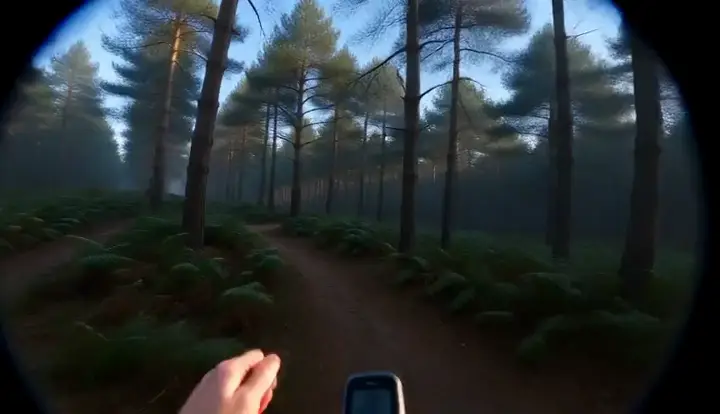
Action Bodycam POV
Running POV, arms swinging, heavy breathing
- Output
- 5s · 480p
AI Bodycam POV Video Generator: Run or Ride Through Your Photo
Updated
Short answer: VdoBloom's bodycam POV generator turns one photo of a place into first-person, chest-mounted action-camera footage. The wearer's arms swing into the bottom of the frame, the horizon tilts with each stride, and the exposure jumps between shade and sun. Pick Trail Run or Bike Ride. The tab opens on Seedance 2 Mini, which makes a 5-second 480p clip for 8 credits, so the 10 free credits on a new account cover your first video. A clip is usually ready in a few minutes. Free-tier clips carry a watermark; any paid plan or credit pack removes it.
Many bodycam generators start from a line of text. This one starts from your photo: the landscape, landmarks and colours of the place you upload carry into the clip, so it looks like you ran or rode through somewhere real to you. The look is built in: ultra-wide fisheye with barrel distortion, motion blur on turns, no stabilisation and no colour grade.
It is an adventure action-cam look, not police bodycam footage. The prompts add no badges, dates, timestamps or text, which keeps the clip clearly fictional and safe to post.
How it works
- 1
Upload a photo of a place
A trail, beach, forest path, city street or park. Wide shots with a clear path through them work best. No person is needed in the photo.
- 2
Pick Trail Run or Bike Ride
Trail Run shows arms swinging and heavy breathing. Bike Ride shows handlebars and gloved hands with wind noise.
- 3
Describe the route if you like
The prompt is editable: add "down the stairs to the beach" or "past the fountain" to steer where the camera goes.
- 4
Choose a Seedance model and length
Seedance 2 Mini at 480p and 5 seconds is the default at 8 credits. The format starts at 16:9; switch to 9:16 for Shorts and Reels. The cost shows on the button.
- 5
Generate and download
The clip lands in My Creations. Free-tier downloads are watermarked; after any purchase the clean MP4 downloads.
Why use this tool
Your place, filmed in first person
Your photo is used as a reference, so the scene keeps its landmarks and colours while the camera moves through it.
Real action-cam flaws
Fisheye distortion, a bobbing and tilting horizon, motion blur and pumping auto-exposure: the details that make POV footage feel real.
Sound in the same pass
Seedance 2 models return the clip with sound, and the prompts ask for breathing, footsteps or wind noise.
Four Seedance models
Seedance 2 Mini, Seedance 2 Fast, Seedance 2 and Seedance 2.5. The tab is limited to these because they take a photo as a reference instead of a fixed first frame.
No text on screen
No dates, timestamps, badges or captions are added, so the clip reads as an adventure clip rather than a record of a real event.
Automatic refunds
If a generation fails, the credits go back to your balance.
Quick facts
The tool at a glance.
- What it does: turns a photo of a place into first-person chest-cam POV footage.
- Input: one photo of a place. Output: an MP4, 16:9 by default.
- Templates: Trail Run, Bike Ride. Each prompt is editable.
- Default: Seedance 2 Mini, 480p, 5 seconds, 8 credits.
- Free credits: 10 at signup plus 2 to 5 a day from the daily check-in.
- Watermark: on free-tier clips; removed with any paid plan or credit pack.
Which model should I use for bodycam POV?
Prices are for one 5-second clip, from the same credit table the picker uses. Mini and Fast go up to 720p; Seedance 2 goes to 1080p and 4K; Seedance 2.5 runs up to 30 seconds.
- Seedance 2 Mini (default)
- 480p:8
- 720p:17
- 1080p:-
- When to pick it:First take; fits in the free credits
- Seedance 2 Fast
- 480p:24
- 720p:50
- 1080p:-
- When to pick it:Faster, cleaner motion
- Seedance 2
- 480p:38
- 720p:82
- 1080p:204
- When to pick it:Sharpest frame for a final cut
- Seedance 2.5
- 480p:56
- 720p:126
- 1080p:316
- When to pick it:Longer runs, up to 30 seconds
| Model | 480p | 720p | 1080p | When to pick it |
|---|---|---|---|---|
| Seedance 2 Mini (default) | 8 | 17 | - | First take; fits in the free credits |
| Seedance 2 Fast | 24 | 50 | - | Faster, cleaner motion |
| Seedance 2 | 38 | 82 | 204 | Sharpest frame for a final cut |
| Seedance 2.5 | 56 | 126 | 316 | Longer runs, up to 30 seconds |
Read more: Seedance 2 Mini · Seedance 2 · Seedance 2.5
Trail Run or Bike Ride?
Both are chest-mounted views. They differ in what is in frame and what you hear.
- Trail Run
- In frame:Arms and hands swinging, horizon tilting
- Sound:Heavy breathing, footsteps
- Best for:Hikes, beaches, city runs
- Bike Ride
- In frame:Handlebars and gloved hands, camera vibration
- Sound:Wind in the mic
- Best for:Trails, coastal roads, park paths
| Template | In frame | Sound | Best for |
|---|---|---|---|
| Trail Run | Arms and hands swinging, horizon tilting | Heavy breathing, footsteps | Hikes, beaches, city runs |
| Bike Ride | Handlebars and gloved hands, camera vibration | Wind in the mic | Trails, coastal roads, park paths |
Is this police bodycam footage?
No. This tab makes adventure action-cam clips. Police-style bodycam clips can be mistaken for real recordings of real incidents, and many platforms label or remove them. The prompts here add no uniforms, badges, timestamps or dispatch audio.
If you want other found-footage looks for fun clips, the dashcam, doorbell cam, security cam and 2000s camcorder tabs use the same Seedance models.
Read more: AI Dashcam Video · Doorbell Cam Video · Security Camera Video
Tips for a convincing POV clip
The model moves a camera through your photo, so the photo decides how real it looks.
- Pick a photo with a clear path or road leading into the distance.
- Shoot from about chest height; drone shots and top-down photos do not read as POV.
- Daylight with some shade gives the exposure something to pump between.
- Keep it to 5 to 8 seconds; longer runs can drift away from your place.
- Add the route to the prompt ("along the shoreline", "down the hill") to steer the camera.
Frequently asked questions
How do I make an AI bodycam POV video?
Upload a photo of a place to the bodycam POV tab, pick Trail Run or Bike Ride, keep or edit the prompt, choose a Seedance model and generate. The clip arrives in My Creations within a few minutes.
Is there a free AI bodycam video generator?
Your first clip is free on VdoBloom. New accounts get 10 free credits and the default clip (Seedance 2 Mini, 480p, 5 seconds) costs 8. A daily check-in adds 2 to 5 credits. Free clips carry a watermark; any purchase removes it.
Can I make it from text only?
This tab needs a photo of a place. For a POV clip from a written description only, use Text to Video with a prompt such as "chest-mounted action camera, running through a forest trail".
Does the video have sound?
Yes on the Seedance 2 models: the clip comes back with sound, and the prompts ask for breathing and footsteps (Trail Run) or wind noise (Bike Ride).
Can I make police bodycam footage?
No. The tab is built for adventure action-cam clips with no law-enforcement context. Fake police footage can be mistaken for real events.
What photo works best?
A wide, sharp photo of a place taken from about chest height, with a path or road leading into the frame. People in the photo are not needed.
Can I make a vertical POV video for TikTok?
Yes. The tab starts at 16:9, the classic action-cam shape, but you can switch to 9:16 before generating.
How long can the clip be?
Seedance 2 Mini, Fast and Seedance 2 make 4 to 15 seconds; Seedance 2.5 goes up to 30. The tab defaults to 5 seconds.
Will it keep my place recognisable?
The prompt tells the model to keep the landscape, landmarks and colours of your photo. Small details can change, since the camera is moving through a scene the model fills in.