Is It Cake Effect
Slice anything: it was cake all along
A photo of an object works best.
Full-screen on phones: Instagram Reels, YouTube Shorts, WhatsApp Status.
Advanced options
Motion or style reference. MP4 or MOV, 480p to 720p, up to 15s total.
MP3 or WAV, up to 15 MB and 30s total.
Example

Is It Cake Effect
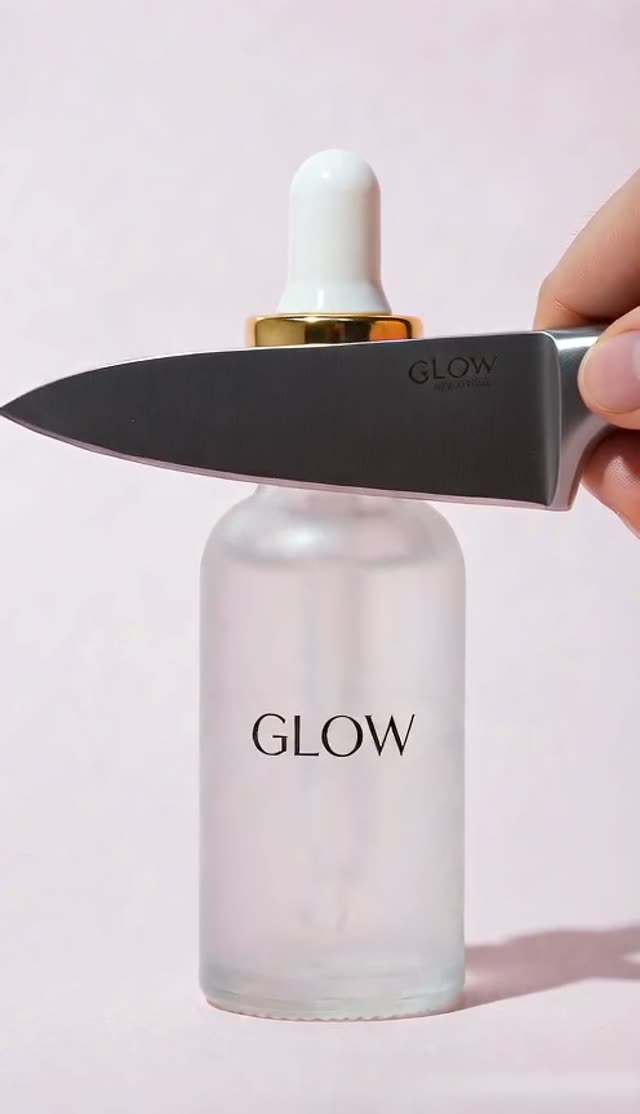
Knife reveals sponge layers
- Output
- 5s · 480p
AI Cake Effect: Cakeify Anything in Your Photo ("Is It Cake?")
Updated
Short answer: the AI cake effect, also called Cakeify or "Is it cake?", is the viral clip where an ordinary object looks normal until a knife cuts it open and it turns out to be cake inside. On VdoBloom you upload one photo of the object, pick Is It Cake? or Cakeify (Overhead), and the AI animates the cut. The tab opens on Seedance 2 Mini at 5 seconds, 480p and vertical 9:16, which costs 8 credits. New accounts get 10 free credits, so your first cake clip is free.
Your photo is the first frame. Before the knife comes in, the object looks exactly as in your picture, which is what makes the reveal land. Then the cut shows soft sponge layers and cream filling, and a slice lifts away. The camera and the light stay locked, so only the cut moves.
It works on shoes, handbags, phones, toys, mugs, fruit, cars and products. Free-tier clips carry a VdoBloom watermark; any paid plan or credit pack removes it. A failed render refunds its credits automatically.

How it works
- 1
Upload a photo of one object
A single clear subject on a simple background: a sneaker, a bag, a phone, a toy, a piece of fruit. Even light helps.
- 2
Pick a cake template
Is It Cake? cuts straight down from the side and lifts a slice away. Cakeify (Overhead) films from above and cuts the object in half to show the layers.
- 3
Edit the filling if you like
The prompt is editable. Ask for chocolate sponge, red velvet, a rainbow layer cake or a cream cheese filling.
- 4
Check the settings
Seedance 2 Mini, 5 seconds, 480p, 9:16 is the 8-credit default. 720p is 17 credits. You can switch to another image-to-video model in the same picker.
- 5
Generate and post
The clip lands in My Creations in a few minutes, ready for Reels, Shorts and TikTok.
Why use this tool
The real object first
The photo is the first frame, so viewers see your exact object before the knife touches it.
Two ways to cut
A side-on slice with a lifted piece, or a top-down cut that splits the object in half.
Locked camera
The prompt keeps the camera, the light and the rest of the scene still. One action only: the cut.
Cheap to try many objects
At 8 credits a clip, you can test several objects and keep the best reveal.
Any filling you describe
Change sponge and cream to chocolate, red velvet or rainbow layers in one line of the prompt.
Made for short video
Vertical 9:16 by default, five seconds long, the length the trend uses.
Quick facts
The AI cake effect at a glance.
- What it makes: a short clip where a knife cuts the object in your photo and it turns out to be cake.
- Other names: Cakeify, cake-ify, "Is it cake?", everything is cake.
- Input: one photo of an object.
- Templates: Is It Cake? (side cut, slice lifted away) and Cakeify (Overhead) (top-down cut in half).
- Default: Seedance 2 Mini, 5 seconds, 480p, 9:16: 8 credits. 720p: 17 credits.
- Free credits: 10 at signup, plus 2 to 5 a day from the daily check-in.
- Watermark: on free-tier clips; removed with any paid plan or credit pack.
What is the "Is it cake?" trend?
It started as a baking trend: real cakes made to look exactly like everyday things, then cut open on camera so viewers find out they were cake all along. AI video tools turned it into an effect you can put on any photo. The AI version is usually called Cakeify.
The effect works because the first second looks completely real. That is why VdoBloom uses your photo as the very first frame instead of redrawing the object.
What a cake clip costs
Credits for one 5-second clip. The exact price is on the Create button before you generate.
- Seedance 2 Mini (default)
- 480p:8
- 720p:17
- Seedance 2 Fast
- 480p:24
- 720p:50
- Seedance 2
- 480p:38
- 720p:82
| Model | 480p | 720p |
|---|---|---|
| Seedance 2 Mini (default) | 8 | 17 |
| Seedance 2 Fast | 24 | 50 |
| Seedance 2 | 38 | 82 |
The two cake templates
Both load an editable prompt:
- Is It Cake?
- Camera:Side-on, locked
- What happens:A hand with a kitchen knife slices straight down, sponge and cream show, a slice is lifted away
- Cakeify (Overhead)
- Camera:Top-down, locked
- What happens:The knife cuts the object cleanly in half and the halves part to show layers of sponge and cream
| Template | Camera | What happens |
|---|---|---|
| Is It Cake? | Side-on, locked | A hand with a kitchen knife slices straight down, sponge and cream show, a slice is lifted away |
| Cakeify (Overhead) | Top-down, locked | The knife cuts the object cleanly in half and the halves part to show layers of sponge and cream |
Is the AI cake effect free?
Your first clip is. New accounts get 10 free credits and the default clip costs 8. The daily check-in adds 2 to 5 credits a day. Free-tier clips carry a watermark; any paid plan or credit pack removes it. The Lite pack is 300 credits for $19.50 one-time (the credits never expire) or $15 a month, which covers 37 default cake clips.
Best objects to cakeify
Objects that make the best reveals:
- Sneakers and handbags: the classic bakery illusion.
- Phones, remotes and game controllers.
- Fruit and vegetables: a lemon or an avocado that is really sponge.
- Toys, plush animals and rubber ducks.
- Your own product, for a playful ad.
Tips for a convincing cut
What helps most:
- One object only, centred, with space around it.
- A plain table or background. Busy scenes confuse which object should be cut.
- Even light without hard shadows across the object.
- Name the filling in the prompt if you want a colour that matches the object.
- If the knife misses or the object changes before the cut, re-run once or try the other template.
Frequently asked questions
What is the AI cake effect?
A short video effect where an ordinary object is cut open with a knife and turns out to be cake inside. It is also called Cakeify or "Is it cake?". On VdoBloom it works from one photo.
Is the AI cake effect free?
Your first clip is. New accounts get 10 free credits and the default 5-second clip costs 8. Free-tier clips carry a watermark; any paid plan or credit pack removes it.
How do I cakeify a photo?
Upload one photo of an object, choose Is It Cake? or Cakeify (Overhead), and press Create. The clip is ready in My Creations in a few minutes.
What is the difference between Is It Cake? and Cakeify (Overhead)?
Is It Cake? films from the side: the knife slices down and a slice is lifted away. Cakeify (Overhead) films from above: the knife cuts the object in half and the halves part to show the layers.
Can I turn a person into cake?
The templates are written for objects, and the effect shows a knife cutting the subject, so use photos of things, toys or products. Objects give the cleanest and most believable reveal.
Can I change the cake flavour?
Yes. Edit the prompt and describe the inside, for example chocolate sponge with ganache, red velvet with cream cheese, or rainbow layers.
How long is the clip?
Five seconds by default, which is enough for the full reveal. Seedance 2 Mini can go from 4 to 15 seconds; longer clips cost more.
Which photos work best?
One clear object with some space around it, shot in even light on a simple background. Products, shoes, fruit, toys and phones all work well.
Can I use the clip in an ad?
Yes, once the watermark is removed with a paid plan or credit pack. Use a photo of your own product so the object in the first frame is real.