2000s Camcorder Video
Your photo as a 2000s home-video memory
A photo of yourself or your family works best.
Classic photo and old TV shape; good for presentations.
Advanced options
Motion or style reference. MP4 or MOV, 480p to 720p, up to 15s total.
MP3 or WAV, up to 15 MB and 30s total.
Example

2000s Camcorder Video
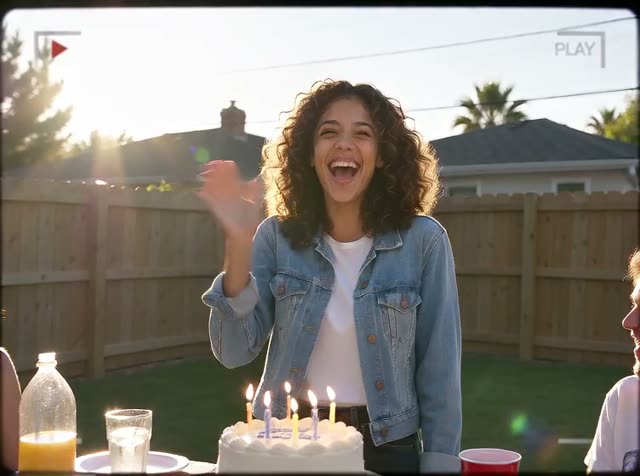
Backyard party, candles, tape noise
- Output
- 5s · 480p
AI Camcorder Video Generator: Your Photo as a 2000s Home Video
Updated
Short answer: this AI camcorder video generator turns one modern photo into a short clip that looks like it was taped on a 2000s home camcorder: 4:3 standard definition, shaky handheld framing, autofocus hunting, a clumsy zoom, colour bleeding, scanlines and tape noise along the bottom. Upload a photo of yourself or your family, pick Camcorder Memory (a backyard birthday party) or Beach Day Tape, and generate. The tab opens on Seedance 2 Mini at 5 seconds and 480p, which costs 8 credits, so the 10 free credits every new account gets cover your first clip.
It does not need a camera. Your photo is used as a reference, not as a locked first frame, so the AI re-films you inside a new home-video scene while your face, hair and outfit stay recognisable. Everything else goes soft and nostalgic, the way old tapes look.
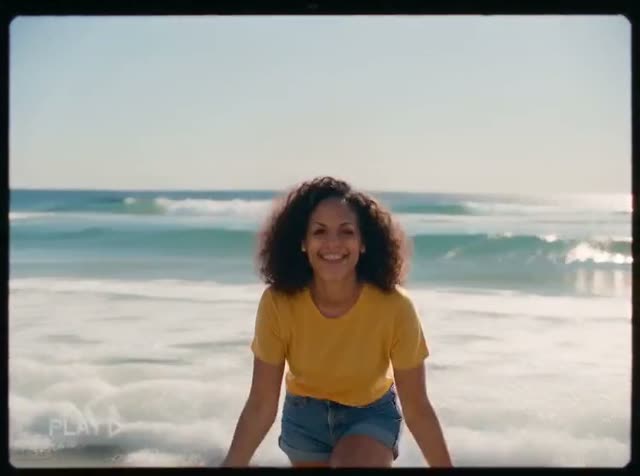
The presets show only a small PLAY triangle and never add a date stamp, so the clip reads as nostalgia rather than a record of a real day. Free-tier clips carry a VdoBloom watermark; any paid plan or credit pack removes it.
How it works
- 1
Upload one clear photo
A sharp, well-lit photo of yourself or your family, face visible. Any modern phone photo works.
- 2
Pick the home-video moment
Camcorder Memory: you laugh, wave and blow out birthday candles while friends cheer off-screen. Beach Day Tape: you run in from the waves and splash the lens.
- 3
Edit the moment if you like
Change the party, the place or the action in the prompt: a school play, a holiday morning, a first bike ride. Keep the camcorder lines as they are for the look.
- 4
Check the settings
Seedance 2 Mini, 5 seconds, 480p, 4:3 is the 8-credit default. 720p is 17 credits. Seedance 2 Fast, Seedance 2 and Seedance 2.5 are in the same picker.
- 5
Generate and share
The clip lands in My Creations in a few minutes, ready for Reels, Shorts, TikTok or a family group chat.
Why use this tool
The camcorder flaws that sell it
Shaky framing, autofocus hunting, a clumsy zoom, interlaced soft detail, colour bleeding, blown-out highlights and tape lines are written into every prompt.
Real 4:3
The tab opens at 4:3, the shape of standard-definition home video, not a cropped widescreen frame.
Your face kept
The photo is a reference and the prompt tells the model to keep your face, hair and outfit as in your photo.
Two ready moments
A backyard birthday party and a summer beach day, the two scenes most people remember from family tapes.
No fake date stamps
Only a PLAY triangle is shown. No dates, place names or logos are added.
Four Seedance models
Seedance 2 Mini, Seedance 2 Fast, Seedance 2 and Seedance 2.5, all able to use your photo as a reference.
Quick facts
The camcorder video tool at a glance.
- What it makes: a short clip of you in a 2000s home-video scene with a tape camcorder look.
- Input: one photo. It is used as a reference, so the scene is new and your face carries over.
- Templates: My Photo as a Camcorder Memory (backyard birthday), Beach Day Tape (summer beach).
- Default: Seedance 2 Mini, 5 seconds, 480p, 4:3: 8 credits. 720p: 17 credits.
- Lengths: 4 to 15 seconds (up to 30 on Seedance 2.5).
- Free credits: 10 at signup, plus 2 to 5 a day from the daily check-in.
- Watermark: on free-tier clips; removed with any paid plan or credit pack.
Looking for a camcorder to buy?
This page is about AI video that looks like old camcorder footage. It is not a camera. If you want to film real video, you need a physical camcorder or a phone. If you want a clip that looks like a family tape from the 2000s, made from a photo you already have, this tool does that in a few minutes.
Which model should I use?
Credits for one 5-second clip. All four use your photo as a reference.
- Seedance 2 Mini (default)
- 480p:8
- 720p:17
- Seedance 2 Fast
- 480p:24
- 720p:50
- Seedance 2
- 480p:38
- 720p:82
- Seedance 2.5
- 480p:56
- 720p:126
| Model | 480p | 720p |
|---|---|---|
| Seedance 2 Mini (default) | 8 | 17 |
| Seedance 2 Fast | 24 | 50 |
| Seedance 2 | 38 | 82 |
| Seedance 2.5 | 56 | 126 |
Camcorder, VHS, Y2K: which look is this?
The prompts aim at a 2000s tape camcorder: standard definition, 4:3, warm oversaturated colour, tape noise and a hand-held family-member feel. VHS tapes from the 1980s and 1990s usually show heavier tracking lines and colour smear, and MiniDV digital camcorders look cleaner with cooler colour. Edit the prompt to push it either way, for example "heavy VHS tracking lines" or "MiniDV digital camcorder, cool colour".
Is the AI camcorder generator free?
Your first clip is. New accounts get 10 free credits and the default clip costs 8. The daily check-in adds 2 to 5 credits a day. Free-tier clips carry a watermark; any paid plan or credit pack removes it. The Lite pack is 300 credits for $19.50 one-time (the credits never expire) or $15 a month, which covers 37 default camcorder clips.
Home-video moments to try
Swap the action in the prompt for one of these:
- Opening presents on a holiday morning in pyjamas, family laughing off-screen.
- Taking a bow after a school play, the zoom wobbling in and out.
- First wobbly ride on a bike down the driveway.
- Dancing at a cousin’s wedding reception under string lights.
- Waving from the back seat on a family road trip.
Tips for the most nostalgic result
What helps most:
- Use a clear, front-facing photo so the face survives the soft tape look.
- Keep 480p. The low resolution is part of the effect; 720p looks cleaner.
- Describe a family moment, not a cinematic one. Home video is messy and unplanned.
- Stay at 4:3 for the real camcorder frame.
- Use photos of yourself or people who agreed to it.
Frequently asked questions
What is an AI camcorder video?
A clip made by AI that looks like footage from an old home camcorder: 4:3, shaky, soft, with tape noise and colour bleeding. This tool makes one from a single photo of you.
Can I make an AI camcorder video for free?
Yes, your first clip. New accounts get 10 free credits and the default 5-second clip costs 8. Free-tier clips carry a watermark; any paid plan or credit pack removes it.
How do I make my photo look like a 2000s home video?
Upload the photo, pick My Photo as a Camcorder Memory or Beach Day Tape, and generate. The prompt already holds the camcorder look: 4:3, autofocus hunting, clumsy zoom, scanlines and tape noise.
Will there be a date stamp?
No. The presets show only a small PLAY triangle and never add dates, so the clip reads as nostalgia rather than a record of a real day.
Is this a VHS filter?
Not quite. A filter changes the look of a video you already have. This tool creates a new home-video scene from a photo, with you in it, in a tape camcorder style.
Does it keep my face?
Yes. The photo is used as a reference and the prompt tells the model to keep your face, hair and outfit as in the photo. Very small or side-on faces drift more.
How much does a camcorder clip cost?
Seedance 2 Mini is 8 credits for 5 seconds at 480p and 17 at 720p. Seedance 2 Fast is 24 and 50. The exact price shows on the Create button.
Can I use an old family photo?
Yes, as long as the face is clear. You can also use a modern photo; the tape look is added by the AI.
How long does it take?
Usually a few minutes. The clip appears in My Creations when it is done.