Confetti Explode Effect
Burst anything into confetti

Confetti Burst
Pops into paper confetti
A photo of an object works best. Playful, no fire.
Full-screen on phones: Instagram Reels, YouTube Shorts, WhatsApp Status.
Advanced options
Motion or style reference. MP4 or MOV, 480p to 720p, up to 15s total.
MP3 or WAV, up to 15 MB and 30s total.
Example
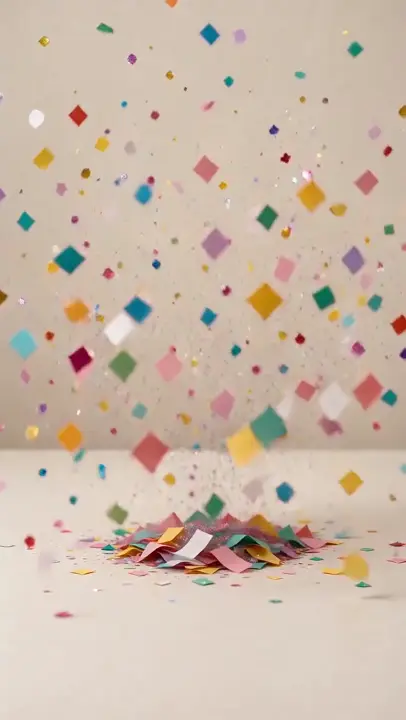
Confetti Explode Effect
Pops into paper confetti
- Output
- 5s · 480p
AI Explode Effect: Make the Object in Your Photo Burst Apart
Updated
Short answer: the AI explode effect, also called "explode it", turns one photo into a short video where the main object shakes for a moment and then bursts apart. On VdoBloom the object pops into a swirling cloud of paper confetti and glitter that flutters down where it stood. The tab opens on Seedance 2 Mini at 5 seconds, 480p and vertical 9:16, which costs 8 credits. New accounts get 10 free credits, so your first explode clip is free.
Your photo is the first frame, so the clip starts on your real object before it blows apart. The camera and the light stay locked and nothing else in the scene moves. It is a playful, brand-safe burst: no fire, no smoke and no sharp debris, which makes it safe for family accounts, product posts and brands.
It works on toys, mugs, shoes, gift boxes, cakes, cars and products. The clip is ready in a few minutes. Free-tier downloads carry a VdoBloom watermark; any paid plan or credit pack removes it. A failed render refunds its credits automatically.
Examples
Confetti Burst
Make thisHow it works
- 1
Upload a photo of one object
One clear subject with some space around it, on a simple background: a toy, a mug, a sneaker, a gift box or your product.
- 2
Keep Confetti Burst or edit the prompt
The Confetti Burst template is loaded for you. The prompt is editable, so you can change the colours or ask for glitter, petals or coloured powder instead of paper confetti.
- 3
Check the settings
Seedance 2 Mini, 5 seconds, 480p, 9:16 is the 8-credit default. 720p is 17 credits. Other image-to-video models are in the same picker.
- 4
Generate
The object shakes, bursts and the pieces settle on the empty surface. The clip lands in My Creations in a few minutes.
- 5
Download and post
Vertical 9:16 is ready for Reels, Shorts and TikTok. Free-tier downloads are watermarked.
Why use this tool
Your real object first
The photo is the first frame, so viewers see your exact object before it bursts.
Playful, not violent
Confetti and glitter instead of fire and shrapnel, so the clip fits brand pages and family feeds.
Locked camera
The prompt keeps the camera, light and background still. One action only: the burst.
Low cost per try
At 8 credits a clip you can test several objects and keep the best one.
Editable burst
Change the colours, the material or the speed of the pieces in one line of the prompt.
Model choice
Most image-to-video models are in the picker, so you can compare the same burst across models.
Quick facts
The AI explode effect on VdoBloom at a glance.
- What it makes: a 5-second clip where the object in your photo shakes, then bursts into confetti and glitter.
- Other names: explode it, AI explosion effect, burst effect, confetti explosion.
- Input: one photo of an object.
- Template: Confetti Burst (editable prompt).
- Default: Seedance 2 Mini, 5 seconds, 480p, 9:16: 8 credits. 720p: 17 credits.
- Free credits: 10 at signup, plus daily check-in credits.
- Watermark: on free-tier clips; removed with any paid plan or credit pack.
What kind of explosion is it?
Searches for "AI explode effect" cover two looks: a cinematic blast with fire, smoke and debris, and a playful burst where the subject breaks into particles. VdoBloom’s tab makes the playful one.
- Confetti and glitter burst
- On this tab:Yes, the default
- How:Confetti Burst template
- Petals, coloured powder or glitter only
- On this tab:Yes
- How:Edit the material in the prompt
- Object dissolving into fine particles
- On this tab:Use the Dissolve or Disintegration effect
- How:Separate tabs, linked below
- Fire, smoke and flying debris
- On this tab:No
- How:The template is written to stay playful
| Explosion look | On this tab | How |
|---|---|---|
| Confetti and glitter burst | Yes, the default | Confetti Burst template |
| Petals, coloured powder or glitter only | Yes | Edit the material in the prompt |
| Object dissolving into fine particles | Use the Dissolve or Disintegration effect | Separate tabs, linked below |
| Fire, smoke and flying debris | No | The template is written to stay playful |
Read more: AI Dissolve Effect · AI Disintegration Effect
What an explode clip costs
Credits for one 5-second clip. The exact price is on the Create button before you generate.
- Seedance 2 Mini (default)
- 480p:8
- 720p:17
- Seedance 2 Fast
- 480p:24
- 720p:50
- Seedance 2
- 480p:38
- 720p:82
| Model | 480p | 720p |
|---|---|---|
| Seedance 2 Mini (default) | 8 | 17 |
| Seedance 2 Fast | 24 | 50 |
| Seedance 2 | 38 | 82 |
Read more: Seedance 2 Mini · Seedance 2 Fast
Is the AI explode effect free?
Your first clip is. New accounts get 10 free credits and the default clip costs 8. Daily check-in credits add more. Free-tier clips carry a watermark; any paid plan or credit pack removes it. The Lite pack is 300 credits for $19.50 one-time (the credits never expire) or $15 a month, which covers 37 default explode clips.
Best objects to explode
Objects that give the cleanest burst:
- Gift boxes and wrapped presents: a party reveal.
- Birthday cakes and balloons, for celebration posts.
- Toys and plush animals.
- Mugs, bottles and sneakers.
- Your own product, for a playful launch or sale post.
Tips for a clean explode clip
What helps most:
- One object only, centred, with space around it for the confetti to fly.
- A plain table or background. Busy scenes confuse which object should burst.
- Even light without hard shadows across the object.
- Name the confetti colours in the prompt if you want them to match the object or your brand.
- If the object changes shape before it bursts, re-run once or try another model.
Frequently asked questions
What is the AI explode effect?
A short video effect where the object in a photo shakes and then bursts apart. On VdoBloom it bursts into paper confetti and glitter, with no fire or debris, from one photo.
Is the AI explode effect free?
Your first clip is. New accounts get 10 free credits and the default 5-second clip costs 8. Free-tier clips carry a watermark; any paid plan or credit pack removes it.
How do I make an explode effect video from a photo?
Upload one photo of an object to the Explode It tab, keep the Confetti Burst template or edit the prompt, and press Create. The clip is ready in My Creations in a few minutes.
Can it make a fire explosion with smoke and debris?
No. The template is written as a playful confetti and glitter burst with no fire, no smoke and no sharp debris, so it stays safe for brands and family accounts.
Can I change what the object bursts into?
Yes. Edit the prompt and describe the pieces, for example gold glitter, flower petals, coloured powder or confetti in your brand colours.
Can I explode a person?
The template is written for objects, so use photos of things, toys or products. Objects give the cleanest burst.
How long is the clip?
Five seconds by default, which is enough for the shake, the burst and the confetti settling. Seedance 2 Mini can go from 4 to 15 seconds; longer clips cost more.
Which photos work best?
One clear object with space around it, shot in even light on a simple background.
Can I use the clip in an ad?
Yes, once the watermark is removed with a paid plan or credit pack. Use a photo of your own product.